Washing Machine DoorMulti-Region Screw Seating Defects
A step-by-step walkthrough of how the OV Auto-Defect Creator Studio generates a custom "screw not properly seated" defect across multiple fasteners simultaneously — each with independent severity control, all in a single session.
Full Workflow
4-Step Walkthrough
From loading a clean washing machine door image to exporting multiple independently labeled screw defects — all in one session.
What Makes This Unique
Multi-region annotation, per-region severity control, and custom defect classes all in the same session. This is how you build assembly inspection models at scale.
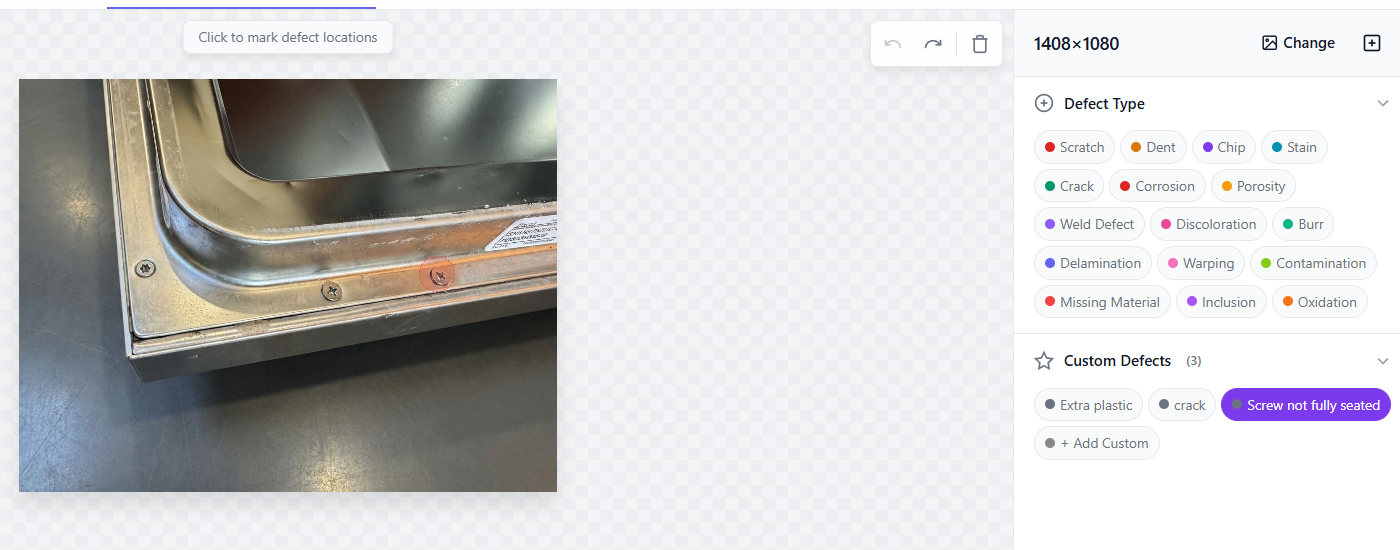
Load the Washing Machine Door Image
Upload a clean reference image of the washing machine door panel. This use case features a custom defect class: "screw not properly seated" — a defect that is highly specific to assembly quality and nearly impossible to collect in quantity from real production lines.
Custom defect classes are a core strength of the studio. If you can describe a defect in plain language, the AI can generate it.
What This Demonstrates
Capabilities on Display
This washing machine door walkthrough highlights the studio's multi-region and custom defect class capabilities in a real assembly inspection scenario.
Custom Defect Classes
"Screw not properly seated" is not a standard defect category — you defined it, and the AI generated it. Any assembly defect you can describe, the studio can synthesize.
True Multi-Region Annotation
Define and configure multiple defect regions in a single session — no re-upload needed per fastener. Each region is tracked independently.
Per-Region Severity Control
Each screw gets its own severity slider. Train your model on realistic multi-severity scenarios — not just uniform "all screws bad" or "all screws good" images.
4 Labeled Samples in One Session
One photo, one session, four independently labeled training samples at different severity levels. Scale this across your image library and your dataset grows exponentially.
Custom Defect Class
"Screw Not Properly Seated" — Why It Matters
Why It Happens
Fastener misalignment occurs when assembly tooling is slightly off, when operators apply uneven torque, or when thread engagement is incomplete. On high-volume lines, even a 1-2% occurrence rate translates to thousands of defective units per shift.
Why It Is Hard to Detect
A nearly-seated screw looks almost identical to a properly seated one in a camera image. The difference is subtle: a slightly elevated head position, a minor tilt angle, or a faint shadow variation. Models need exposure to the full severity range to catch it reliably.
Why Synthetic Data Solves It
You cannot wait for your production line to generate enough mildly-misaligned screws to train a model. The studio generates them on demand, at every severity level, across every screw position on your panel, in under five minutes.
Explore More
Other Use Cases
See the studio in action across different product types and defect generation scenarios.
Electrical Connector — Dents & Flash
AI-suggested defect types, severity slider control, and two defect classes (dent + extra plastic) generated on an industrial connector in a single session.
Back to Defect Creator Studio
Explore all studio capabilities — precision generation, micro-defects, style transfer, and more.
Build Assembly Inspection Models at Scale
Custom defect classes, multi-region annotation, per-region severity. All the tools you need to train fastener inspection AI without waiting for real defects to appear.