Detecting Misaligned Crosstalk Barriers in 224G Connector Wafers: A Machine Vision Walkthrough
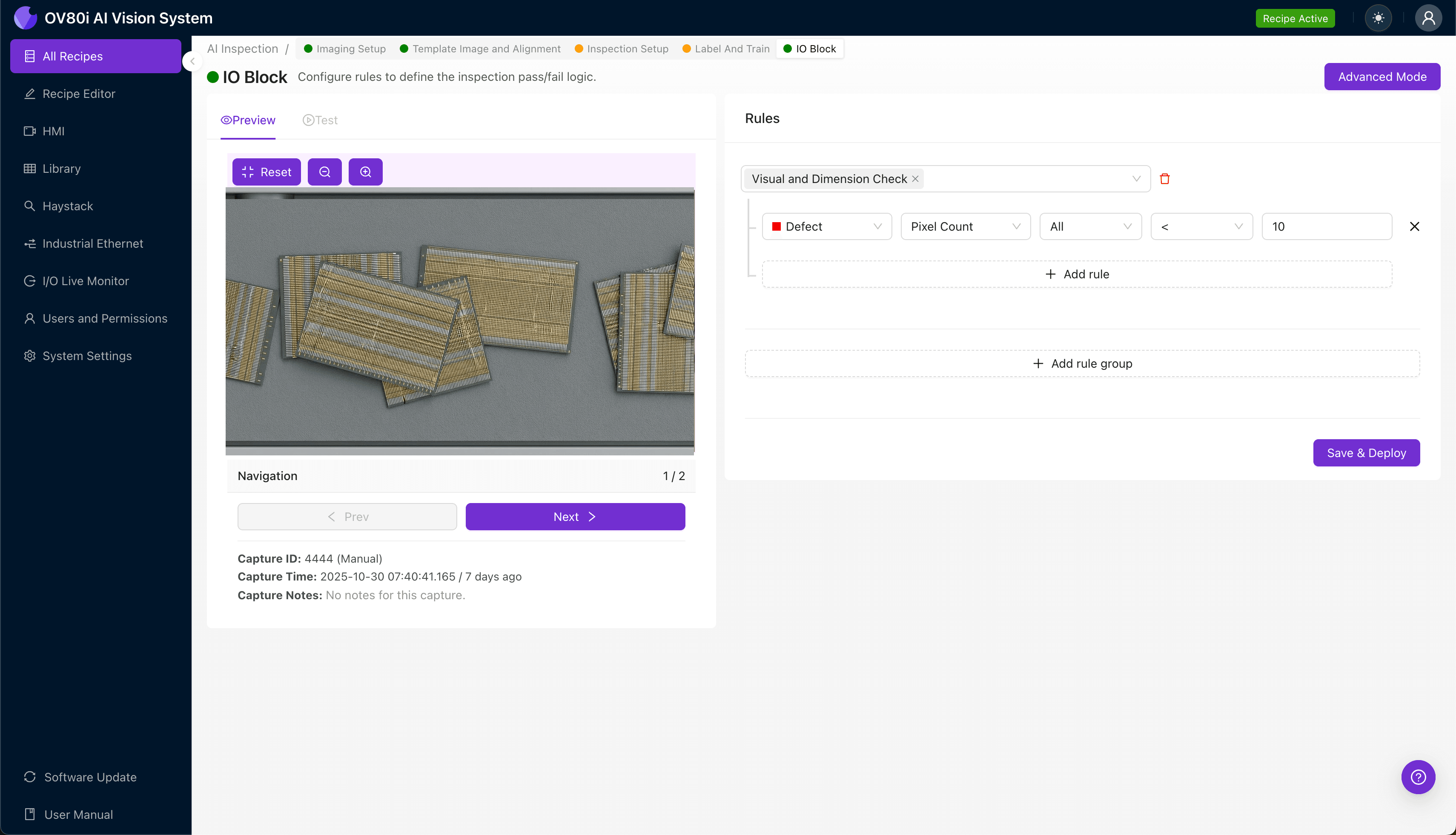
"224G connector wafers require microscale precision in crosstalk barrier positioning—tolerances that exceed human visual capabilities. Overview.ai's machine vision platform delivers 100% inline inspection, detecting lateral shifts, angular misalignments, and barrier defects in milliseconds to ensure signal integrity at next-generation speeds."
The Problem: Why 224G Connector Wafers Demand Precision Inspection
As data center infrastructure pushes toward 224G signaling speeds, connector wafer manufacturing tolerances have shrunk to near-microscopic levels. Crosstalk barriers—the thin isolation structures separating signal channels—must be positioned with extreme accuracy to maintain signal integrity at these unprecedented speeds.
Common Defects in 224G Connector Wafers with Misaligned Crosstalk Barriers:
- Lateral barrier shift – crosstalk walls offset horizontally from designed positions, compromising channel isolation
- Barrier height inconsistency – uneven barrier profiles creating variable impedance zones
- Angular misalignment – barriers tilted relative to the wafer substrate, causing asymmetric coupling
- Incomplete barrier formation – gaps or voids in barrier material from molding defects
- Barrier-to-contact interference – misaligned barriers encroaching on contact pin footprints
- Substrate warpage-induced drift – thermal distortion shifting barrier positions post-molding
Human inspectors struggle with these defects due to the microscale dimensions involved—barriers often measure just 50-100 microns wide. Inspector fatigue compounds the problem during high-volume production runs, and the consistency required for 224G-grade components simply exceeds human visual capabilities.
The Solution: Machine Vision and Deep Learning
Machine vision systems eliminate the variability inherent in manual inspection by applying identical evaluation criteria to every single component. Deep learning models excel at detecting subtle misalignment patterns that fall below human perception thresholds, learning to recognize failure modes from labeled training data.
Overview.ai's approach delivers consistent, objective inspection at full line speed—enabling 100% inline quality control without creating production bottlenecks. The OV80i system captures high-resolution images and applies trained AI models in milliseconds, flagging defective wafers before they advance downstream.
Step 1: Imaging Setup
Begin by placing the 224G connector wafer under the OV80i camera, ensuring the crosstalk barrier regions are clearly visible within the field of view. Proper fixturing is critical—wafers should be positioned consistently to minimize alignment variations between inspections.
Click "Configure Imaging" in the Overview interface to access Camera Settings. Adjust exposure to reveal barrier edge detail without overexposing reflective contact surfaces, and fine-tune gain to balance noise levels against feature visibility.
Click "Save" to lock in your optimized imaging parameters.
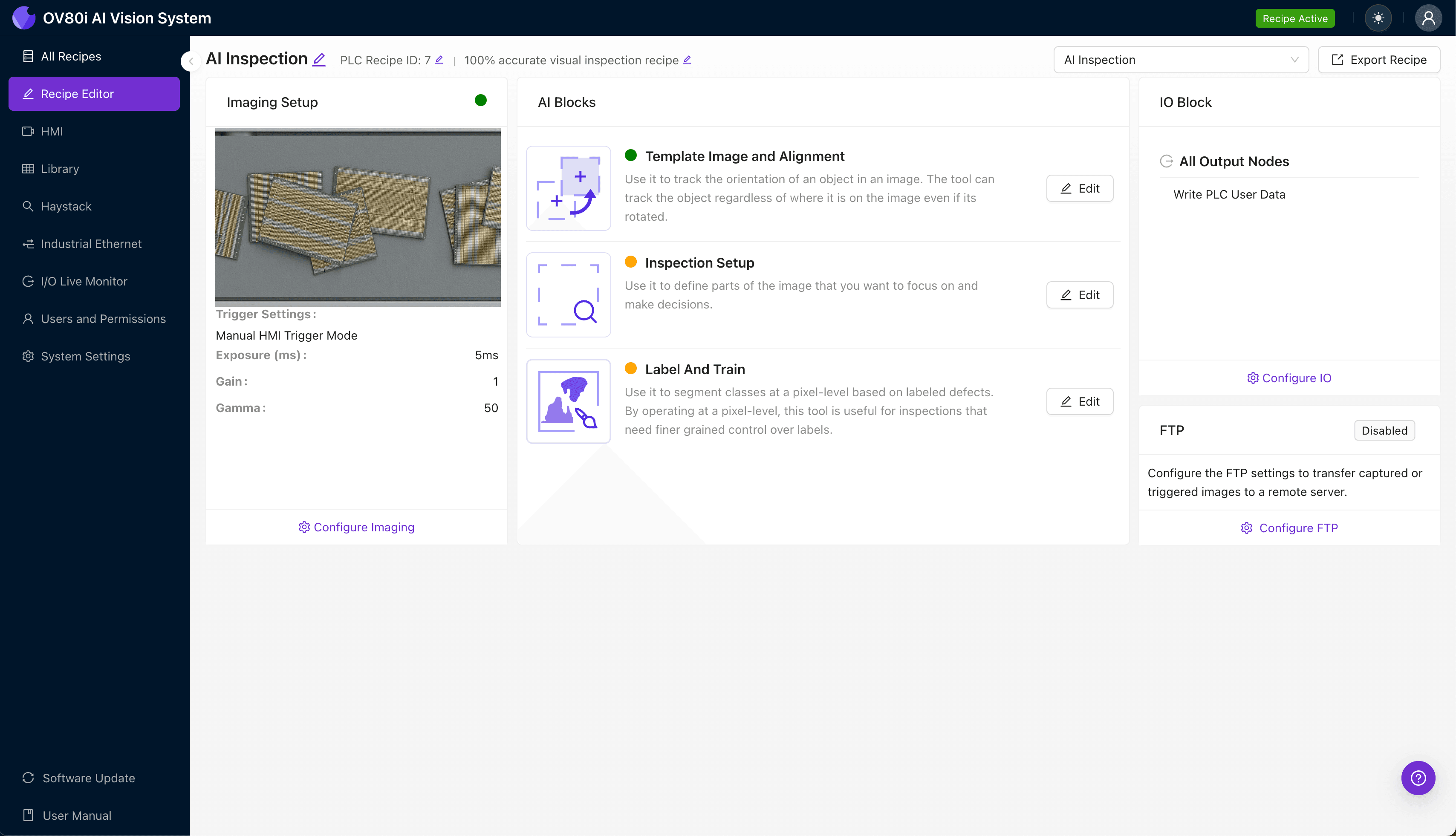
Step 2: Image Alignment
Navigate to the "Template Image" panel and capture a reference image of a correctly-positioned wafer. This template establishes the baseline geometry against which all subsequent parts will be registered.
Click "+ Rectangle" to add an alignment region around the wafer's main body or a distinctive fiducial feature. Set the "Rotation Range" to 20 degrees to accommodate minor orientation variations as parts enter the inspection zone.
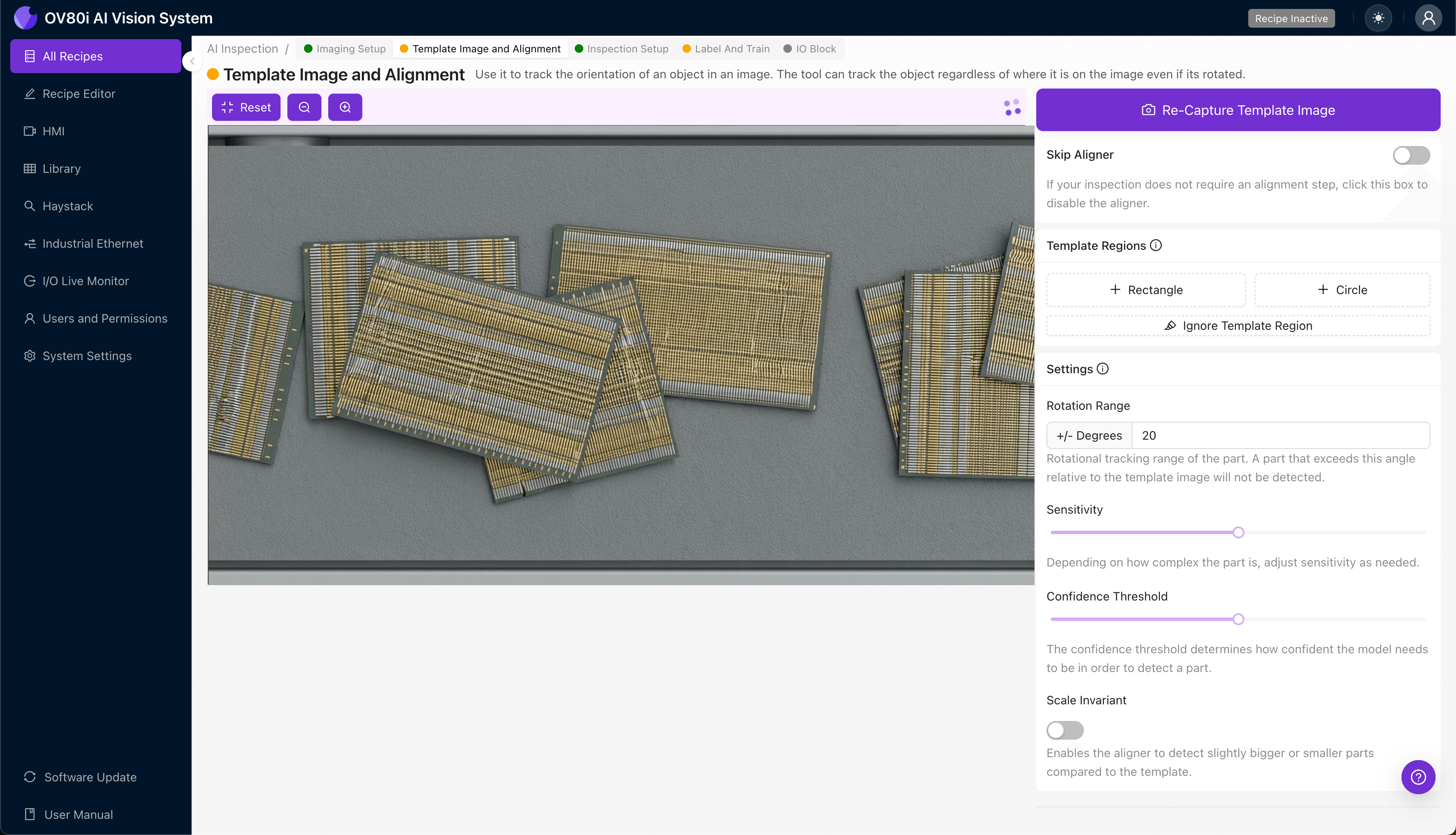
Step 3: Inspection Region Selection
Navigate to "Inspection Setup" to define where the system should focus its analysis. Rename your "Inspection Types" with descriptive labels like "Left_Barrier_Alignment" or "Center_Barrier_Position" for clear traceability.
Click "+ Add Inspection Region" to create a new zone. Resize the yellow bounding box to cover the critical crosstalk barrier areas—typically the isolation structures between high-speed differential pairs.
Click "Save" after positioning regions over each barrier zone requiring inspection.
Step 4: Labeling Data
The human-in-the-loop labeling process trains the AI to distinguish acceptable from defective components. Quality engineers review captured images and classify them as Good (barriers properly aligned) or Bad (misalignment present).
Include representative samples across your full range of production variation—different mold cavities, material lots, and process conditions. Critically, incorporate known failure modes including edge-case defects to build a robust detection model.

Step 5: Creating Rules
Configure pass/fail logic based on your defined Inspection Types, setting confidence thresholds appropriate for your quality requirements. Multiple inspection regions can be combined using AND/OR logic to create comprehensive acceptance criteria.
These rules gate automated acceptance on the line, instantly diverting nonconforming wafers to rejection bins while allowing good parts to proceed without interruption.

Key Outcomes & ROI
Implementing automated inspection for 224G connector wafers delivers measurable business impact:
- Reduced scrap rates – catching misaligned barriers before downstream assembly prevents costly rework and material waste
- Higher throughput – 100% inline inspection eliminates sampling bottlenecks and maintains full production speed
- Enhanced compliance and traceability – automated logging creates auditable quality records for customer and regulatory requirements
- Process improvement insights – defect trend analysis identifies upstream tooling wear or process drift before quality excursions occur
Conclusion
224G connector wafers represent the leading edge of high-speed interconnect technology, and their manufacturing tolerances demand inspection capabilities beyond human limits. Overview.ai's machine vision platform transforms this quality challenge into a competitive advantage—delivering the consistency, speed, and precision that next-generation connectivity requires.
Eliminate Defects Today
Stop relying on manual inspection. Deploy Overview.ai to catch defects instantly.