How to Detect Cold Solder Joints on DAC Paddle Cards Using AI-Powered Visual Inspection

"Cold solder joints on DAC paddle cards create intermittent failures that can bring down entire network segments. AI-powered visual inspection detects these subtle defects consistently at line speed, eliminating the fatigue and inconsistency of manual microscope inspection."
The Problem: Why Cold Solder Defects on DAC Cables Are So Difficult to Catch
Direct Attach Copper (DAC) cables are the backbone of high-speed data center interconnects, and the paddle card solder joints are critical failure points. When cold solder joints form on these connections, they create intermittent failures that can bring down entire network segments.
Common Defects Found in DAC Paddle Card Solder Joints:
- Dull or grainy solder surface – Indicates insufficient heat during reflow, creating a crystalline rather than smooth finish
- Poor wetting on paddle card pads – Solder fails to flow properly across the copper pad surface, leaving exposed metal
- Visible separation at the solder-pad interface – Microscopic gaps between solder and substrate that compromise electrical continuity
- Irregular solder fillet geometry – Concave or lumpy profiles instead of the characteristic smooth meniscus shape
- Cracked or fractured solder joints – Stress fractures from thermal shock during cooling
- Excessive voiding within the joint – Internal air pockets that reduce mechanical strength and thermal conductivity
Manual inspection of these defects is fundamentally unreliable. Human inspectors experience fatigue after just 20-30 minutes of microscope work, and the subtle visual differences between acceptable and defective cold joints are nearly impossible to judge consistently at production speeds.
The Solution: Machine Vision and Deep Learning for Consistent Detection
Traditional rule-based machine vision struggles with cold solder joint detection because the defects exist on a spectrum. A joint isn't simply "good" or "bad"—it requires contextual understanding of acceptable variation versus genuine failure modes.
Deep learning models excel here because they learn from thousands of labeled examples, capturing the nuanced visual patterns that distinguish marginal joints from truly defective ones.
Overview.ai's approach delivers consistent, objective inspection at line speed. The system never fatigues, never second-guesses itself, and provides traceable documentation for every single unit inspected.
Step 1: Imaging Setup
Position the DAC cable assembly under the OV80i camera system, ensuring the paddle card solder joints are centered in the field of view. Proper lighting angle is critical—angled illumination helps reveal the surface texture differences between proper reflow and cold joints.
Click "Configure Imaging" in the Overview interface. Adjust the Camera Settings including exposure time and gain to maximize contrast on the solder surfaces without blowing out highlights.
Click "Save" to lock in your imaging parameters.

Step 2: Image Alignment
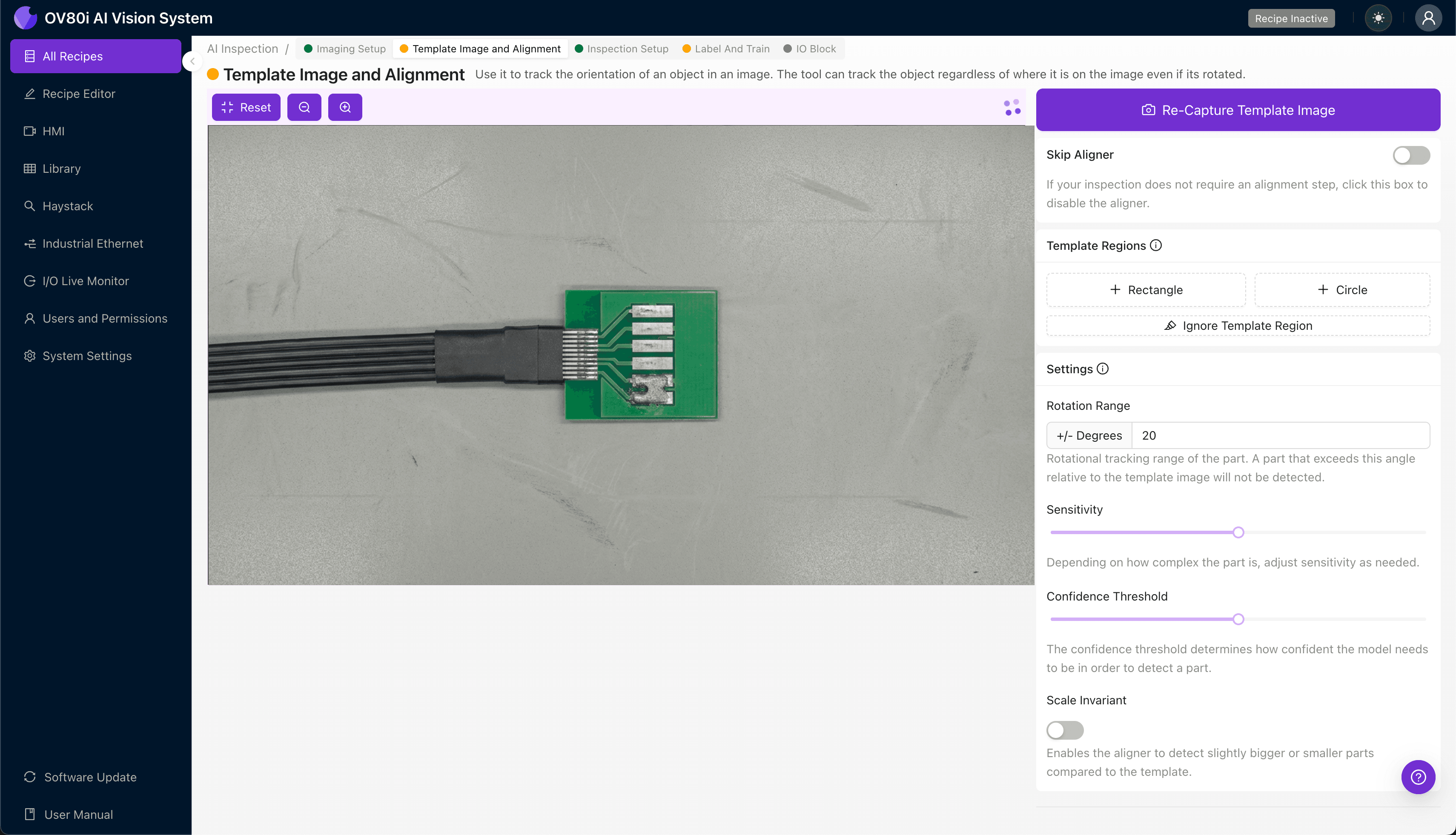
Navigate to the "Template Image" section and capture a reference image of a correctly positioned paddle card. This template ensures consistent alignment regardless of minor placement variations on the inspection station.
Click "+ Rectangle" and draw a region around the main paddle card body and connector housing. This gives the system geometric reference points.
Set the "Rotation Range" to 20 degrees to accommodate slight angular variations in part presentation during production.
Step 3: Inspection Region Selection
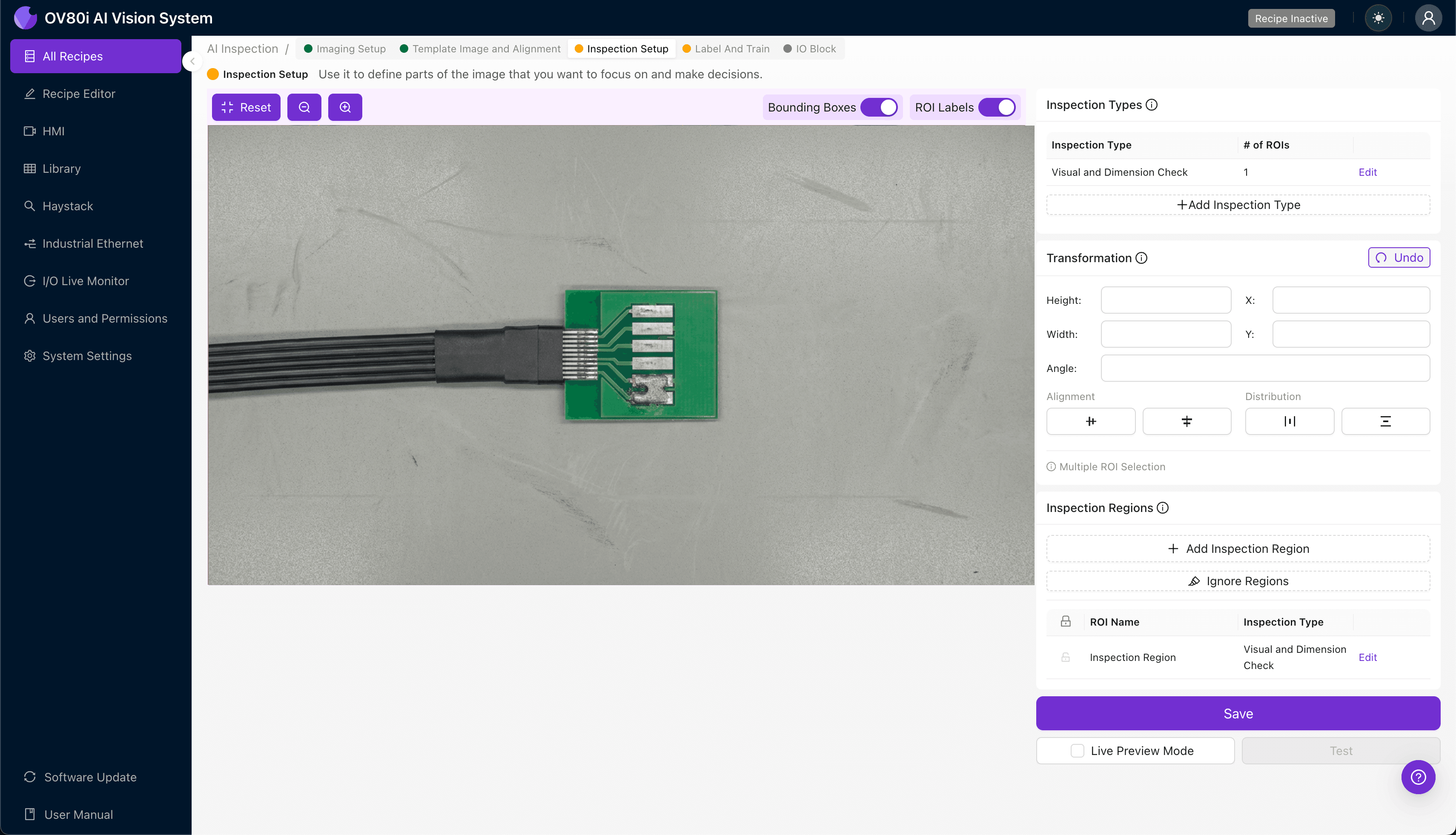
Navigate to "Inspection Setup" to define where the system should focus its analysis. This step is crucial for maximizing detection accuracy while minimizing false positives.
Rename your "Inspection Types" to reflect the specific defect categories: "Cold_Joint_Paddle" or "Solder_Wetting_Defect" for clear traceability.
Click "+ Add Inspection Region" and resize the yellow bounding box to cover the critical solder joint areas on the paddle card. Focus on the high-stress joints where cold solder failures most commonly occur.
Click "Save" to confirm your inspection zones.
Step 4: Labeling Data
The human-in-the-loop labeling process is where your manufacturing expertise trains the AI model. This step transforms tribal knowledge into scalable, automated inspection capability.
Review captured images and label each as Good or Bad based on your quality standards. Be consistent—borderline cases should follow documented acceptance criteria.
Include representative samples across the full spectrum: perfect joints, marginal-but-acceptable joints, and known failure modes from field returns or reliability testing. The more diverse your training set, the more robust your model becomes.
Step 5: Creating Rules
Configure your pass/fail logic based on the Inspection Types you defined earlier. You can set thresholds for confidence levels and define how the system should handle borderline detections.
Gate automated acceptance on the production line by connecting inspection results to your reject mechanism. Units flagged as defective are automatically diverted for rework or secondary review, ensuring no cold solder joints reach your customers.

Key Outcomes & ROI
Implementing AI-powered visual inspection for DAC paddle card solder joints delivers measurable business impact:
- Reduced scrap rates – Catch cold joints before downstream assembly, avoiding costly rework on completed cable assemblies
- Higher throughput – Inspect 100% of units at line speed without creating bottlenecks or requiring additional headcount
- Compliance and traceability – Maintain complete inspection records for every unit, supporting customer audits and warranty investigations
- Process improvement insights – Identify trends in defect occurrence to address root causes in your SMT process parameters
Eliminate Cold Solder Escapes from Your DAC Production
Stop relying on fatigued inspectors. Deploy Overview.ai to catch cold solder joints consistently at line speed.