How to Detect Hot-Bar Solder Joint Bridges Between Fine-Pitch Pads Using AI Vision Inspection
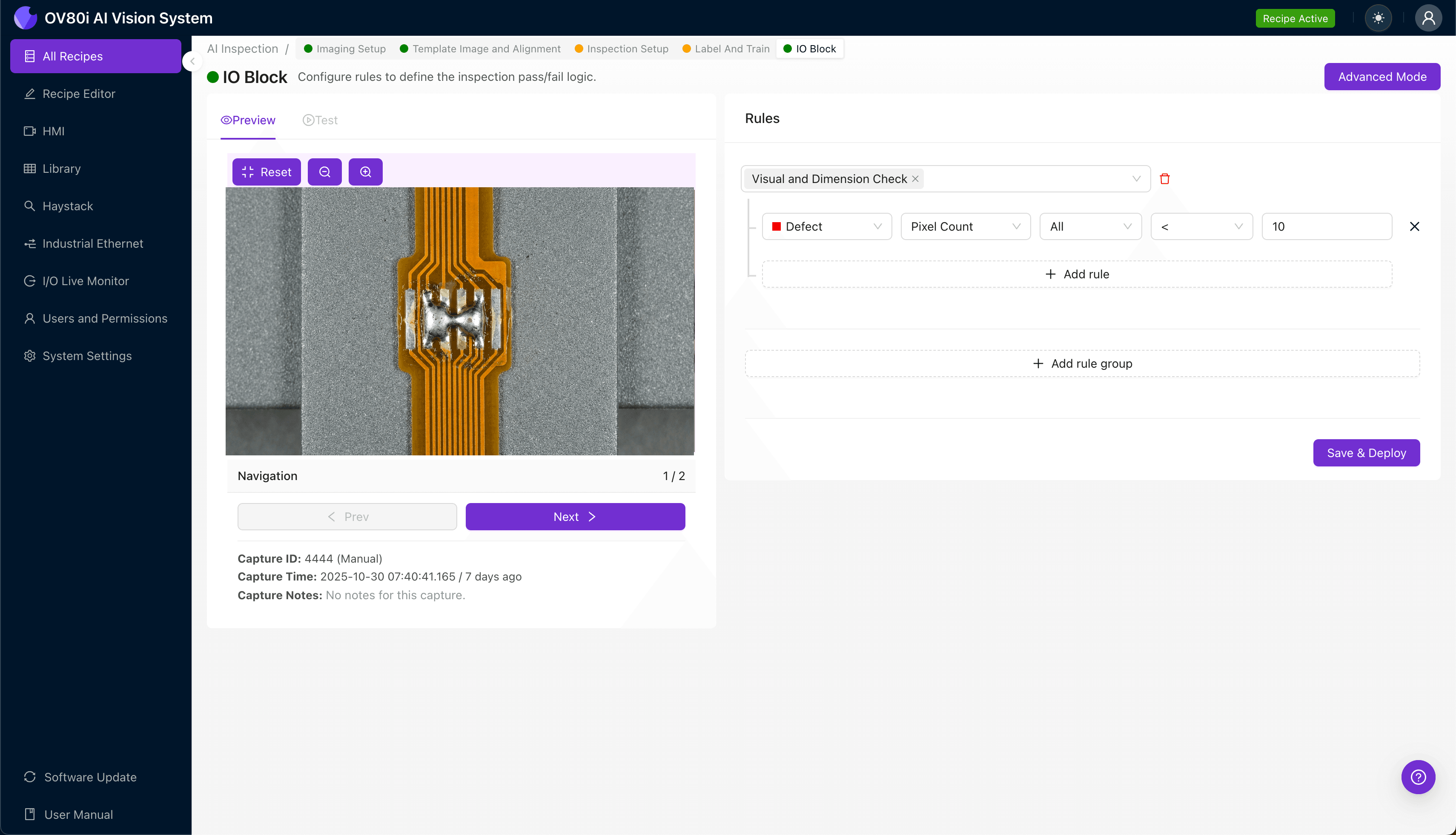
"Solder bridges on fine-pitch hot-bar joints occur at scales approaching 100 microns—invisible to the naked eye and missed by 20-30% of human inspectors. Deep learning vision systems detect these defects in milliseconds with consistent accuracy, eliminating costly escapes before downstream assembly adds value."
The Problem: Why Solder Bridges on Fine-Pitch Pads Are So Difficult to Catch
Hot-bar soldering connects flex circuits, ribbon cables, and fine-pitch components using a heated thermode that applies precise pressure and temperature. Even minor process variations can create solder bridges that short adjacent conductors—often invisible to the naked eye at pitches below 0.5mm.
Common Defects in Hot-Bar Solder Joints with Fine-Pitch Bridging:
- Solder bridging — Excess solder creates an unintended electrical connection between adjacent pads
- Insufficient solder wetting — Poor intermetallic bond formation due to inadequate heat or flux activation
- Cold joints — Dull, grainy appearance indicating incomplete reflow and weak mechanical bonds
- Pad lifting or delamination — Excessive thermode pressure or temperature damages the substrate
- Misalignment — Component or flex circuit shifts during bonding, causing partial pad coverage
- Solder voids — Trapped gas or flux residue creates internal gaps that weaken joint integrity
Human inspectors struggle with fine-pitch solder joints because the defects occur at scales approaching 100 microns. Inspector fatigue sets in quickly when examining repetitive, densely packed connections—and even experienced operators achieve only 70-80% detection rates on subtle bridging defects.
The Solution: Machine Vision and Deep Learning for Consistent Detection
Traditional rule-based machine vision systems fail on hot-bar joints because acceptable solder appearance varies significantly based on alloy composition, pad metallization, and thermode wear. Deep learning models learn what "good" looks like from labeled examples, enabling them to detect subtle anomalies that fixed algorithms miss.
Overview.ai's approach delivers consistent, objective inspection at full line speed. The OV80i system captures high-resolution images of every joint, analyzes them against trained models, and flags defects in milliseconds—without the variability of human judgment or the brittleness of programmed thresholds.
Step 1: Imaging Setup
Position the hot-bar solder joint assembly under the OV80i camera, ensuring the fine-pitch pad area fills the field of view. Proper magnification is critical—you need sufficient resolution to distinguish individual pads at your specific pitch.
Click "Configure Imaging" in the Overview interface to access Camera Settings. Adjust exposure time and gain to achieve high contrast between solder, pad metallization, and substrate—typically requiring bright, diffuse lighting to minimize specular reflections from the solder surface.
Click "Save" to lock in your optimized imaging parameters.
Step 2: Image Alignment
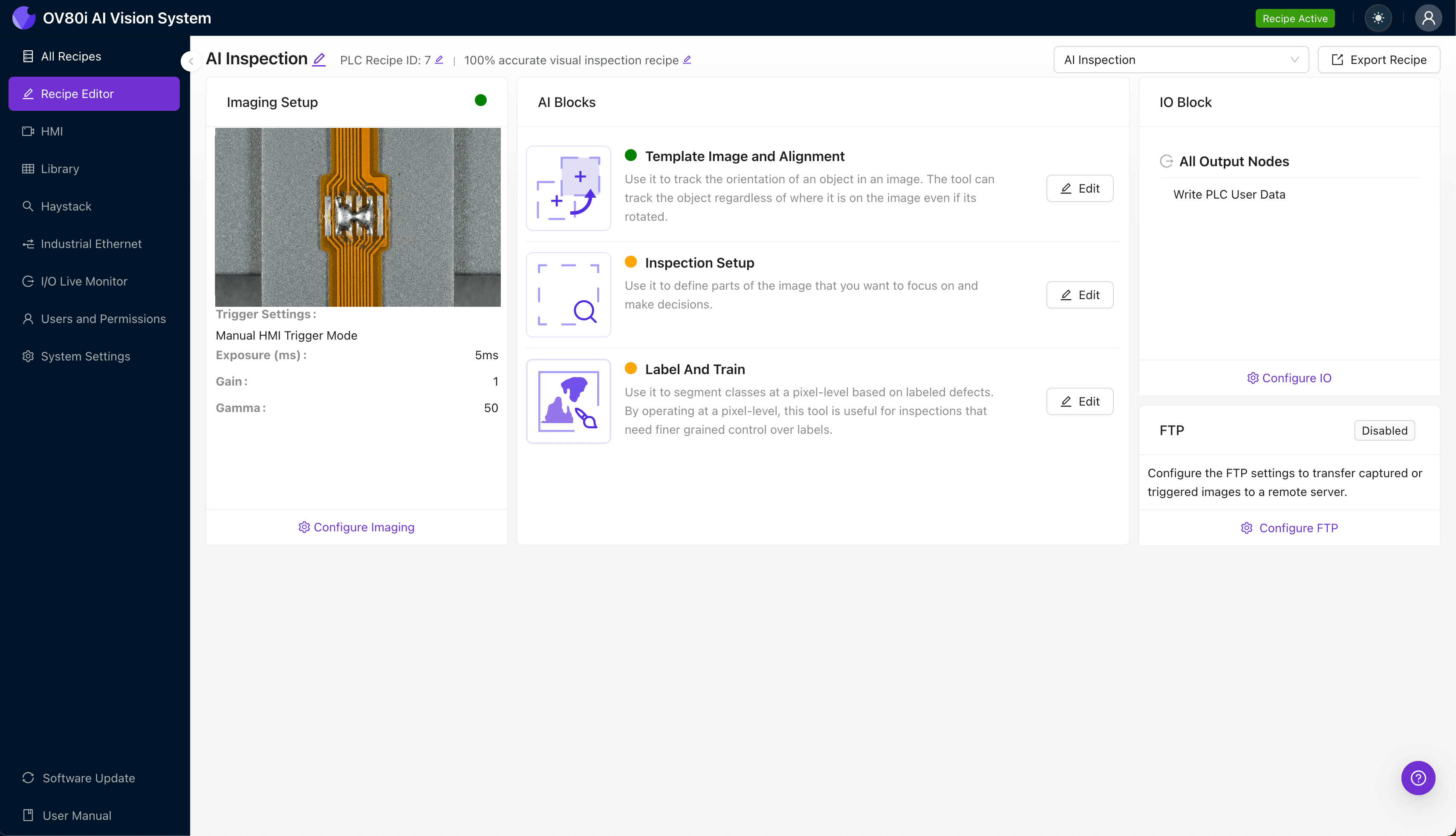
Navigate to "Template Image" in the configuration menu. Capture a Template image of a known-good assembly positioned in your target orientation.
Click "+ Rectangle" to add an alignment region around the connector body or fiducial marks adjacent to the solder joint area. This gives the system stable reference features for part location.
Set "Rotation Range" to 20 degrees to accommodate normal variation in how assemblies arrive at the inspection station.

Step 3: Inspection Region Selection
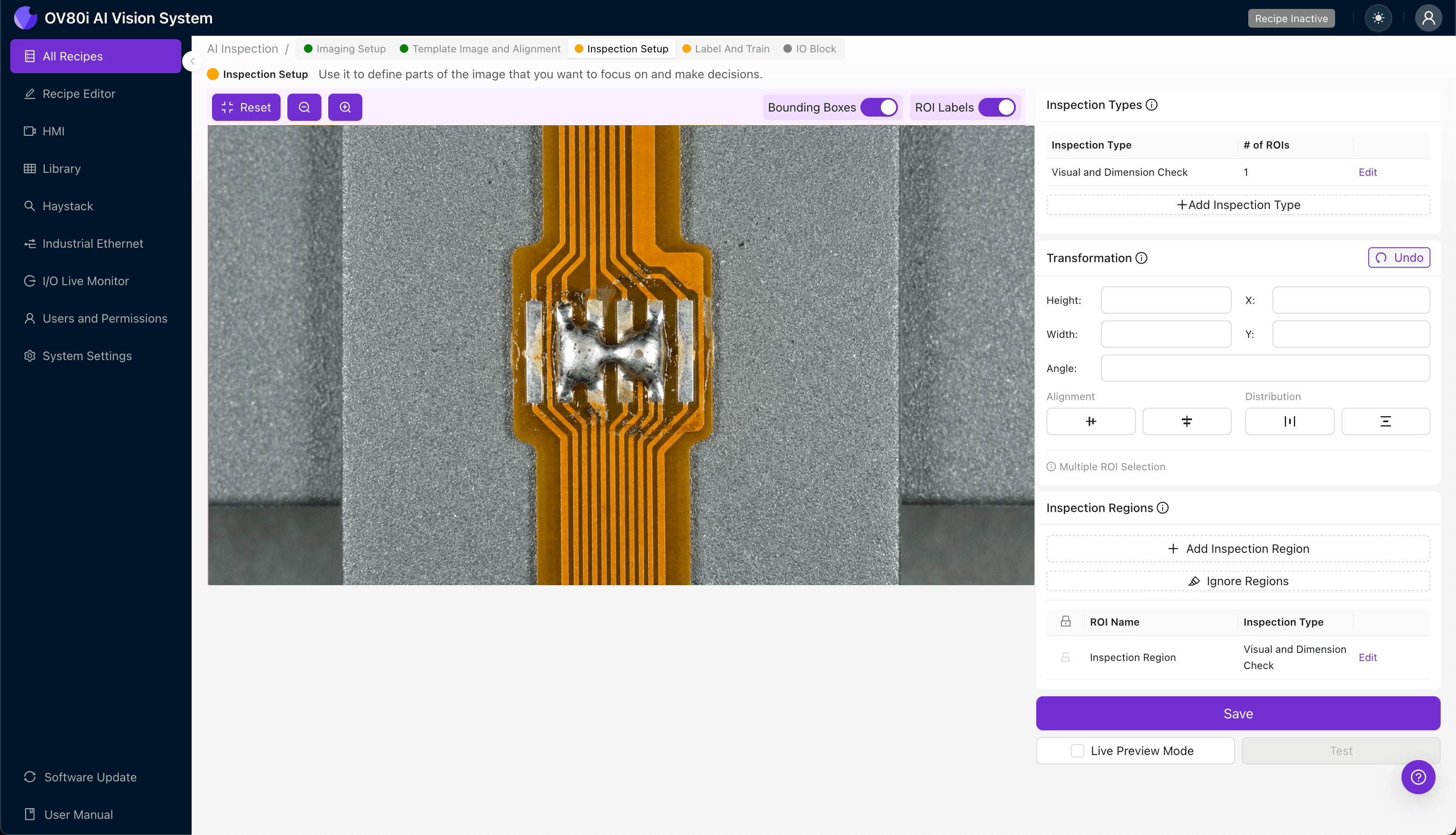
Navigate to "Inspection Setup" to define where the system should look for defects. Rename your "Inspection Types" to reflect the specific failure modes—for example, "Bridge_Detection" and "Wetting_Quality."
Click "+ Add Inspection Region" to create a new zone. Resize the yellow bounding box to cover the critical fine-pitch pad array where bridging occurs.
For comprehensive coverage, add separate regions for each row of pads if your joint spans multiple pitch areas. Click "Save" to confirm your inspection zones.
Step 4: Labeling Data
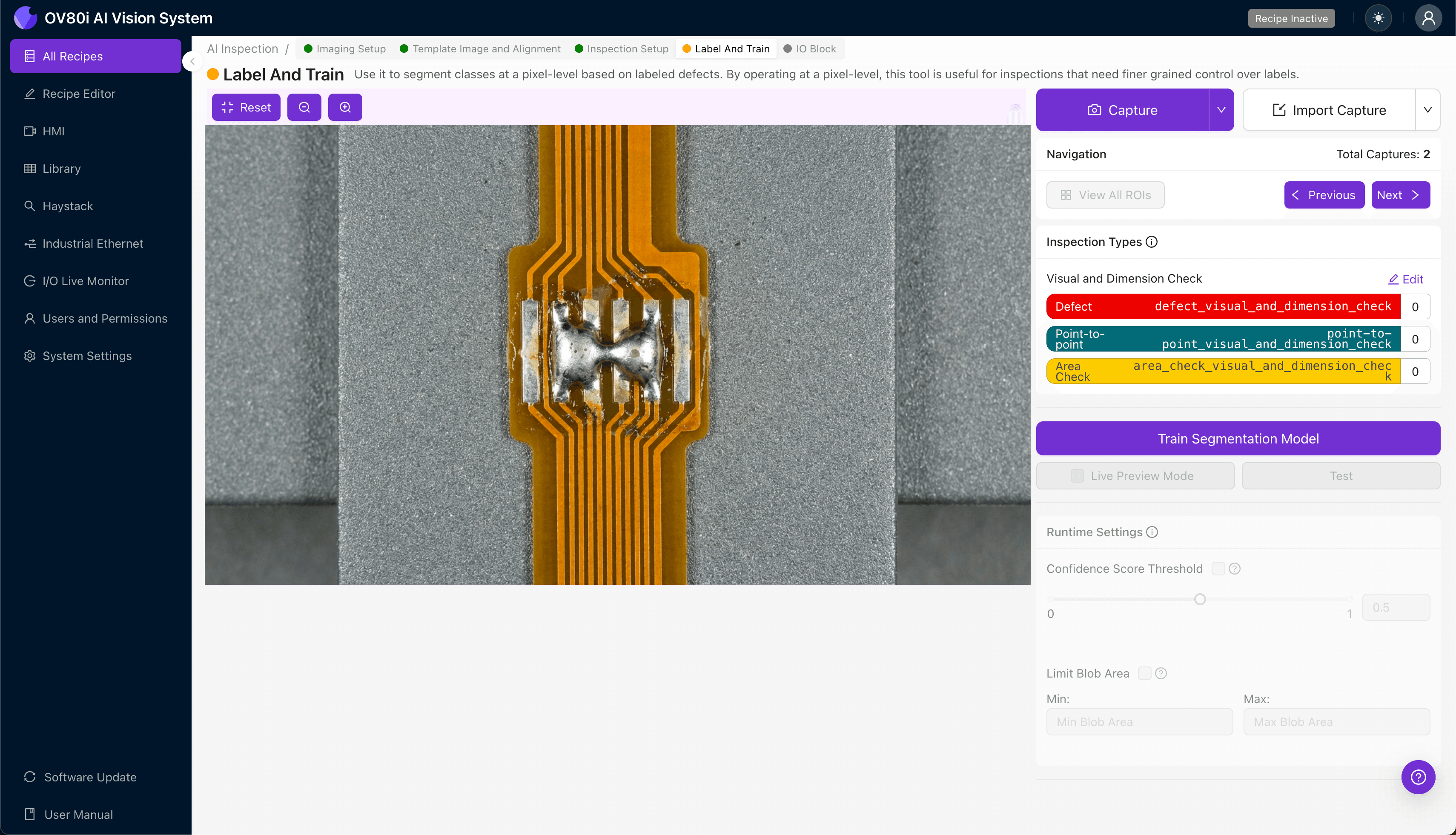
Overview.ai uses a human-in-the-loop process to build accurate detection models. As production runs, the system presents images for operator classification—building the training dataset from your actual process variation.
Label images as "Good" or "Bad" based on your quality criteria. Be precise: a bridge is a bridge, even if it's small.
Include representative samples across your full range of acceptable variation, plus known failure modes from your defect library. The model learns boundaries from this diversity—skimping on edge cases creates blind spots in detection.
Step 5: Creating Rules
With your trained model deployed, set pass/fail logic based on your defined Inspection Types. Configure the system to reject any assembly where "Bridge_Detection" identifies a positive finding.
Gate automated acceptance on the line by integrating Overview's output with your reject mechanism. Parts that pass proceed automatically; flagged assemblies route to rework or secondary inspection stations for disposition.
Key Outcomes & ROI
Implementing AI-powered inspection for hot-bar solder joints delivers measurable operational improvements:
- Reduced scrap rates — Catch bridging defects before downstream assembly adds value to defective units
- Higher throughput — Eliminate inspection bottlenecks with millisecond-level automated analysis
- Compliance and traceability — Maintain complete image records of every joint for customer audits and failure analysis
- Process improvement insights — Trend defect data by shift, thermode, or material lot to identify root causes and optimize your hot-bar process parameters
Hot-bar solder bridges on fine-pitch pads represent a significant quality risk that traditional inspection methods consistently miss. Overview.ai's deep learning approach transforms this challenge into a solved problem—delivering the consistency, speed, and accuracy that modern electronics manufacturing demands.
Eliminate Solder Bridge Escapes Today
Stop relying on manual inspection for fine-pitch hot-bar joints. Deploy Overview.ai to catch bridging defects instantly at full line speed.