How to Detect Defects in Immersion-Cooled OSFP Cages with Clogged Micro-Channels Using AI Visual Inspection
"Micro-channel blockages in immersion-cooled OSFP cages can cause catastrophic thermal failures in data centers. AI-powered visual inspection catches sub-millimeter defects that human inspectors miss, enabling 100% inline inspection at full production speed."
The Problem: Why Micro-Channel Defects Slip Through Traditional Inspection
Immersion-cooled OSFP (Octal Small Form Factor Pluggable) cages represent the cutting edge of high-density data center thermal management. These precision-engineered components rely on intricate micro-channel structures to circulate dielectric coolant—and when those channels become clogged or compromised, catastrophic thermal failures follow.
Common Defects in Immersion-Cooled OSFP Cages
- Micro-channel blockages — Particulate contamination or manufacturing debris obstructing coolant flow paths
- Incomplete channel etching — Shallow or malformed micro-channels from inconsistent chemical milling processes
- Burr intrusion — Metal burrs from machining operations extending into critical flow areas
- Coolant port misalignment — Inlet/outlet ports offset from design specifications, restricting flow capacity
- Surface contamination films — Residual oils, flux residue, or oxidation layers reducing thermal transfer efficiency
- Micro-crack propagation — Stress fractures in channel walls that compromise structural integrity under thermal cycling
Manual inspection of these defects is virtually impossible at production scale. Human inspectors experience rapid fatigue when examining hundreds of micro-channel arrays per shift, and the sub-millimeter scale of many blockages falls below reliable visual detection thresholds—especially under time pressure.
The Solution: Machine Vision + Deep Learning for Consistent Detection
Machine vision systems equipped with deep learning algorithms eliminate the variability inherent in human inspection. By training neural networks on thousands of labeled images, these systems learn to recognize subtle patterns that indicate blockages, contamination, or structural anomalies—even when defects vary in size, shape, or location.
Overview.ai's approach delivers consistent, objective inspection at full line speed. Rather than sampling a fraction of production output, manufacturers can achieve 100% inline inspection—catching defects before they escape to customers or cause field failures in mission-critical data center infrastructure.
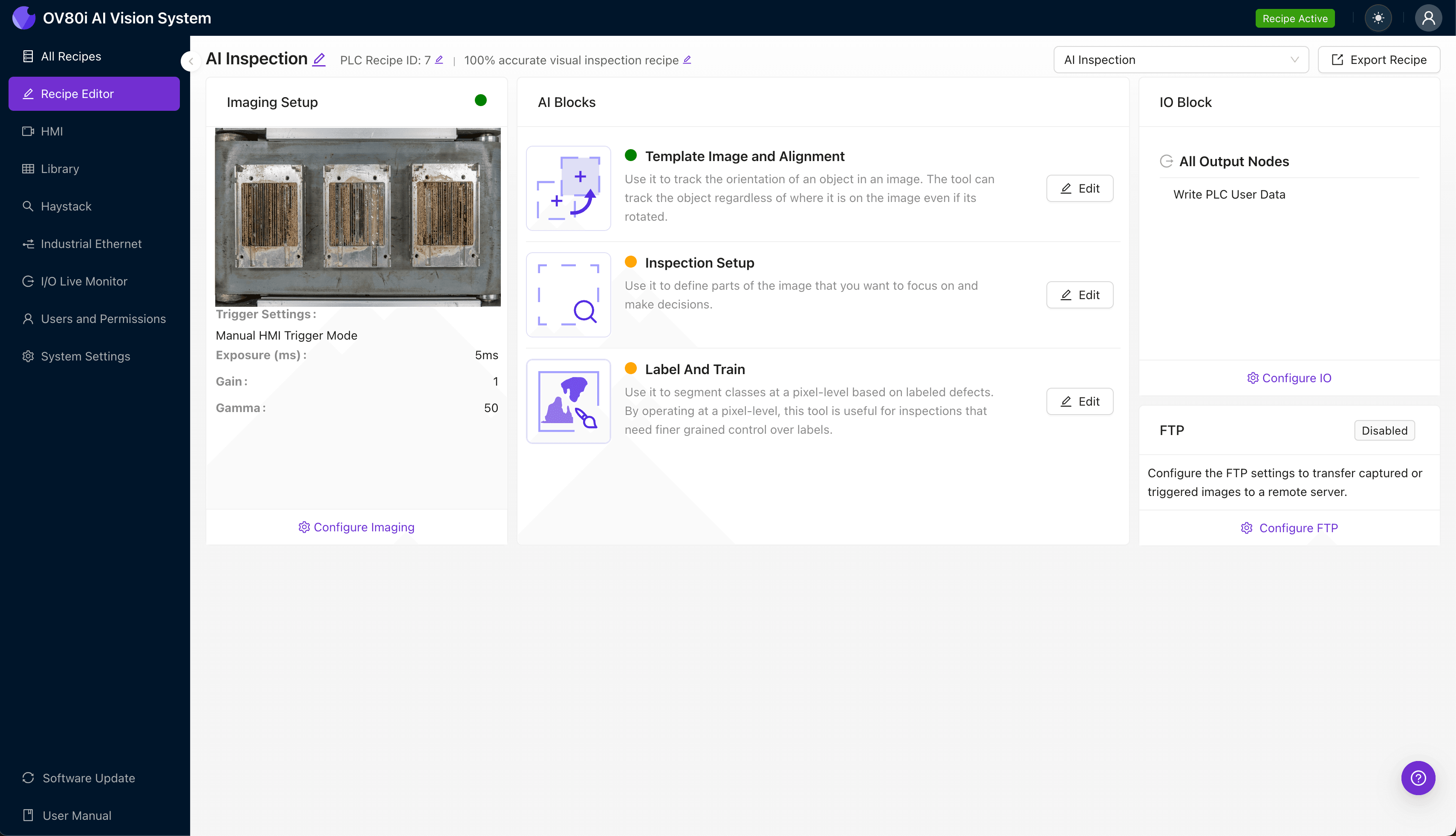
Step 1: Imaging Setup
Begin by positioning the immersion-cooled OSFP cage under the OV80i camera system. Ensure the micro-channel array faces the lens with consistent orientation and minimal shadowing across the inspection area.
Click "Configure Imaging" to access the camera settings panel. Adjust exposure time to capture clear channel definition without overexposing reflective metallic surfaces, and fine-tune gain settings to balance signal strength against image noise.
Click "Save" to lock in your optimized imaging parameters.
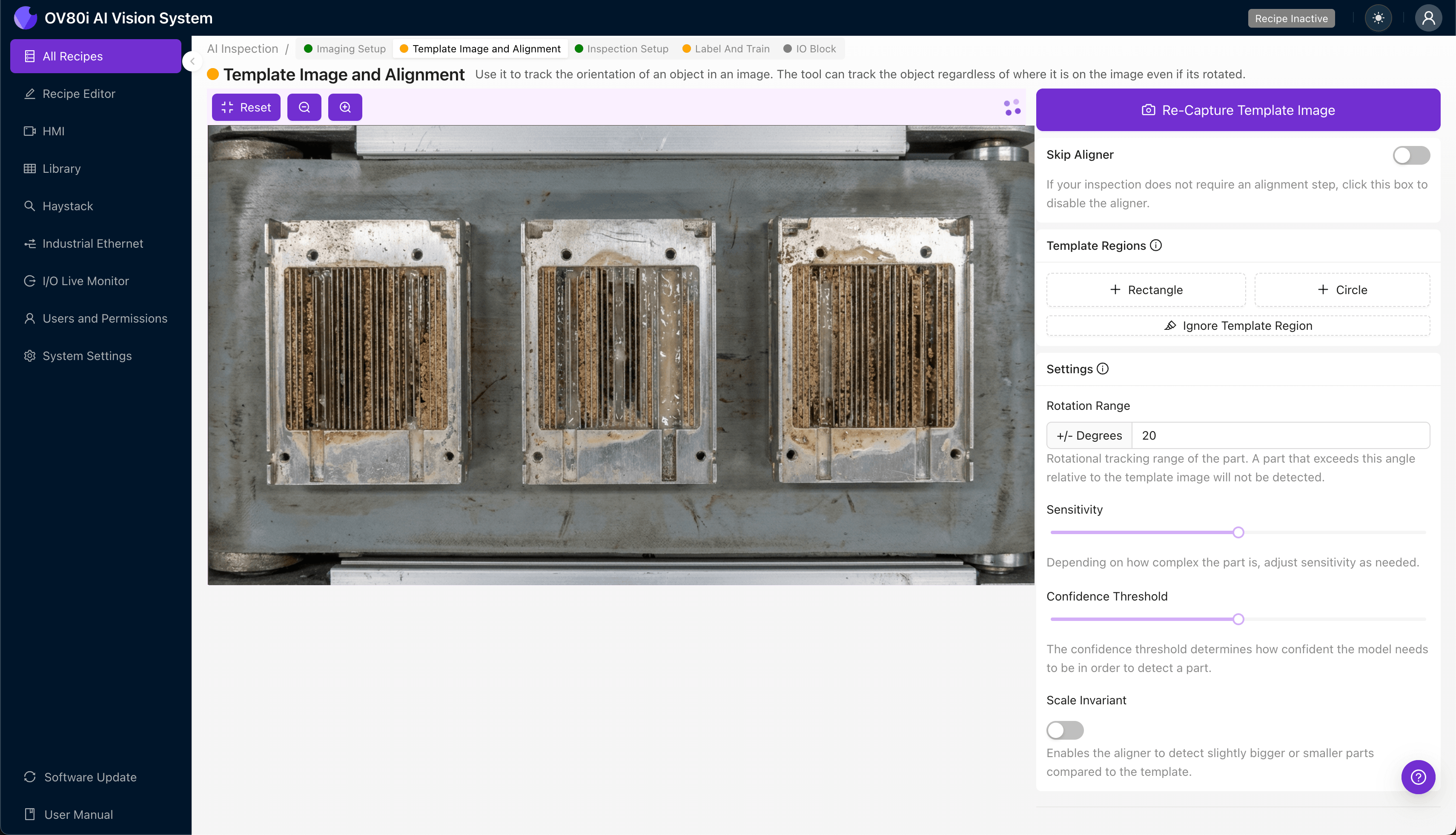
Step 2: Image Alignment
Navigate to the "Template Image" tab to establish your reference frame. Capture a template image of a known-good OSFP cage positioned in your standard inspection orientation.
Click "+ Rectangle" to draw an alignment region around the main body of the cage. This anchor point ensures consistent registration across production variations.
Set the "Rotation Range" to 20 degrees to accommodate minor positioning differences as parts arrive at the inspection station. This tolerance ensures robust alignment without sacrificing detection accuracy.
Step 3: Inspection Region Selection
Navigate to "Inspection Setup" to define your critical detection zones. Rename your "Inspection Types" with descriptive labels such as "Micro-Channel Blockage," "Port Contamination," and "Surface Defects."
Click "+ Add Inspection Region" to create targeted detection areas. Resize the yellow bounding box to cover the micro-channel array, coolant port interfaces, and any high-risk zones identified in your failure mode analysis.
Click "Save" to confirm your inspection configuration.
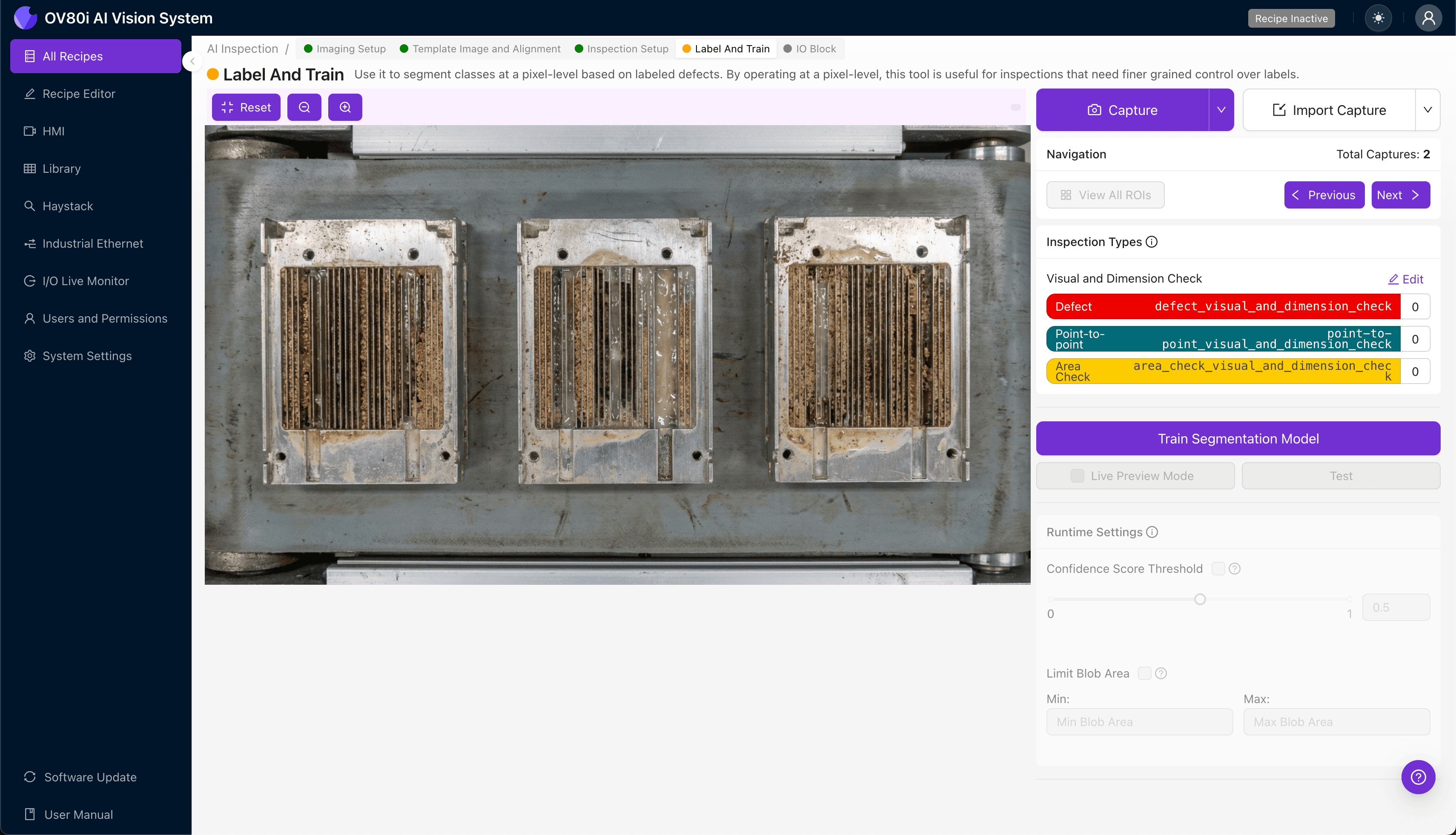
Step 4: Labeling Data
The human-in-the-loop labeling process is where your manufacturing expertise trains the AI. Review captured images and classify each as Good (acceptable quality) or Bad (defective).
Include representative samples across your full production variation—different lots, suppliers, and environmental conditions. Incorporate known failure modes from customer returns, warranty claims, and internal quality holds to ensure the model recognizes real-world defect presentations.
Aim for balanced datasets with sufficient examples of each defect type to build robust detection confidence.

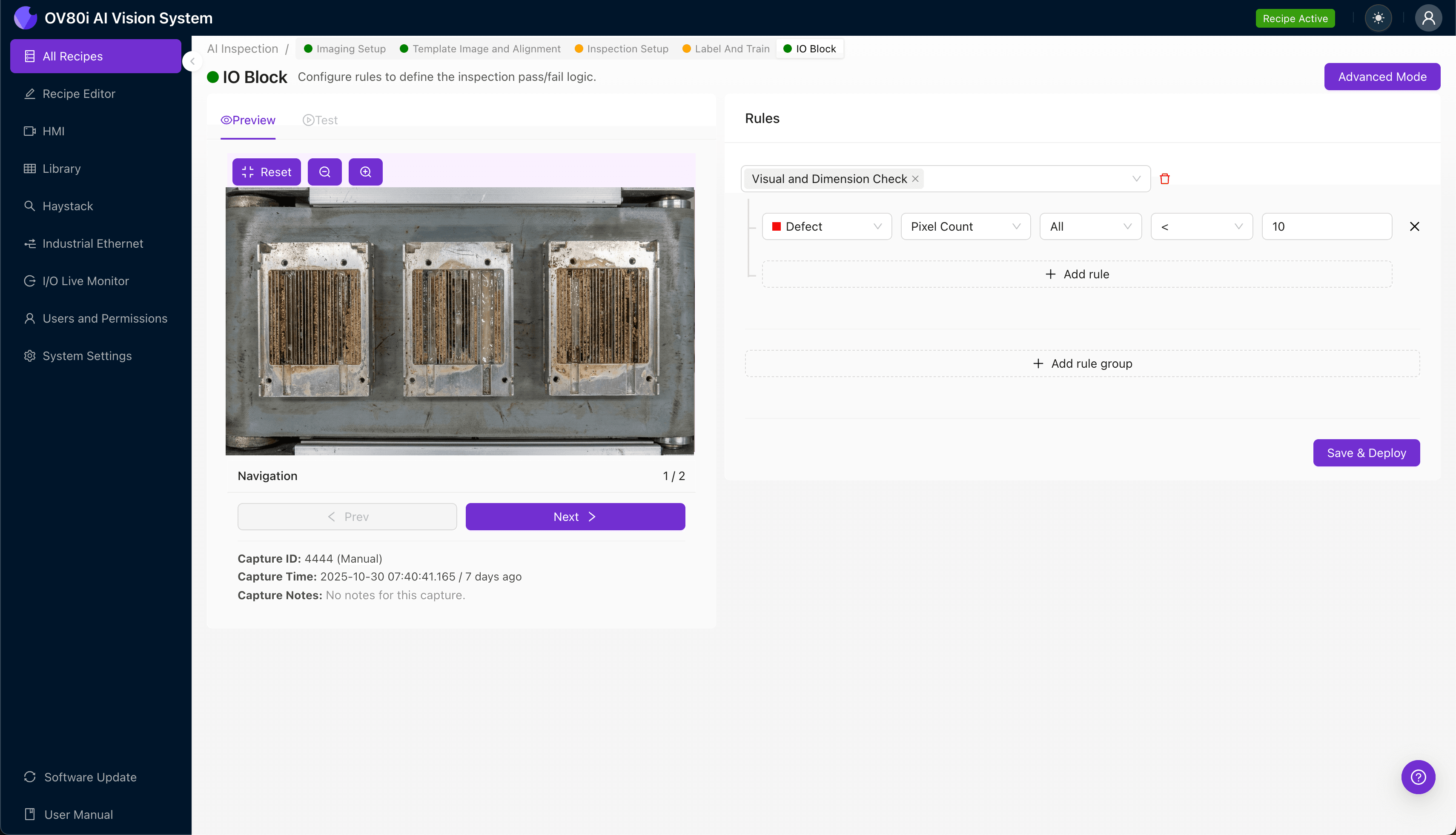
Step 5: Creating Rules
Define your pass/fail logic based on the Inspection Types you configured. Set thresholds for defect severity, size, and location—allowing minor cosmetic variations while catching functional defects that impact thermal performance.
Gate automated acceptance on the line by integrating inspection results with your reject/divert mechanisms. Parts passing all inspection criteria continue downstream, while flagged units route to secondary review or quarantine automatically.
Key Outcomes & ROI
Implementing AI-powered visual inspection for immersion-cooled OSFP cages delivers measurable business impact:
- Reduced scrap rates — Catch defects earlier in the process before additional value-add operations
- Higher throughput — Eliminate inspection bottlenecks with real-time, inline detection at production speed
- Compliance and traceability — Maintain complete inspection records with timestamped images for customer audits and warranty analysis
- Process improvement insights — Identify defect trends by shift, machine, or material lot to drive upstream quality improvements
Conclusion
Micro-channel integrity in immersion-cooled OSFP cages isn't just a quality metric—it's the difference between reliable data center operation and thermal runaway failures. With Overview.ai's deep learning-powered inspection, manufacturers gain the confidence of 100% inspection without sacrificing line speed.
Ready to eliminate micro-channel defects from your production line? Contact Overview.ai to schedule a demo with your actual parts.
Eliminate Micro-Channel Defects Today
Stop relying on manual inspection. Deploy Overview.ai to catch micro-channel blockages and thermal management defects instantly.