How to Detect Misaligned TOSA/ROSA in Optical Transceivers Using AI-Powered Visual Inspection
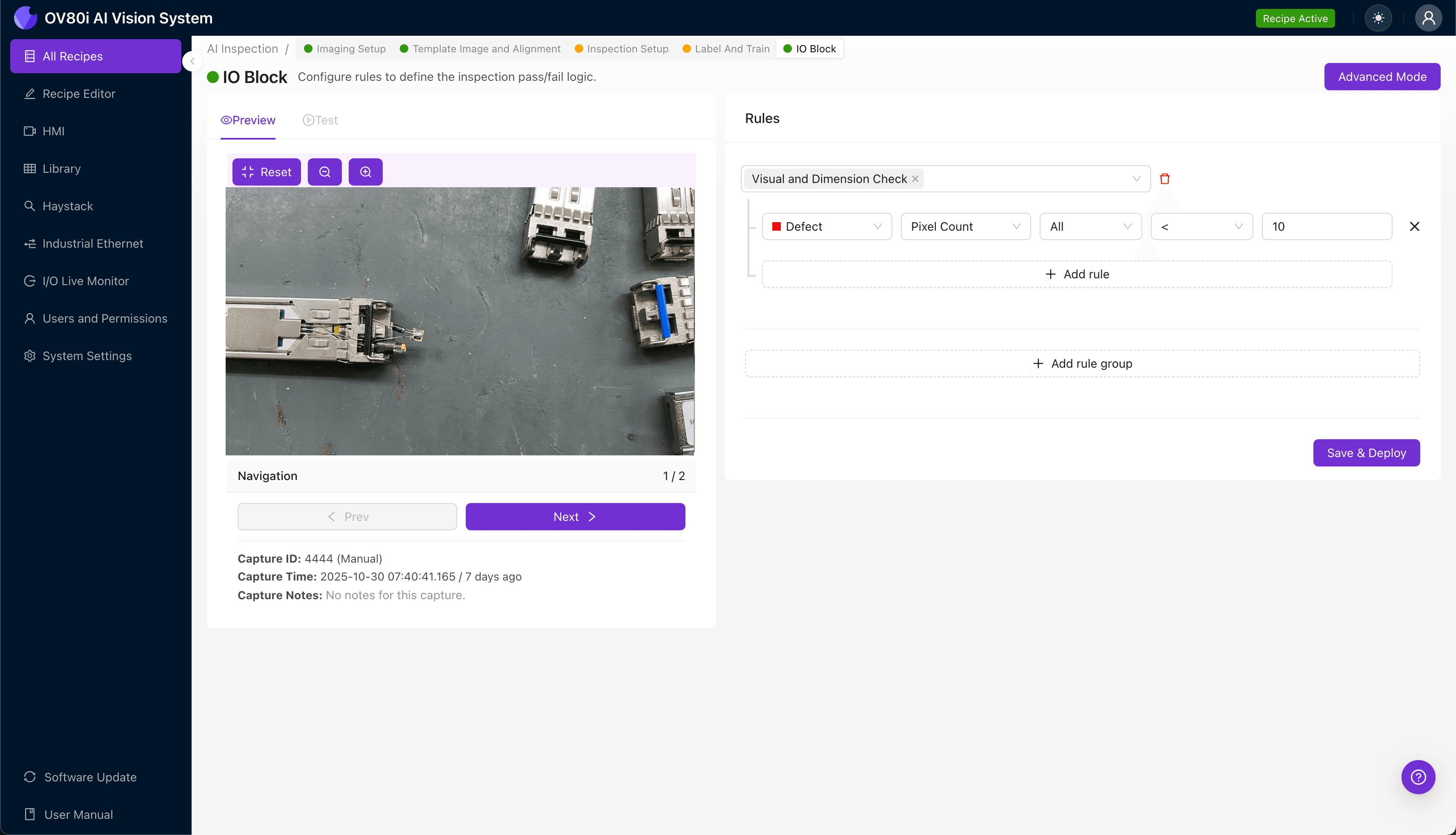
"Misaligned TOSA/ROSA components cause catastrophic signal failures in optical transceivers. Overview.ai's deep learning platform detects sub-millimeter alignment deviations at line speed, eliminating costly field returns and ensuring consistent optical performance across every unit."
The Problem: Why Misaligned TOSA/ROSA Components Threaten Transceiver Quality
Optical transceivers rely on precise alignment between the Transmitter Optical Sub-Assembly (TOSA) and Receiver Optical Sub-Assembly (ROSA) to achieve optimal signal transmission. Even microscopic deviations in positioning can cause catastrophic performance failures, leading to costly field returns and damaged customer relationships.
Common Defects in Misaligned TOSA/ROSA Components:
- Axial misalignment — lateral offset between the optical fiber and the active component's emitting/receiving surface
- Angular tilt — deviation from the perpendicular axis causing beam divergence and coupling loss
- Z-axis displacement — incorrect focal distance between the lens and the photodiode or laser diode
- Epoxy overflow or insufficient bonding — adhesive irregularities that shift component position during curing
- Ferrule concentricity errors — off-center fiber core relative to the ferrule's outer diameter
- Bent or damaged lead frames — mechanical stress causing gradual TOSA/ROSA drift post-assembly
Human inspectors struggle to maintain accuracy when evaluating these sub-millimeter alignment tolerances across thousands of units per shift. Fatigue sets in quickly, consistency degrades, and the speed demands of modern transceiver production lines make manual inspection fundamentally inadequate.
The Solution: Machine Vision and Deep Learning for Consistent, Objective Inspection
Machine vision systems eliminate human variability by capturing high-resolution images and analyzing them against trained models with pixel-level precision. Deep learning algorithms excel at detecting subtle alignment anomalies that even experienced inspectors would miss—especially when defects present inconsistently across production batches.
Overview.ai's approach delivers consistent, objective, at-line-speed inspection without slowing throughput. The system learns what "good" alignment looks like from your actual production data, then flags deviations in real-time so defective units never reach downstream processes.
Step 1: Imaging Setup
Position the optical transceiver under the Overview.ai camera system, ensuring the TOSA/ROSA assembly area is clearly visible and well-illuminated. Proper lighting is critical—consider using diffused or angled illumination to reveal subtle surface variations and shadow patterns that indicate misalignment.
Click "Configure Imaging" in the software interface to access Camera Settings. Adjust exposure to capture crisp detail without washout, and fine-tune gain to optimize signal-to-noise ratio for your specific transceiver housing material.
Click "Save" to lock in your imaging configuration.
Step 2: Image Alignment
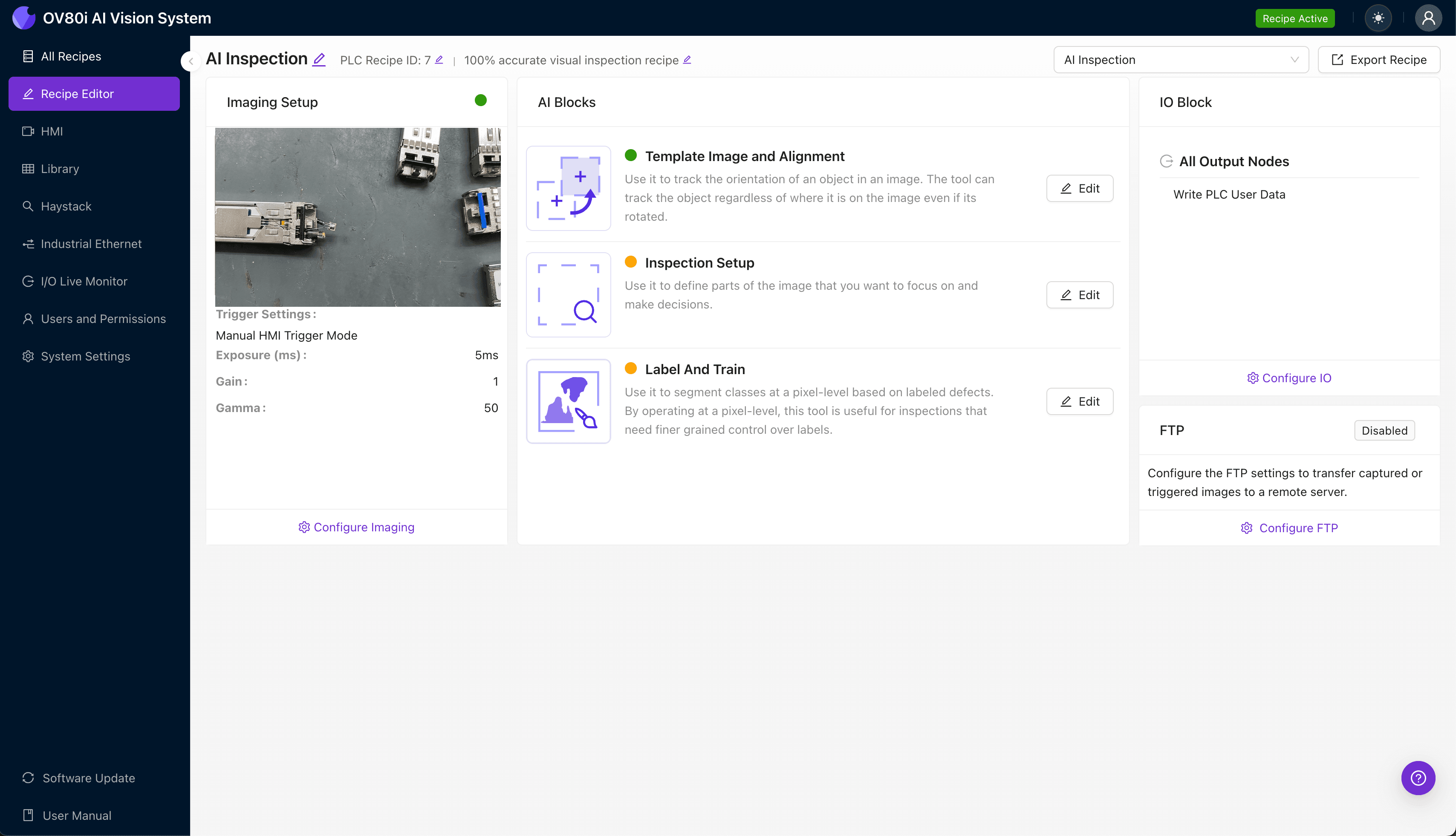
Navigate to the "Template Image" tab and capture a reference image of a correctly positioned transceiver. This template establishes the baseline orientation for all subsequent inspections.
Click "+ Rectangle" and draw a region around the transceiver's main body—this tells the system how to locate and orient each unit consistently. Set the "Rotation Range" to 20 degrees to accommodate slight variations in how parts arrive at the inspection station.
Step 3: Inspection Region Selection
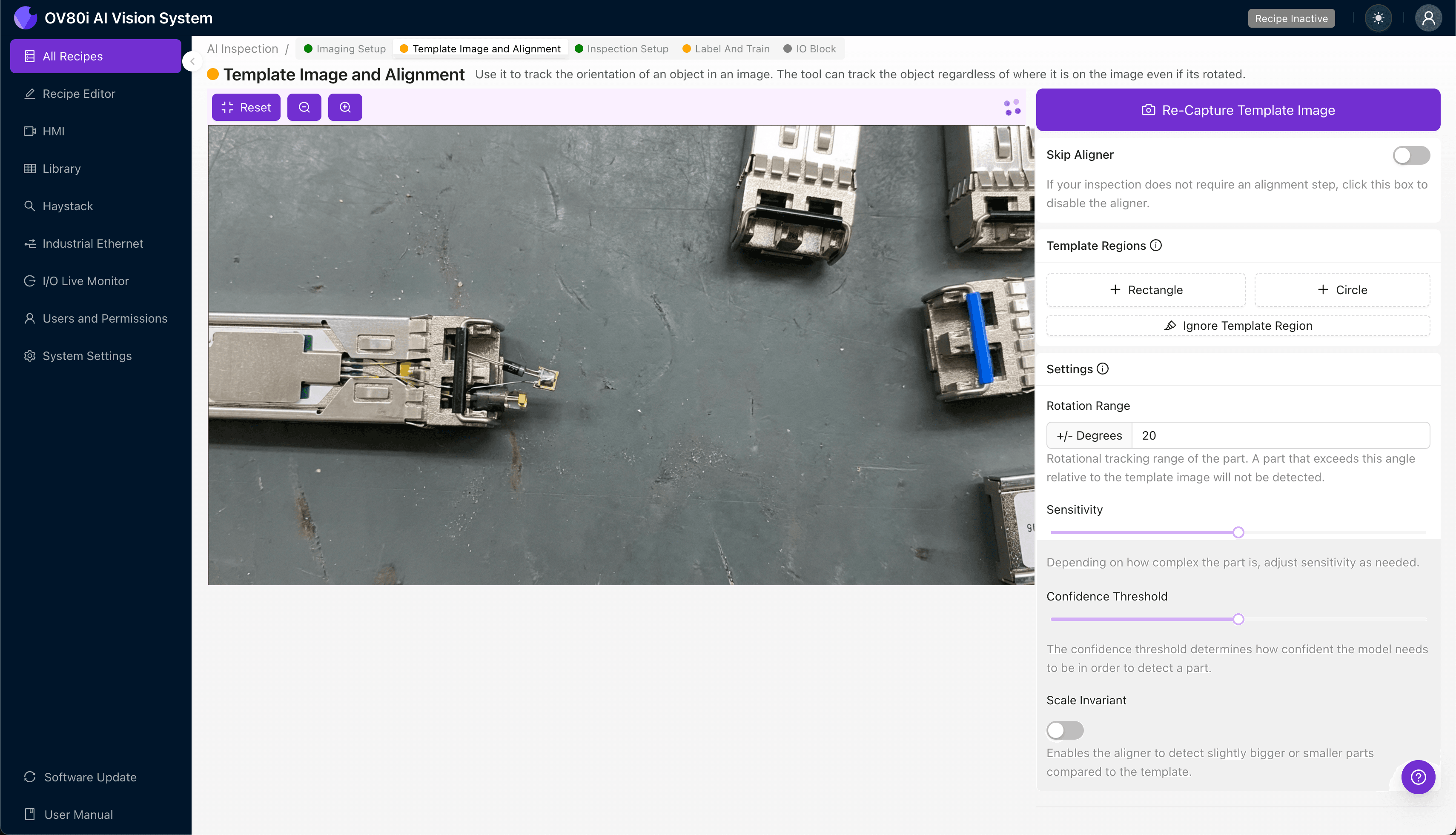
Navigate to "Inspection Setup" to define where the system should look for defects. Rename your "Inspection Types" with descriptive labels such as "TOSA_Alignment," "ROSA_Position," and "Epoxy_Bond_Quality."
Click "+ Add Inspection Region" for each critical area. Resize the yellow bounding box to cover the TOSA mounting surface, the ROSA receiving window, and the fiber ferrule interface zone.
Click "Save" to confirm your inspection regions.
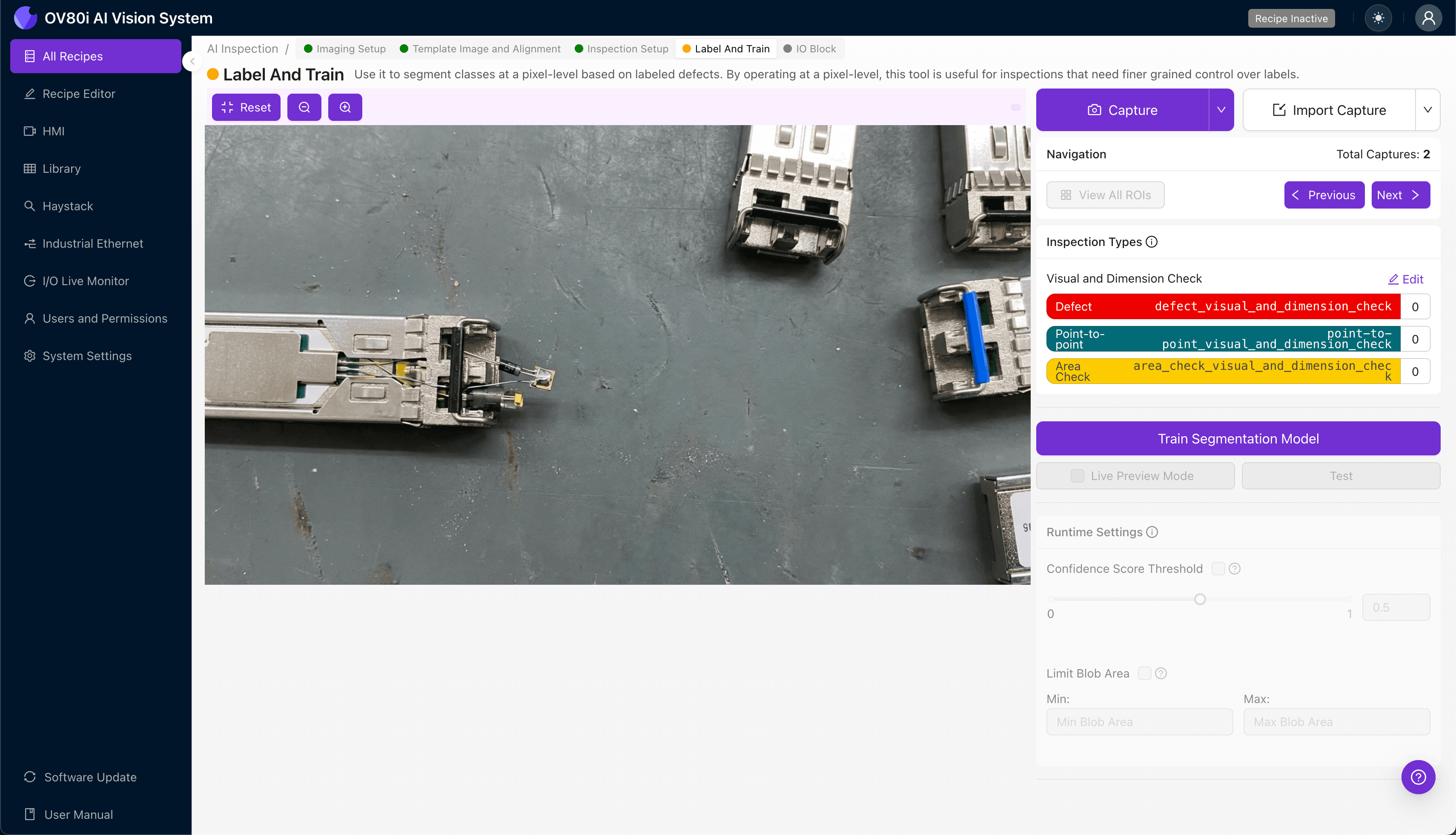
Step 4: Labeling Data
The human-in-the-loop labeling process teaches the AI what constitutes acceptable versus defective alignment. Review captured images and categorize each as Good or Bad based on your quality specifications.
Include representative samples across normal production variation—different lot numbers, slight color variations, and acceptable tolerance ranges. Most importantly, incorporate known failure modes: units that failed optical power testing, customer returns, and intentionally misaligned samples from engineering.
Step 5: Creating Rules
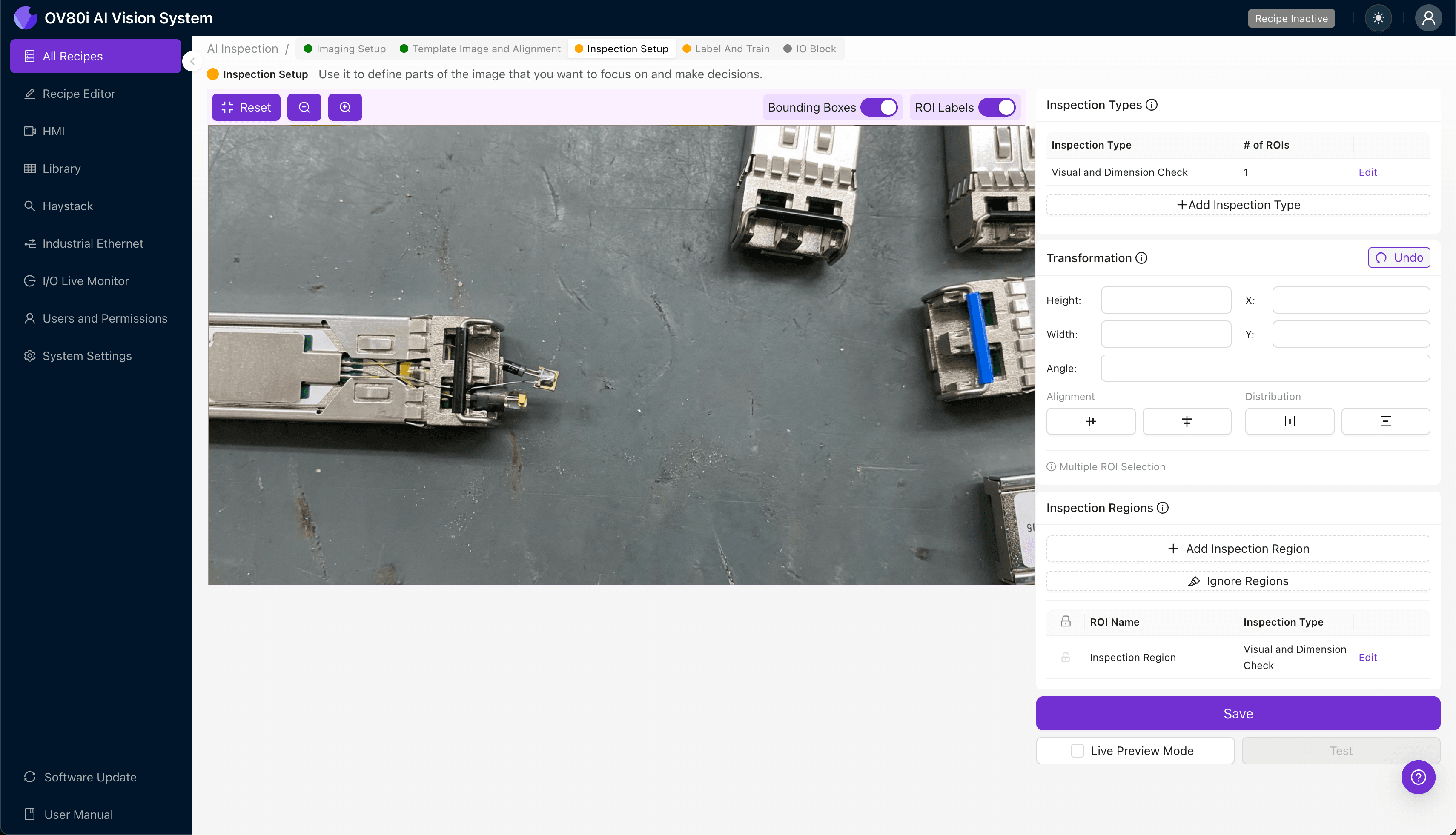
Configure your pass/fail logic based on the Inspection Types you defined earlier. Set confidence thresholds that balance escape rate reduction against false rejection costs.
Gate automated acceptance on the line so that any transceiver flagged for TOSA/ROSA misalignment is automatically diverted for secondary inspection or rework. This prevents suspect units from contaminating downstream inventory.
Key Outcomes & ROI
Implementing AI-powered visual inspection for TOSA/ROSA alignment delivers measurable business impact:
- Reduced scrap rates — catch alignment defects before expensive burn-in testing and final assembly
- Higher throughput — inspect 100% of units at line speed without creating bottlenecks
- Enhanced compliance and traceability — maintain detailed inspection records with timestamped images for customer audits and root cause analysis
- Process improvement insights — identify upstream equipment drift or supplier quality issues by analyzing defect trend data over time
Eliminate TOSA/ROSA Alignment Escapes Today
Stop relying on manual inspection for sub-millimeter tolerances. Deploy Overview.ai to catch alignment defects with pixel-level precision at production speed.