Detecting Thermal Fatigue Cracks in Precision Mold Inserts with AI-Powered Visual Inspection

"Thermal fatigue cracks in precision mold inserts often go undetected until catastrophic failure occurs. AI-powered visual inspection catches these microscopic defects consistently at production speed, protecting your tooling investment and eliminating downstream defects."
The Problem: Why Thermal Fatigue Cracks Go Undetected
Precision mold inserts operate under extreme thermal cycling conditions, making them highly susceptible to fatigue-related degradation. These microscopic cracks often propagate undetected until catastrophic failure occurs, resulting in costly production shutdowns and defective parts.
Common Defects Found in Thermally Fatigued Mold Inserts:
- Heat checking patterns – Fine, interconnected surface cracks forming a "crazing" or "crow's foot" pattern from repeated heating and cooling cycles
- Radial crack propagation – Linear cracks extending outward from gates, runners, or high-stress geometric features
- Corner and edge micro-fractures – Stress concentration failures at sharp transitions and parting line interfaces
- Surface oxidation and pitting – Corrosive degradation that accelerates crack initiation sites
- Subsurface delamination – Internal material separation visible as surface discoloration or subtle topographical changes
- Thermal erosion channels – Material loss patterns near injection points that weaken structural integrity
Human inspectors struggle to maintain the consistency needed to catch these defects. Fatigue sets in after just 20-30 minutes of microscopic examination, and the subtle nature of early-stage thermal cracks makes them nearly invisible to the naked eye—especially at production speeds.
The Solution: Machine Vision and Deep Learning
Traditional rule-based inspection systems fail with thermal fatigue cracks because these defects are highly variable in appearance. Deep learning models, however, learn to recognize the patterns of degradation rather than relying on rigid geometric rules, enabling detection of cracks that would otherwise slip through.
Overview.ai's approach delivers consistent, objective inspection at line speed—every insert, every time. By training on real-world examples of both acceptable and failed components, the system develops human-level judgment without human-level fatigue or variability.
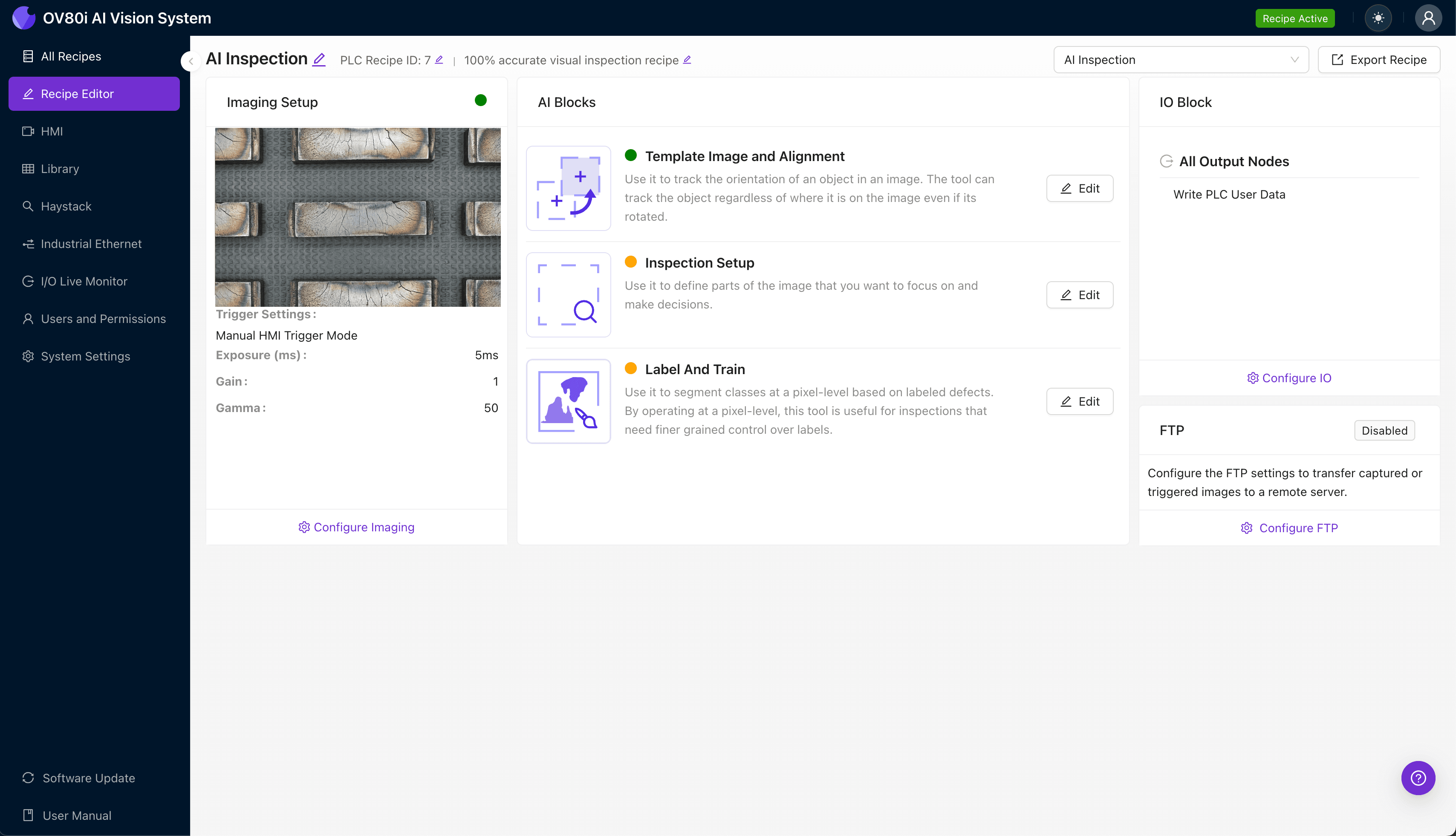
Step 1: Imaging Setup
Position the precision mold insert under the OV80i camera system, ensuring the critical surfaces (cavity face, gate areas, parting line edges) are fully visible. Proper lighting is essential—angled illumination helps reveal surface cracks that flat lighting would obscure.
Click "Configure Imaging" to access camera settings. Adjust exposure to prevent washout on reflective tool steel surfaces, and fine-tune gain to maximize crack visibility without introducing noise.
Click "Save" to lock in your optimized imaging parameters.
Step 2: Image Alignment
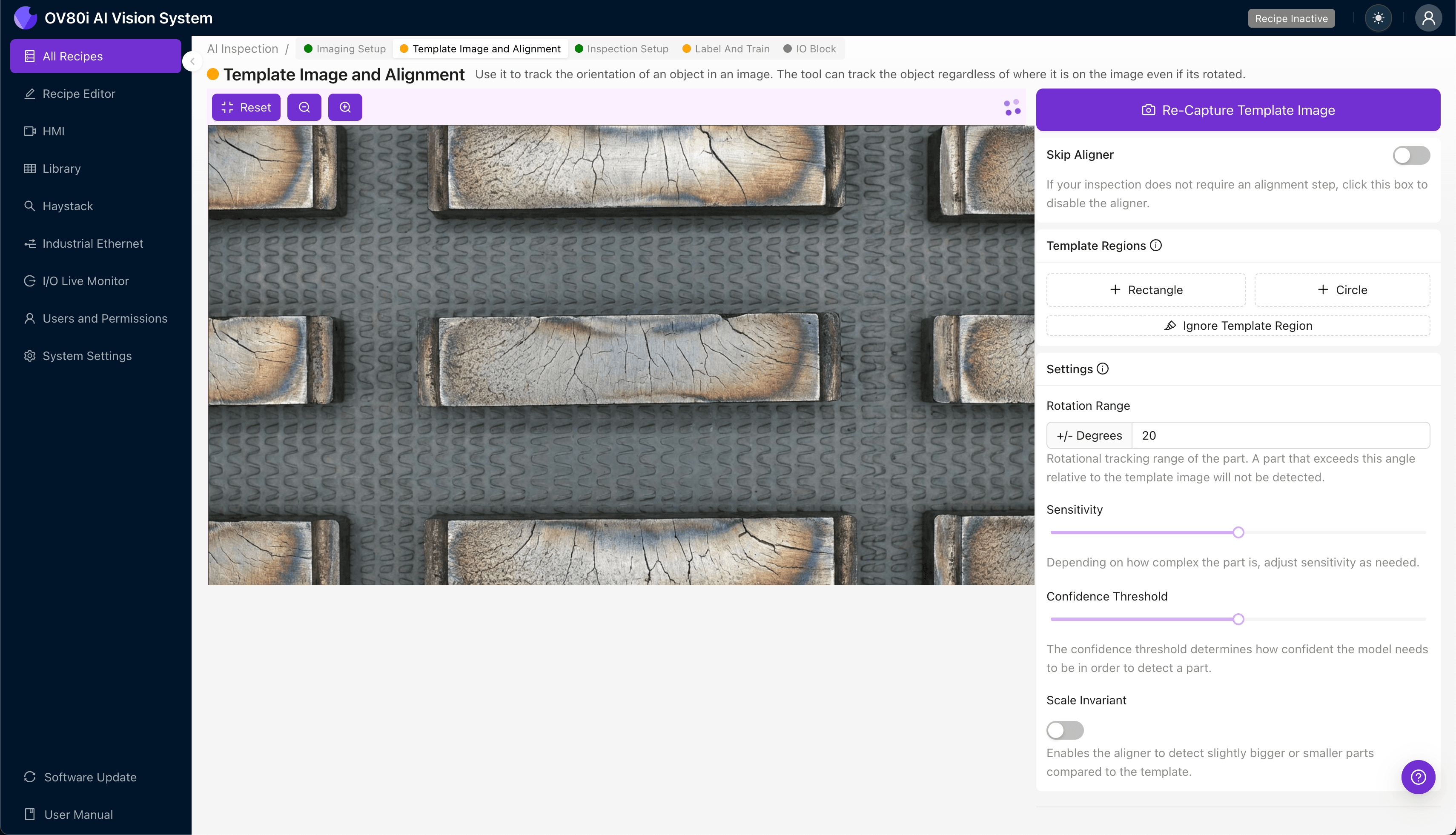
Navigate to "Template Image" and capture a reference image of a known-good mold insert in its standard orientation. This template ensures consistent positioning across all inspected parts.
Click "+ Rectangle" to add an alignment region around the main body of the insert. This gives the system geometric reference points for automatic part registration.
Set the "Rotation Range" to 20 degrees to accommodate minor positioning variations as inserts move through your inspection station.
Step 3: Inspection Region Selection
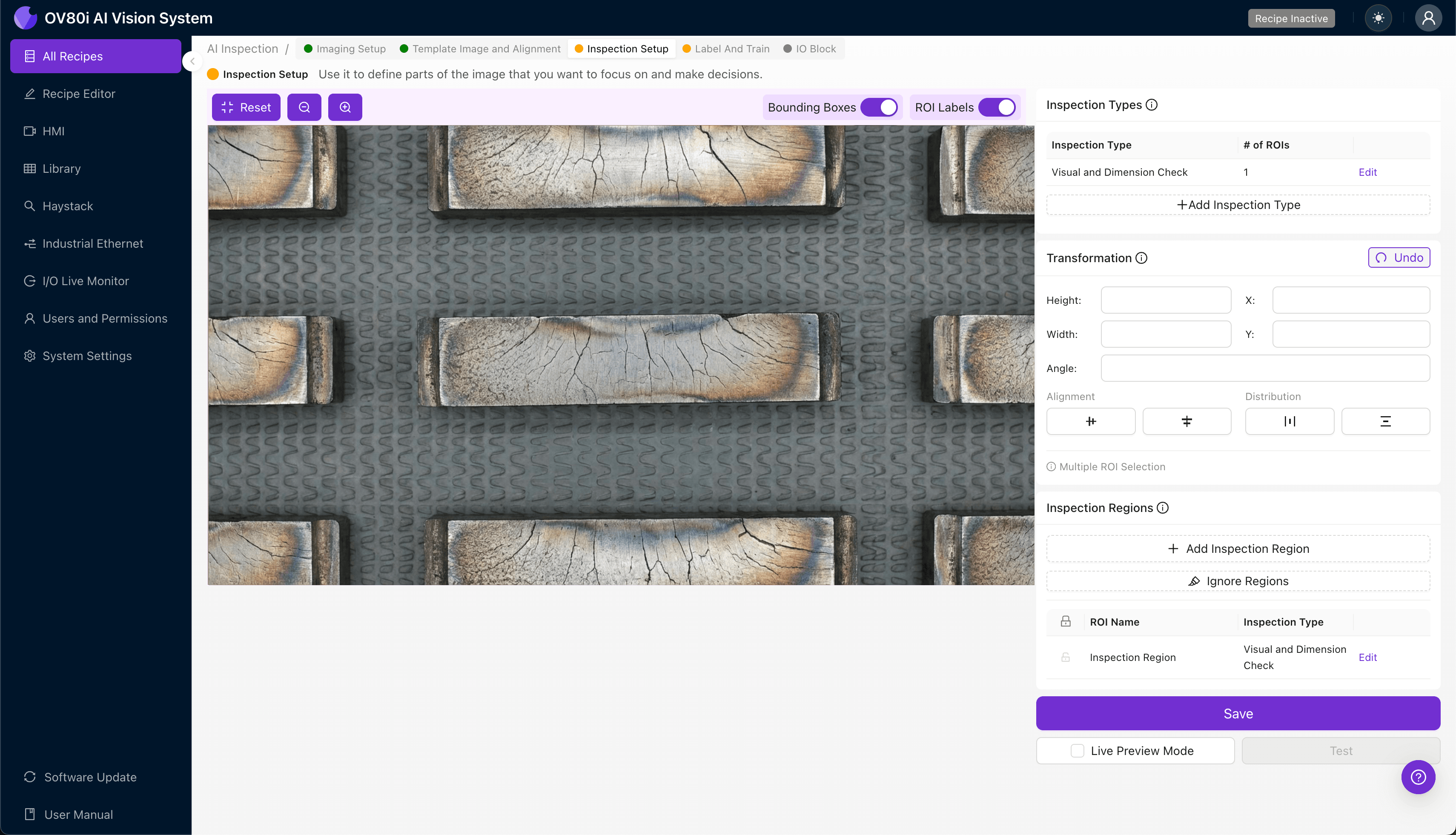
Navigate to "Inspection Setup" to define where the system should focus its analysis. Rename your "Inspection Types" with descriptive labels like "Gate Area Cracks," "Cavity Surface Check," and "Parting Line Integrity."
Click "+ Add Inspection Region" for each critical zone. Resize the yellow bounding box to cover high-stress areas where thermal fatigue cracks typically initiate—gate regions, sharp corners, and cooling channel proximities.
Click "Save" to confirm your inspection regions.
Step 4: Labeling Data
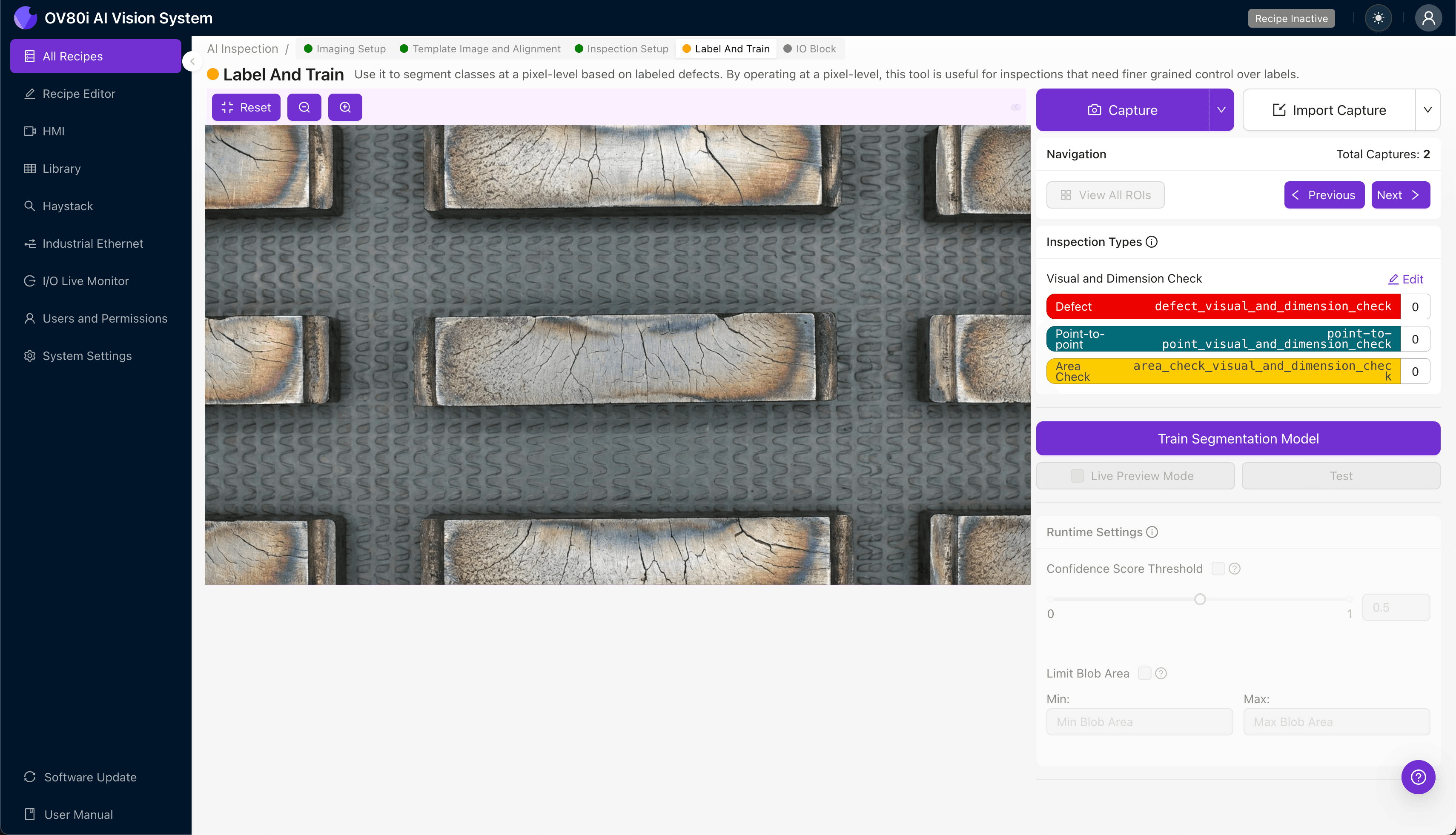
This is where human expertise trains the AI. The human-in-the-loop process ensures the model learns from your quality team's knowledge of acceptable versus unacceptable conditions.
Label captured images as Good or Bad, being especially thorough with borderline cases. Include representative samples of all known failure modes: early-stage heat checking, propagated cracks, and severe thermal erosion.
The more varied your training data, the more robust your inspection model becomes.
Step 5: Creating Rules
Set your pass/fail logic based on the Inspection Types you've defined. For example, you might allow minor surface oxidation but reject any insert showing crack propagation near the gate area.
These rules gate automated acceptance on the line, ensuring only conforming inserts continue to production while flagged components route to secondary review or replacement queues.
Key Outcomes & ROI
Implementing AI-powered inspection for precision mold inserts delivers measurable business impact:
- Reduced scrap and rework – Catch degraded inserts before they produce defective molded parts, eliminating downstream waste
- Higher throughput – 100% inline inspection runs at production speed without creating bottlenecks or sampling delays
- Enhanced compliance and traceability – Automatic image archiving provides audit-ready documentation for aerospace, medical, and automotive quality standards
- Process improvement insights – Trend data reveals which insert positions, materials, or operating conditions accelerate thermal fatigue, enabling predictive maintenance
Protect Your Tooling Investment
Precision mold inserts represent significant capital investment—and thermal fatigue cracks are inevitable in high-volume production. The question isn't whether degradation will occur, but whether you'll catch it before it impacts your parts.
Overview.ai's visual inspection platform gives you the consistent, objective detection capability that human inspection simply cannot maintain.
Protect Your Mold Inserts Today
Stop letting thermal fatigue cracks slip through. Deploy Overview.ai to catch defects before catastrophic failure.