How to Detect Galvanic Corrosion Defects in RF Shielding Gaskets Using AI-Powered Visual Inspection
"Galvanic corrosion in RF shielding gaskets compromises EMI protection and causes field failures that are costly to fix. AI-powered visual inspection catches oxide deposits, pitting, and coating delamination at production speed—before defective gaskets reach your customers."
The Problem: Why Galvanic Corrosion in RF Gaskets Is a Silent Quality Killer
RF shielding gaskets are critical components in electronics manufacturing, protecting sensitive circuits from electromagnetic interference. When galvanic corrosion occurs—typically where dissimilar metals contact each other in the presence of an electrolyte—it compromises both the gasket's conductivity and its sealing integrity.
Common Defects Found in RF Shielding Gaskets with Galvanic Corrosion:
- White oxide deposits — Powdery aluminum corrosion byproducts accumulating at metal interfaces
- Pitting corrosion — Localized cavities forming on the gasket surface where anodic dissolution occurs
- Bimetallic boundary degradation — Visible deterioration at contact points between dissimilar metals (e.g., aluminum-to-copper joints)
- Conductive coating delamination — Silver or nickel plating separating from the base substrate due to underlying corrosion
- Surface discoloration and staining — Brown, green, or white patches indicating active corrosion zones
- Micro-crack propagation — Stress corrosion cracking that compromises gasket compression and EMI shielding effectiveness
Human inspectors struggle to catch these defects consistently. Fatigue sets in quickly when examining hundreds of gaskets per shift, and subtle early-stage corrosion is nearly impossible to identify at production speeds.
The Solution: Machine Vision and Deep Learning for Consistent Detection
AI-powered visual inspection eliminates the variability inherent in manual quality control. Deep learning models trained on thousands of corrosion examples can identify subtle surface anomalies that even experienced inspectors miss—detecting defects at the earliest stages before they become catastrophic failures.
Overview.ai's approach delivers consistent, objective inspection at line speed. By deploying systems like the OV80i directly on your production line, you achieve 100% inline inspection without sacrificing throughput or introducing human error.
Step 1: Imaging Setup
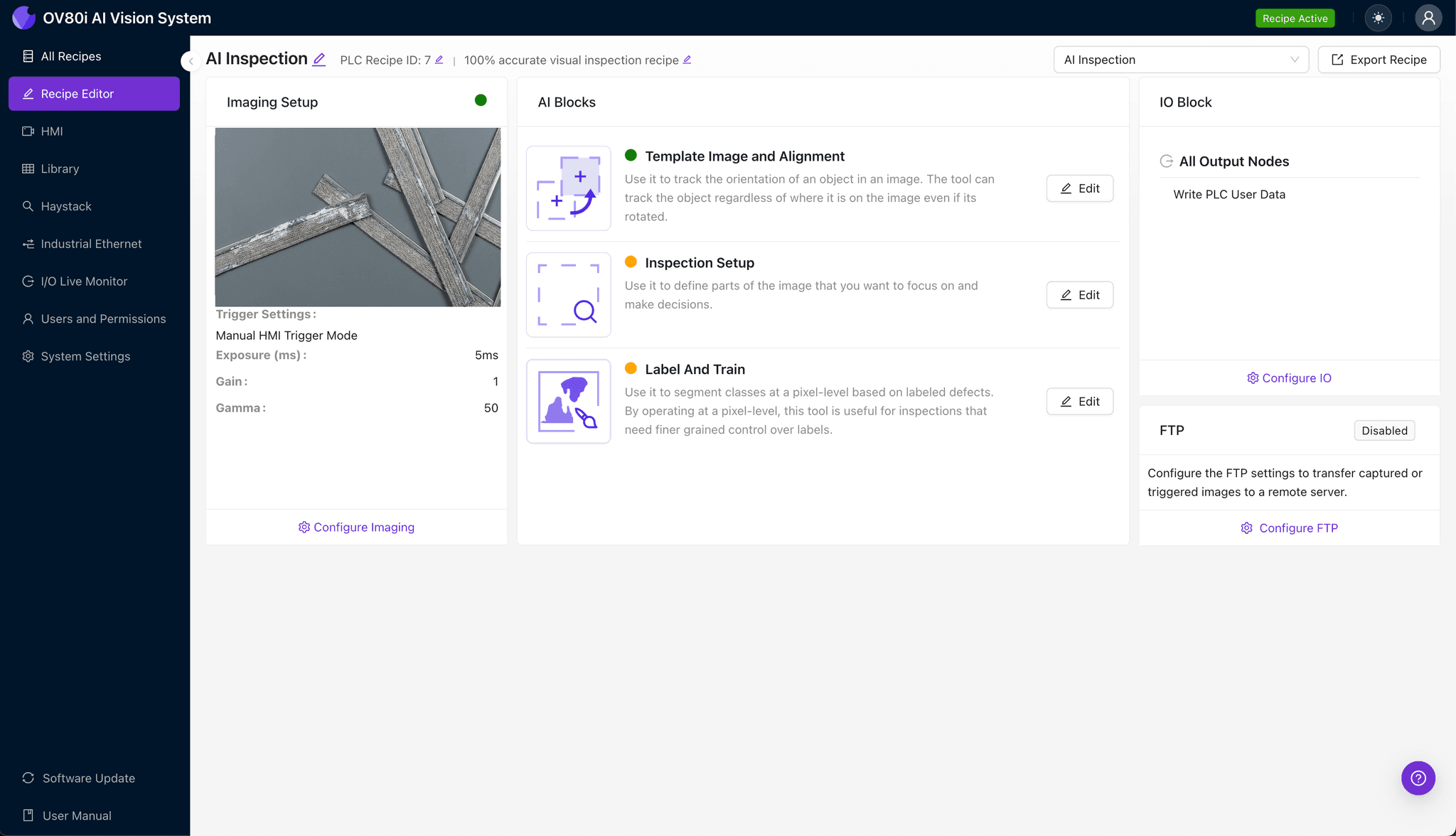
Position the RF shielding gasket under the OV80i camera, ensuring the inspection surface faces upward with consistent orientation. Proper lighting is essential—angled illumination often reveals surface corrosion and pitting more effectively than direct overhead lighting.
Click "Configure Imaging" in the Overview interface. Adjust the Camera Settings, including exposure and gain, until corrosion artifacts and surface texture are clearly visible without overexposure.
Click "Save" to lock in your optimized imaging parameters.
Step 2: Image Alignment
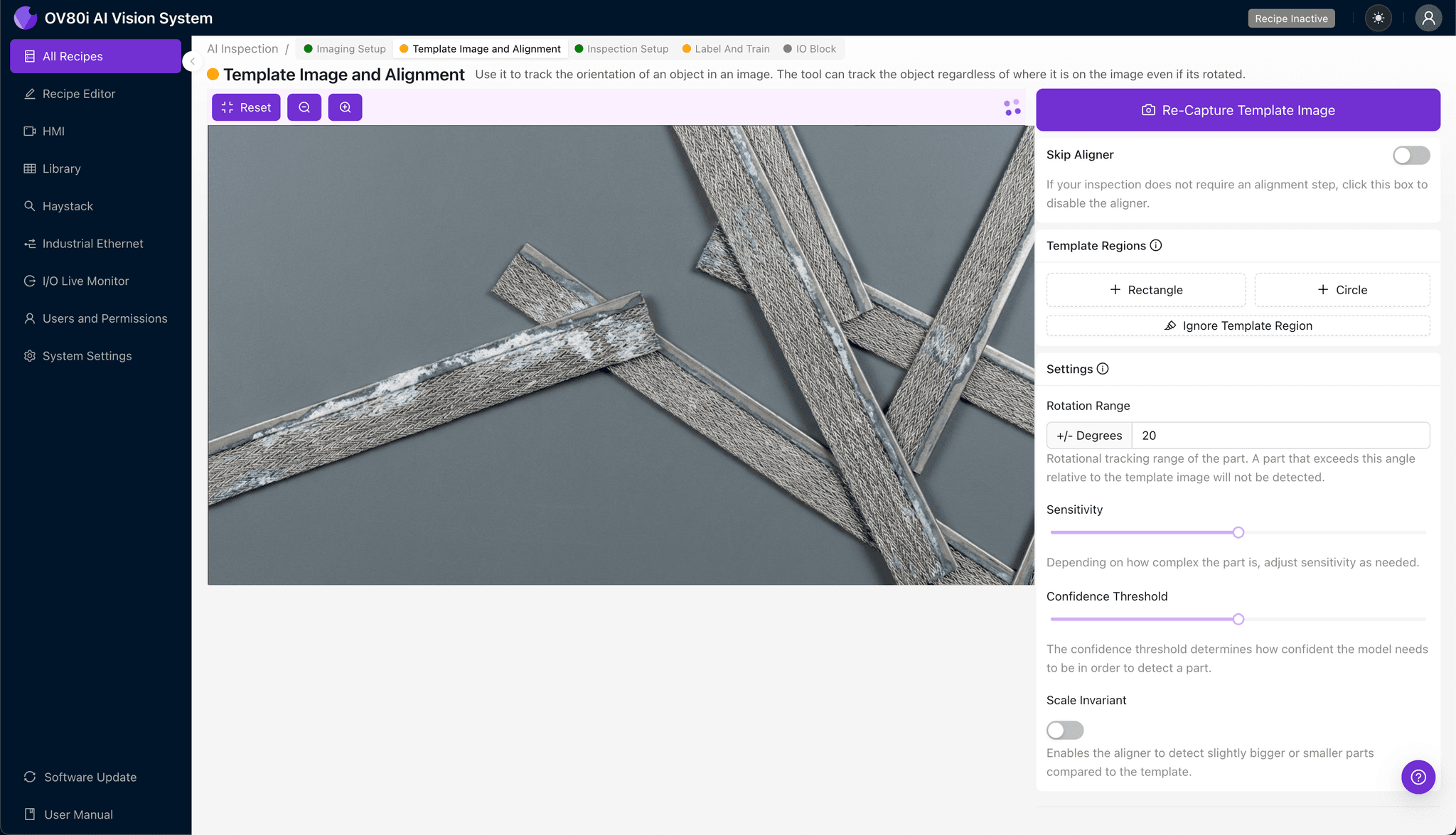
Navigate to the "Template Image" tab and capture a Template of your gasket in its ideal inspection position. This reference image ensures the system can locate and align each part consistently, regardless of minor placement variations.
Click "+ Rectangle" and draw a region around the main body of the gasket. Set the "Rotation Range" to 20 degrees to accommodate slight orientation differences as parts arrive on the line.
Step 3: Inspection Region Selection
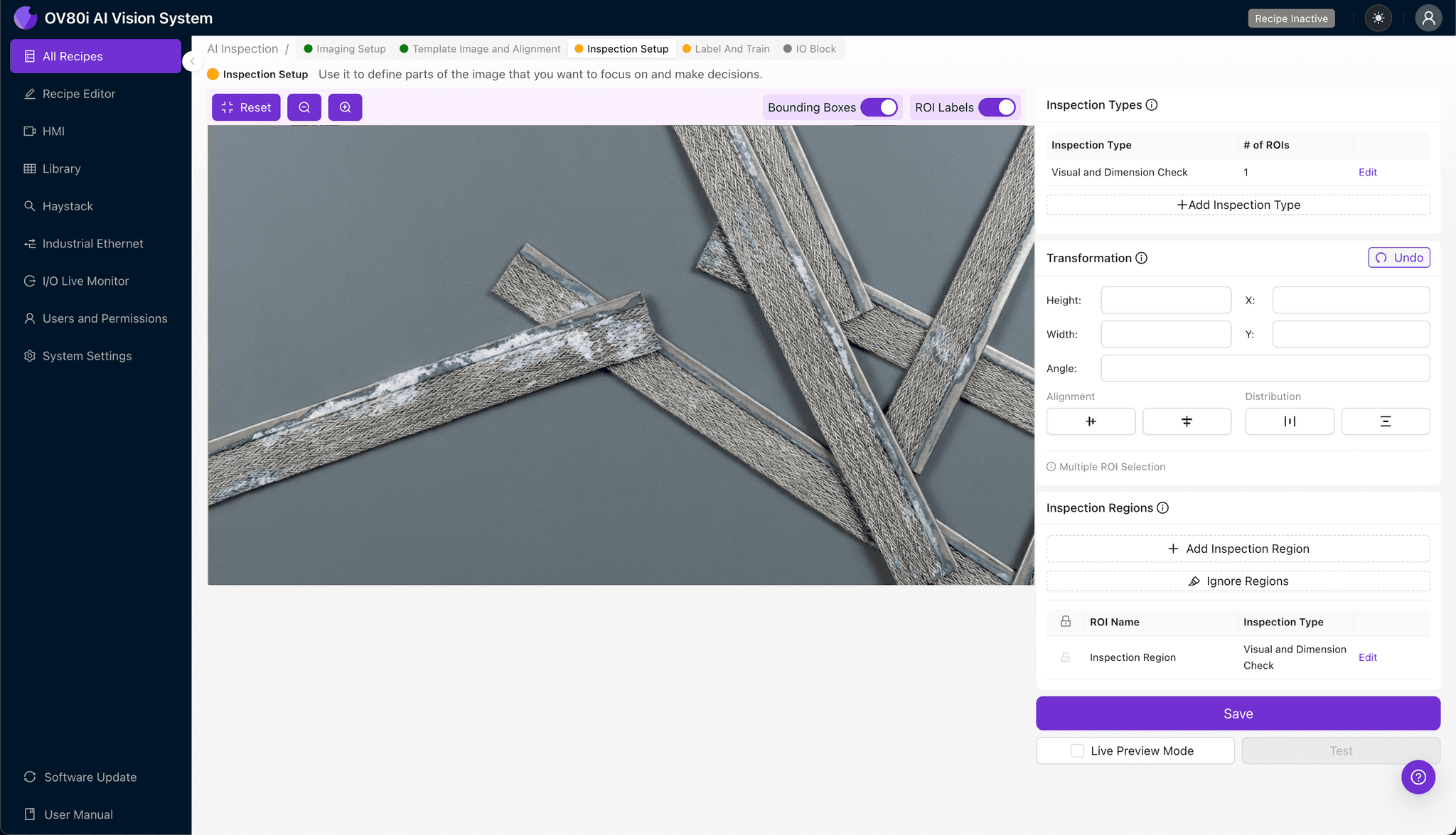
Navigate to "Inspection Setup" to define where the system should look for defects. Rename your "Inspection Types" to reflect the specific corrosion failure modes you're targeting (e.g., "Oxide_Deposits," "Surface_Pitting," "Coating_Delamination").
Click "+ Add Inspection Region" for each critical area. Resize the yellow bounding box to cover high-risk zones—particularly bimetallic contact points, edges, and any areas prone to moisture exposure.
Click "Save" to confirm your inspection regions.
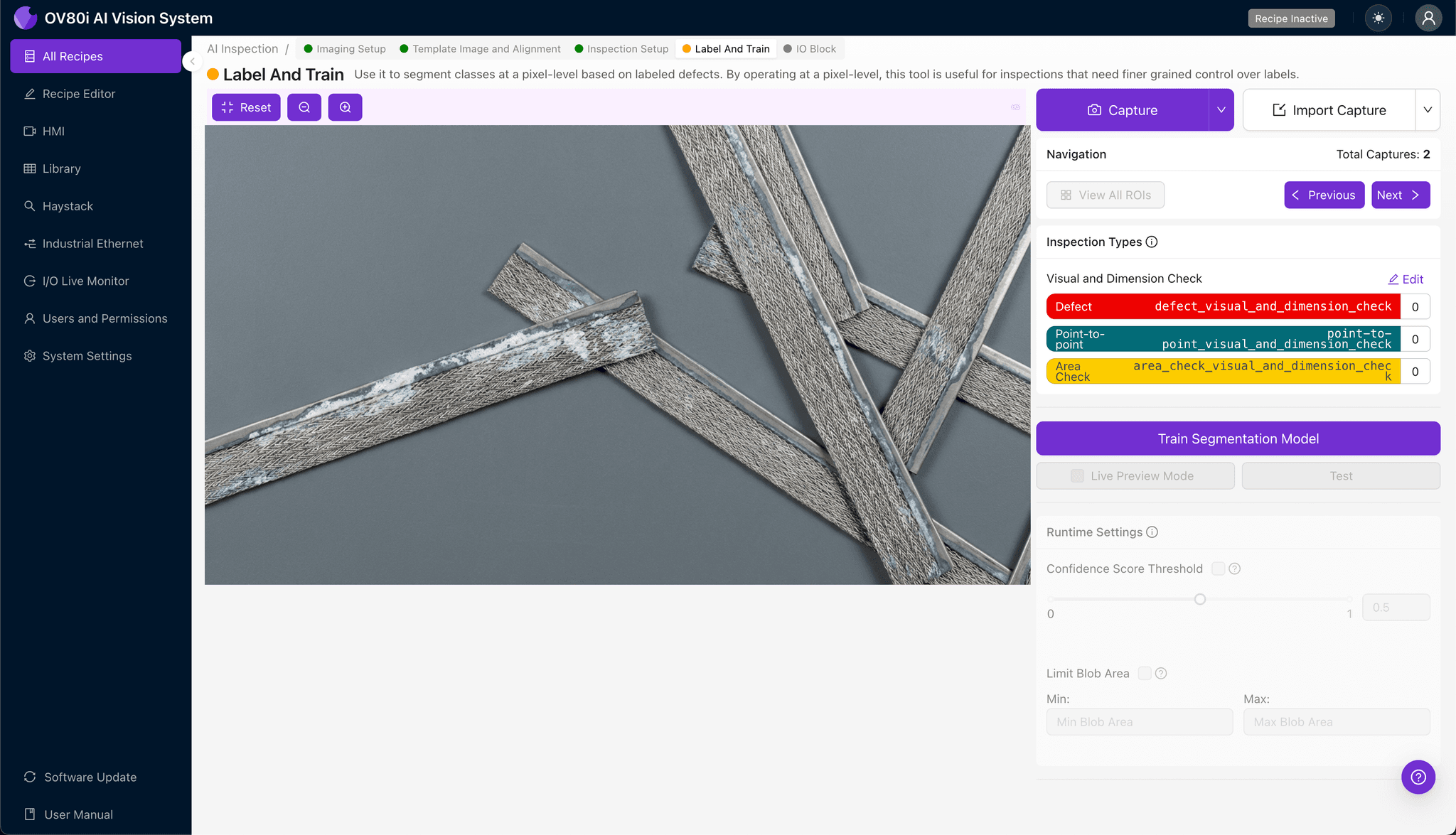
Step 4: Labeling Data
This is where human expertise trains the AI. Using Overview's human-in-the-loop labeling interface, review captured images and classify each as Good or Bad.
Include representative samples across the full range of acceptable variation, as well as known failure modes at different corrosion stages. The more diverse your labeled dataset, the more robust your model becomes in production.
Step 5: Creating Rules
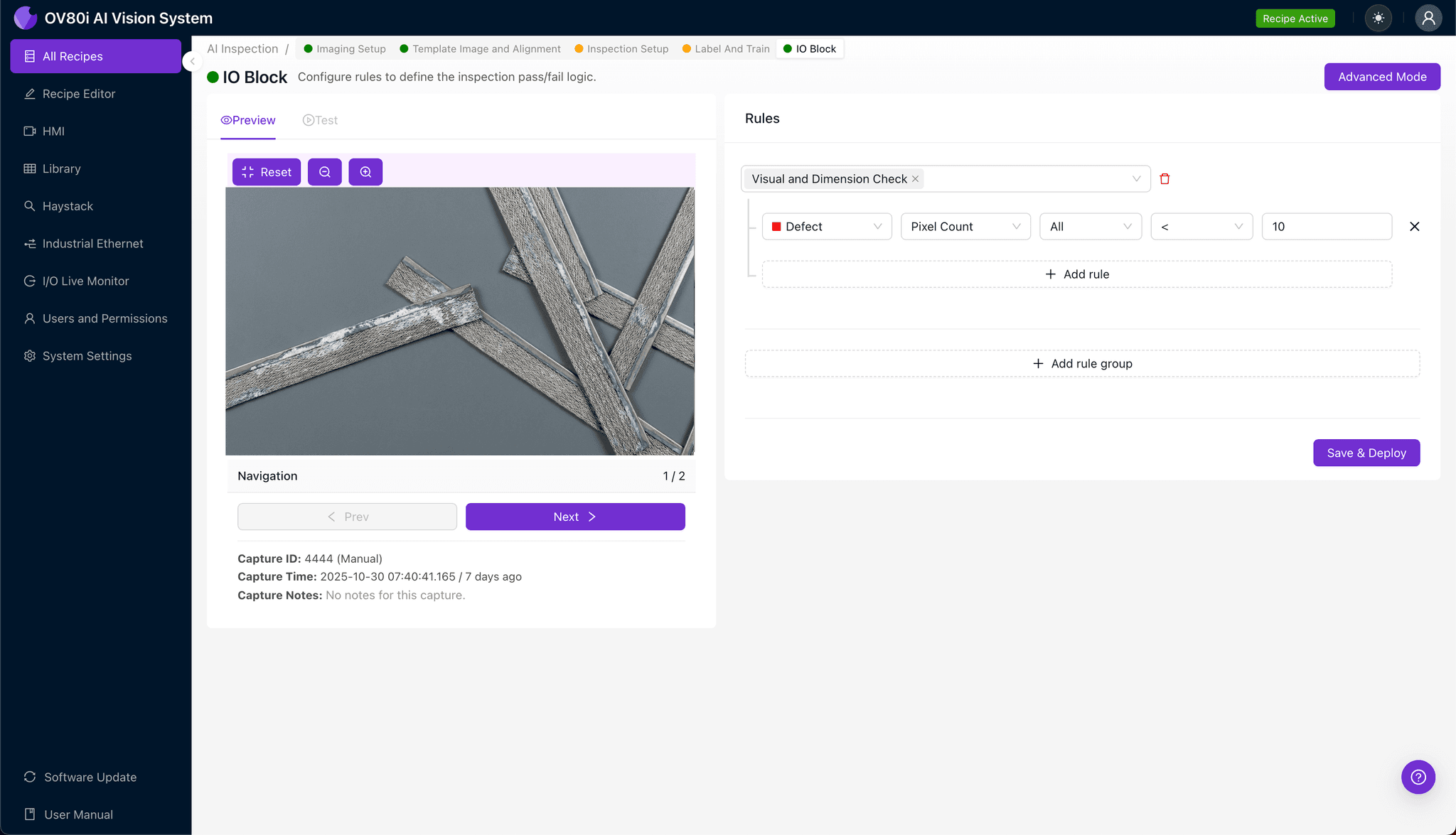
With your model trained, navigate to the Rules configuration to set pass/fail logic based on your defined Inspection Types. For example, you might reject any part with detected pitting corrosion while flagging minor discoloration for secondary review.
These rules gate automated acceptance on the line, ensuring only conforming gaskets proceed downstream while defective units are automatically diverted.
Key Outcomes & ROI
Deploying AI-powered inspection for galvanic corrosion detection delivers measurable business impact:
- Reduced scrap and rework costs — Catch corrosion defects early, before they contaminate downstream assemblies or reach customers
- Higher throughput — Inspect 100% of production at line speed without adding labor or creating bottlenecks
- Compliance and traceability — Automatically log inspection results with timestamped images for ISO 9001, IATF 16949, and customer audit requirements
- Process improvement insights — Identify corrosion trends over time to address root causes, such as material lot issues or environmental factors in your facility
Conclusion
Galvanic corrosion in RF shielding gaskets is a defect that's easy to miss—until it causes field failures, customer complaints, or EMI compliance issues. By implementing AI-powered visual inspection with Overview.ai, manufacturers gain the consistency, speed, and precision needed to catch these defects before they become costly problems.
Eliminate Corrosion Defects Today
Stop relying on manual inspection for galvanic corrosion detection. Deploy Overview.ai to catch defects instantly at line speed.