SFP+ Cage with a Deformed Bezel-Attachment Tab: A Complete Visual Inspection Walkthrough

"Deformed bezel-attachment tabs on SFP+ cages cause field failures and customer returns. Deep learning-powered visual inspection catches bent tabs, cracks, and dimensional defects at line speed—eliminating the inconsistency and fatigue that plague manual inspection of reflective stamped metal components."
The Problem: Why Bezel-Attachment Tab Defects Slip Through
SFP+ cages are critical interconnect components that must meet exacting mechanical tolerances to ensure proper transceiver module insertion and retention. When bezel-attachment tabs become deformed during stamping, forming, or handling operations, the resulting defects can cause field failures, customer returns, and damaged brand reputation.
Common Defects Found in SFP+ Cage Bezel-Attachment Tabs:
- Bent or twisted tabs — tabs deflected outside the angular tolerance window, preventing flush bezel mounting
- Cracked or fractured tab roots — stress fractures at the tab base caused by over-aggressive forming operations
- Incomplete tab formation — short shots or partial punches leaving tabs undersized or missing material
- Burrs and sharp edges — excess material on tab surfaces creating interference with mating bezels
- Dimensional out-of-spec — tab length, width, or thickness falling outside acceptable tolerance bands
- Surface scoring or tool marks — visible damage from worn progressive dies or improper material handling
Manual inspection of these micro-scale features is inherently unreliable. Inspectors experience fatigue after just 20-30 minutes of examining small metallic components under magnification, and the reflective surfaces of stamped stainless steel create inconsistent visual conditions that lead to both false accepts and false rejects.
The Solution: Machine Vision Powered by Deep Learning
Traditional rule-based machine vision struggles with the natural variation found in stamped metal components—lighting angles, surface finish differences, and acceptable cosmetic marks can trigger false failures. Deep learning models, however, learn to distinguish between true defects and acceptable variation by training on real production data.
Overview.ai's approach delivers consistent, objective inspection at full line speed. The OV80i system captures high-resolution images of every SFP+ cage, analyzes bezel-attachment tab geometry in milliseconds, and makes pass/fail decisions without the subjectivity or fatigue that plagues human inspection.
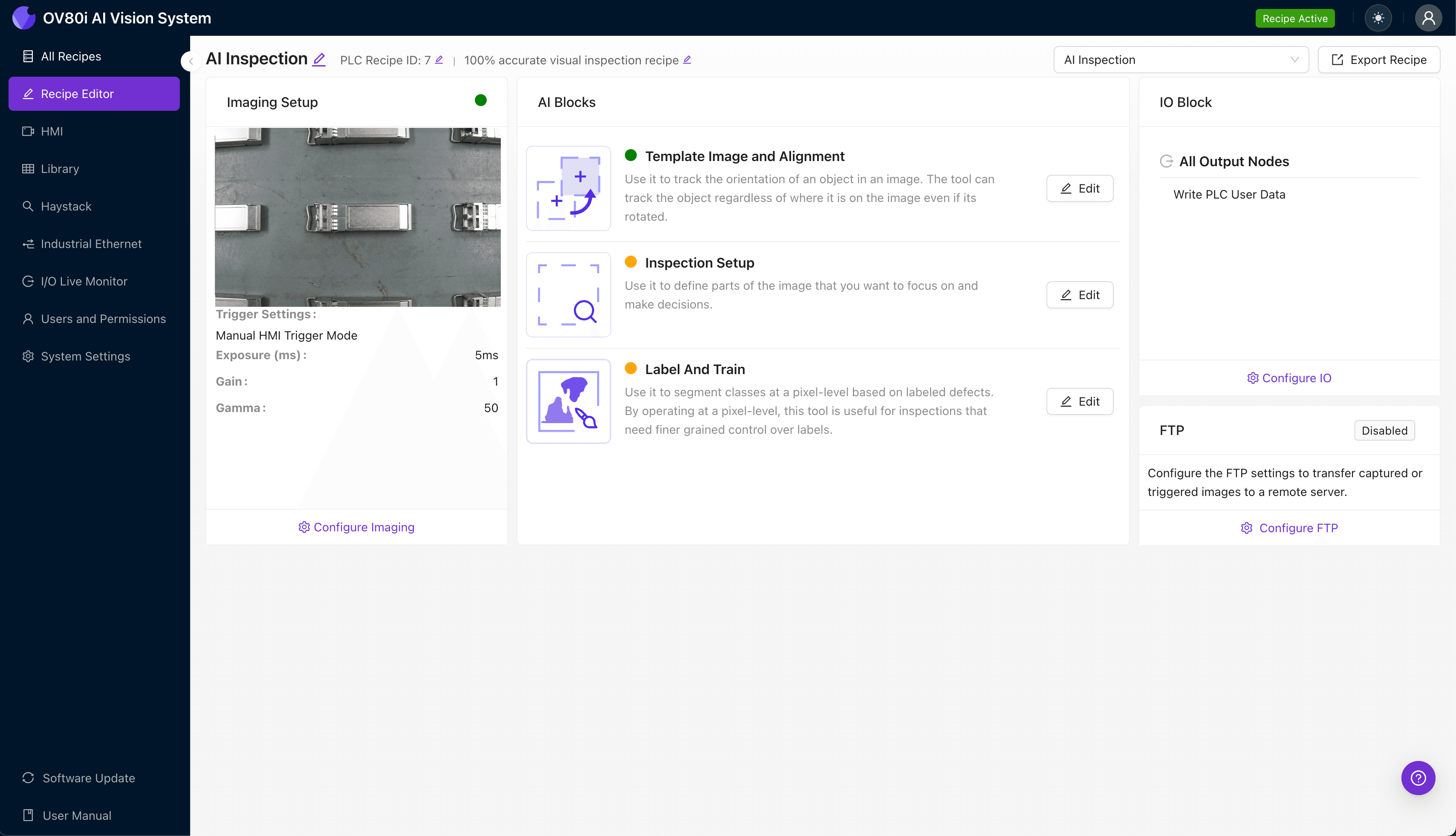
Step 1: Imaging Setup
Begin by placing a representative SFP+ cage sample under the OV80i camera, positioning it so the bezel-attachment tabs are clearly visible and well-lit. Reflective stamped metal surfaces often require diffuse lighting or polarization to minimize glare hotspots that obscure defect details.
Click "Configure Imaging" in the Overview.ai interface to access Camera Settings. Adjust exposure time to capture tab edges without blooming, and fine-tune gain to balance signal-to-noise ratio across the metallic surface.
Click "Save" to lock in your imaging parameters before proceeding.
Step 2: Image Alignment
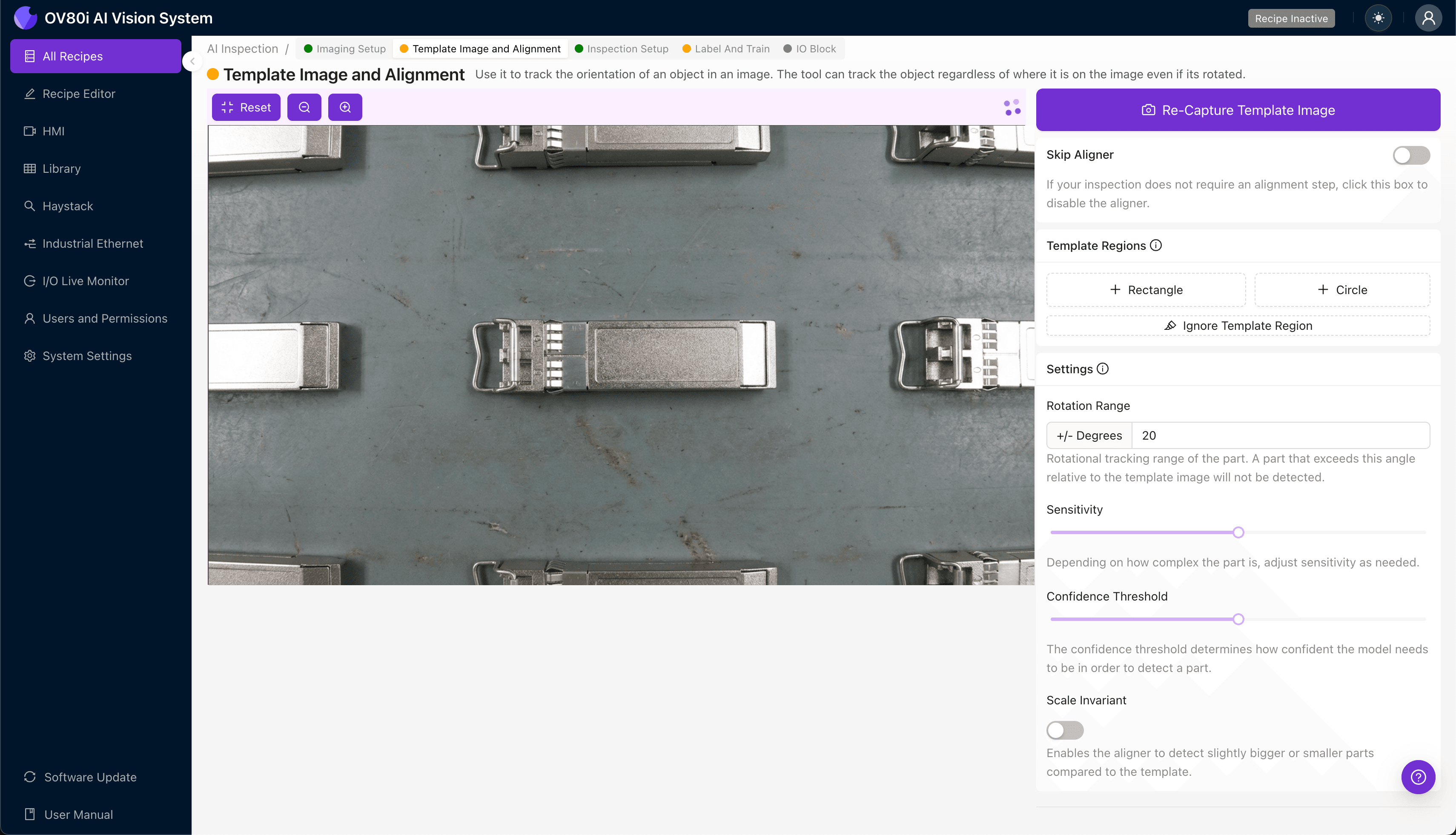
Navigate to the "Template Image" section and capture a Template of your golden reference SFP+ cage. This template establishes the baseline geometry the system will use to locate and align every subsequent part.
Click "+ Rectangle" to add an alignment region around the main body of the cage housing. Set the "Rotation Range" to 20 degrees to accommodate natural variation in part presentation on the conveyor or fixture.
Step 3: Inspection Region Selection
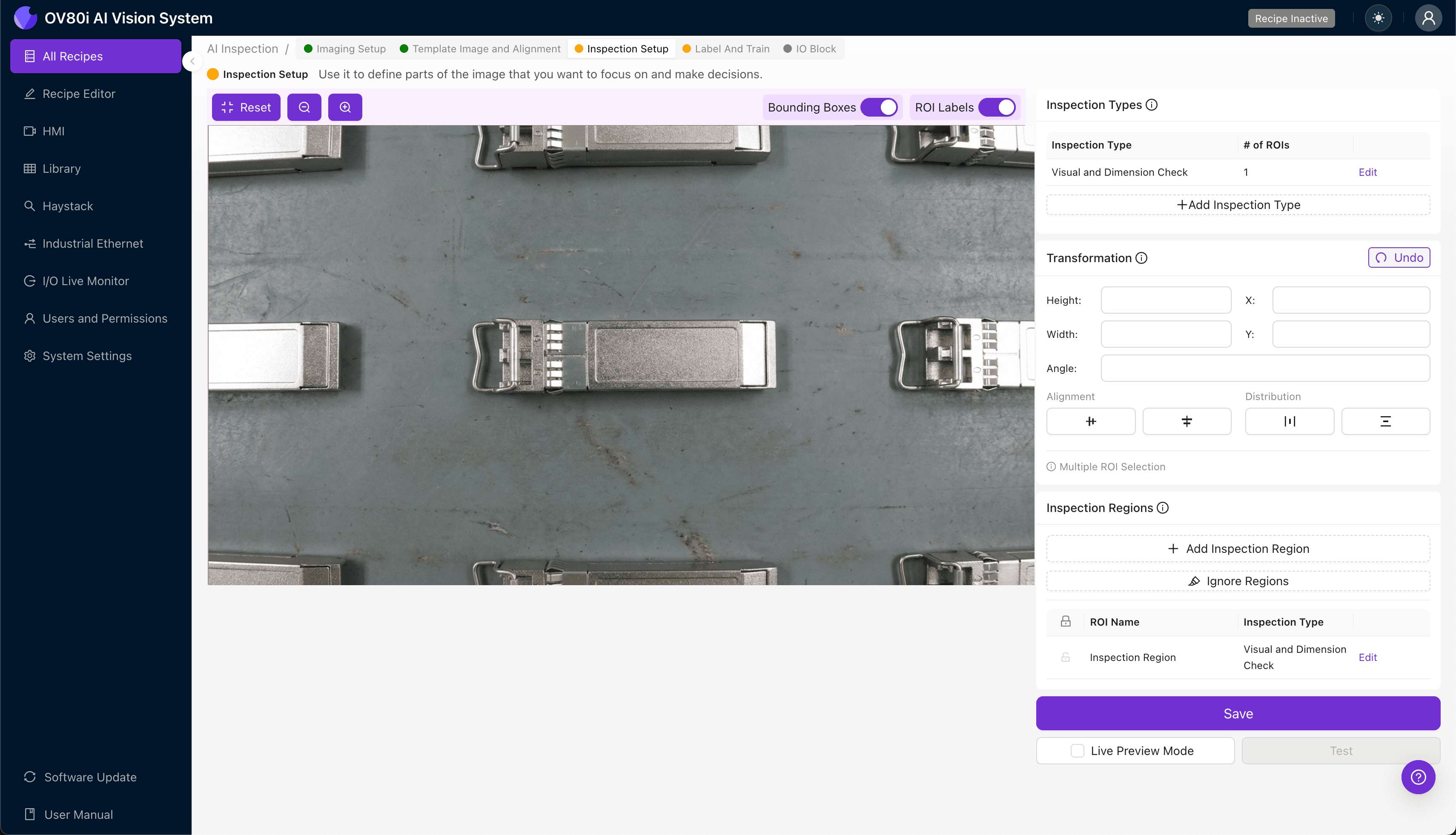
Navigate to "Inspection Setup" to define where the system should focus its analysis. Rename your "Inspection Types" with descriptive labels such as "Tab_Bend_Defect," "Tab_Crack," and "Tab_Dimensional" for clear traceability.
Click "+ Add Inspection Region" for each critical area. Resize the yellow bounding box to cover each bezel-attachment tab location, ensuring the region captures the full tab geometry plus a small margin for alignment tolerance.
Click "Save" after defining all inspection zones.
Step 4: Labeling Data
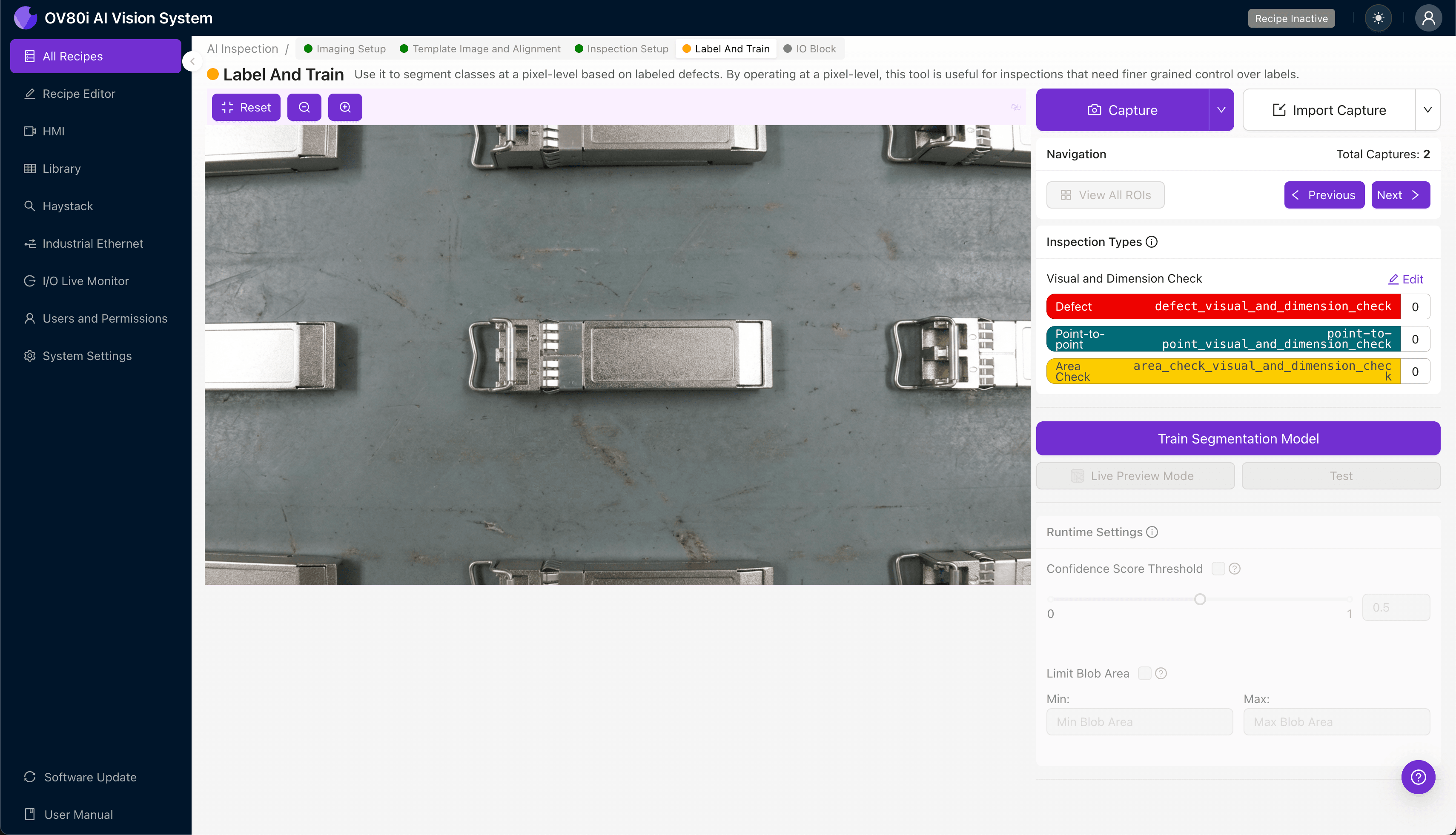
The human-in-the-loop labeling process is where your quality expertise trains the AI model. As production images flow through the system, operators review and label each sample as Good or Bad based on your established quality criteria.
Include representative samples across the full range of acceptable variation, not just perfect parts. Most importantly, capture known failure modes—bent tabs, cracks, and dimensional outliers—to ensure the model learns the boundaries between pass and fail.
Step 5: Creating Rules
With labeled data in place, configure your pass/fail logic based on the Inspection Types you defined. Set threshold confidence levels for each defect category and define how multiple inspection regions combine into a final part disposition.
Gate automated acceptance on the line by integrating the OV80i's output signal with your reject mechanism. Parts flagged as defective are automatically diverted, ensuring only conforming SFP+ cages proceed to assembly or shipment.
Key Outcomes & ROI
Implementing automated visual inspection for SFP+ cage bezel-attachment tabs delivers measurable business impact:
- Reduced scrap and rework — catch defects at the source before they propagate downstream into assembled modules
- Higher throughput — inspect 100% of production at line speed without creating bottlenecks
- Compliance and traceability — generate timestamped inspection records with images for customer audits and root cause analysis
- Process improvement insights — trend defect data over time to identify die wear, material lot issues, or upstream process drift
Conclusion
Deformed bezel-attachment tabs on SFP+ cages represent exactly the type of subtle, high-stakes defect that benefits most from AI-powered visual inspection. By following this five-step workflow with Overview.ai's platform, manufacturers can eliminate the inconsistency of manual inspection while capturing valuable quality data that drives continuous improvement.
Ready to automate your SFP+ cage inspection process? Contact Overview.ai to schedule a demo with your actual production samples.
Eliminate SFP+ Cage Defects Today
Stop relying on fatigued inspectors for critical tab geometry checks. Deploy Overview.ai to catch deformed bezel-attachment tabs instantly.