How to Detect SMT Gullwing Lead Coplanarity Deviations Using AI-Powered Visual Inspection
"Coplanarity deviations as small as 50-100 microns can cause solder defects that escape to customers. AI-powered visual inspection catches these invisible defects at full line speed, eliminating the subjectivity and fatigue of manual quality control."
The Problem: Why Coplanarity Defects Slip Through Traditional Inspection
Gullwing leads must sit flat against solder pads to form reliable joints during reflow. When coplanarity deviates beyond acceptable tolerances (typically >0.1mm for fine-pitch components), defective assemblies make it to customers.
Common defects associated with SMT gullwing lead coplanarity deviations include:
- Lifted leads — One or more leads sitting above the coplanar plane, preventing solder contact
- Bent or twisted leads — Mechanical damage causing angular deviation from the lead forming specification
- Splayed leads — Outward bending that shifts lead tips beyond pad boundaries
- Heel lift — Leads separating from the package body at the bend radius
- Non-wet opens — Solder failing to wick onto lifted leads during reflow
- Inconsistent standoff height — Variable gap between package body and PCB surface
Human inspectors struggle with coplanarity assessment because deviations of 50-100 microns are virtually invisible to the naked eye. Fatigue compounds the problem—after hours of squinting at tiny leads, even experienced operators miss subtle height variations that cause field failures.
The Solution: Machine Vision + Deep Learning
AI-powered visual inspection eliminates the subjectivity and inconsistency inherent in manual quality control. High-resolution imaging captures lead geometry with micron-level precision, while deep learning models learn to recognize the subtle patterns that distinguish acceptable components from rejects.
Unlike rule-based systems that require explicit programming for every defect type, neural networks generalize from labeled examples. They detect novel failure modes that weren't anticipated during system setup.
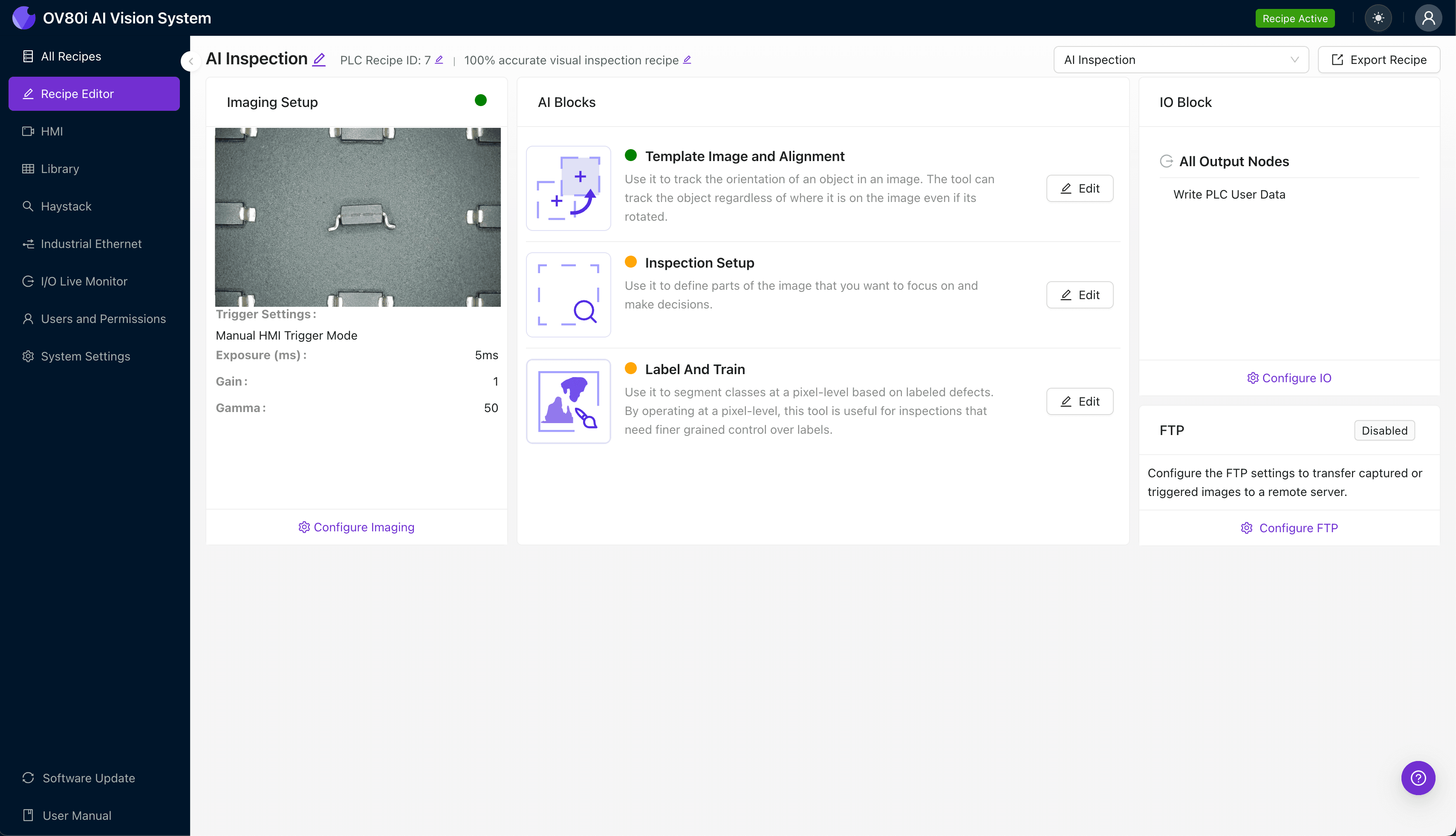
Overview.ai's approach delivers consistent, objective inspection at full line speed. The OV80i system integrates directly into your production flow, providing 100% inline inspection without creating bottlenecks or requiring dedicated inspection stations.
Step 1: Imaging Setup
Position the gullwing component under the camera with leads clearly visible in the field of view. Angled lighting helps accentuate height variations by casting shadows from lifted leads.
Click "Configure Imaging" to access the Camera Settings panel. Adjust exposure to capture crisp lead edges without washout, and fine-tune gain to balance signal strength against noise in the image.
Click "Save" once you achieve consistent, high-contrast images across multiple sample parts.
Step 2: Image Alignment
Navigate to the "Template Image" tab and capture a reference image of a properly positioned component. This template anchors the system's understanding of where leads should appear in each frame.
Click "+ Rectangle" and draw a region around the main component body—this gives the alignment algorithm a stable feature to lock onto. Set the "Rotation Range" to 20 degrees to accommodate normal variation in part placement on the conveyor or fixture.

Step 3: Inspection Region Selection
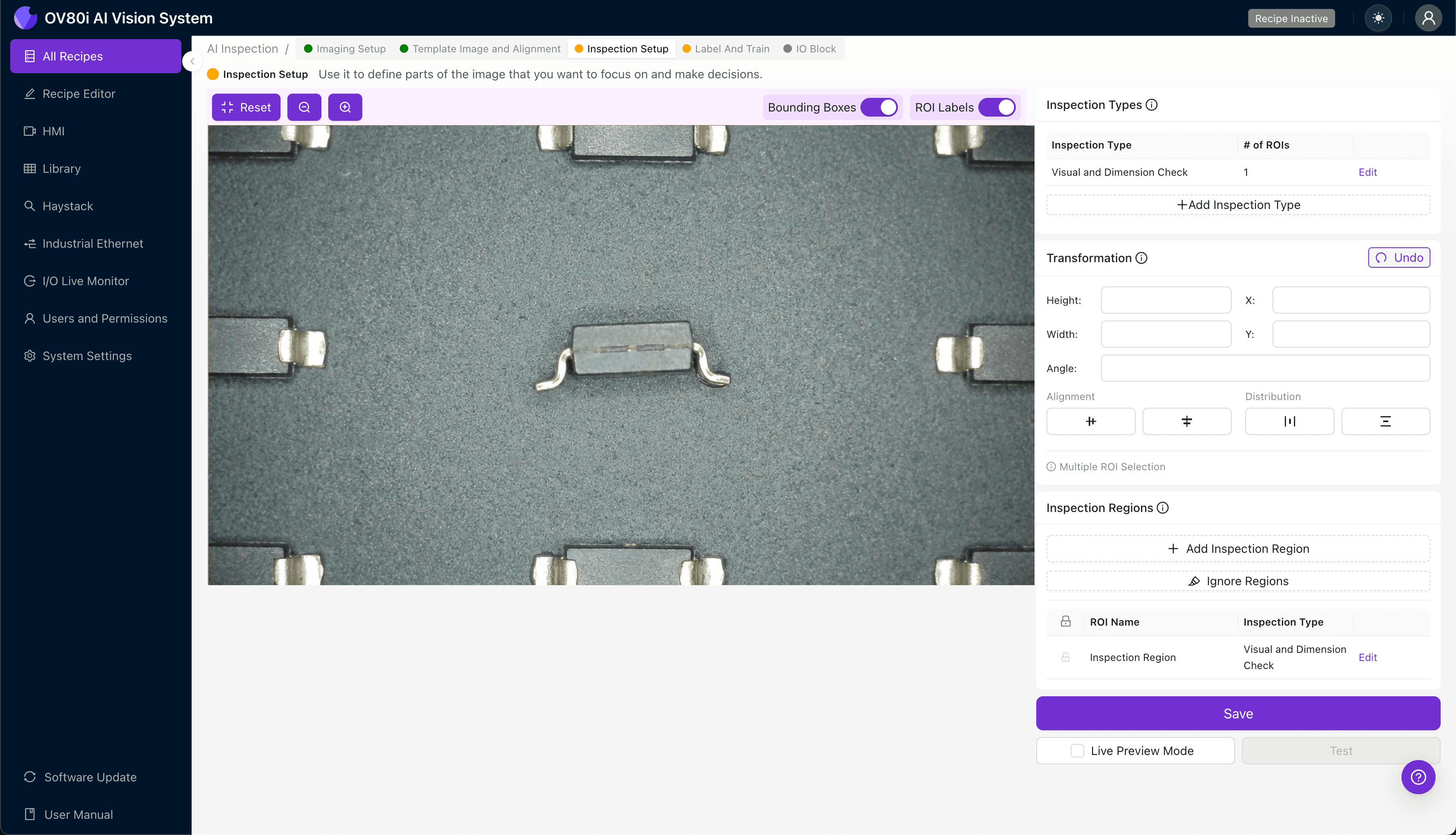
Navigate to "Inspection Setup" to define where the system should look for defects. Rename your "Inspection Types" to reflect the specific failure modes you're targeting—for example, "Lead_Coplanarity" or "Heel_Lift."
Click "+ Add Inspection Region" to create a new zone. Resize the yellow bounding box to cover the critical lead areas on each side of the package, ensuring all gullwing leads fall within the inspection boundary.
Click "Save" to lock in your region definitions.
Step 4: Labeling Data
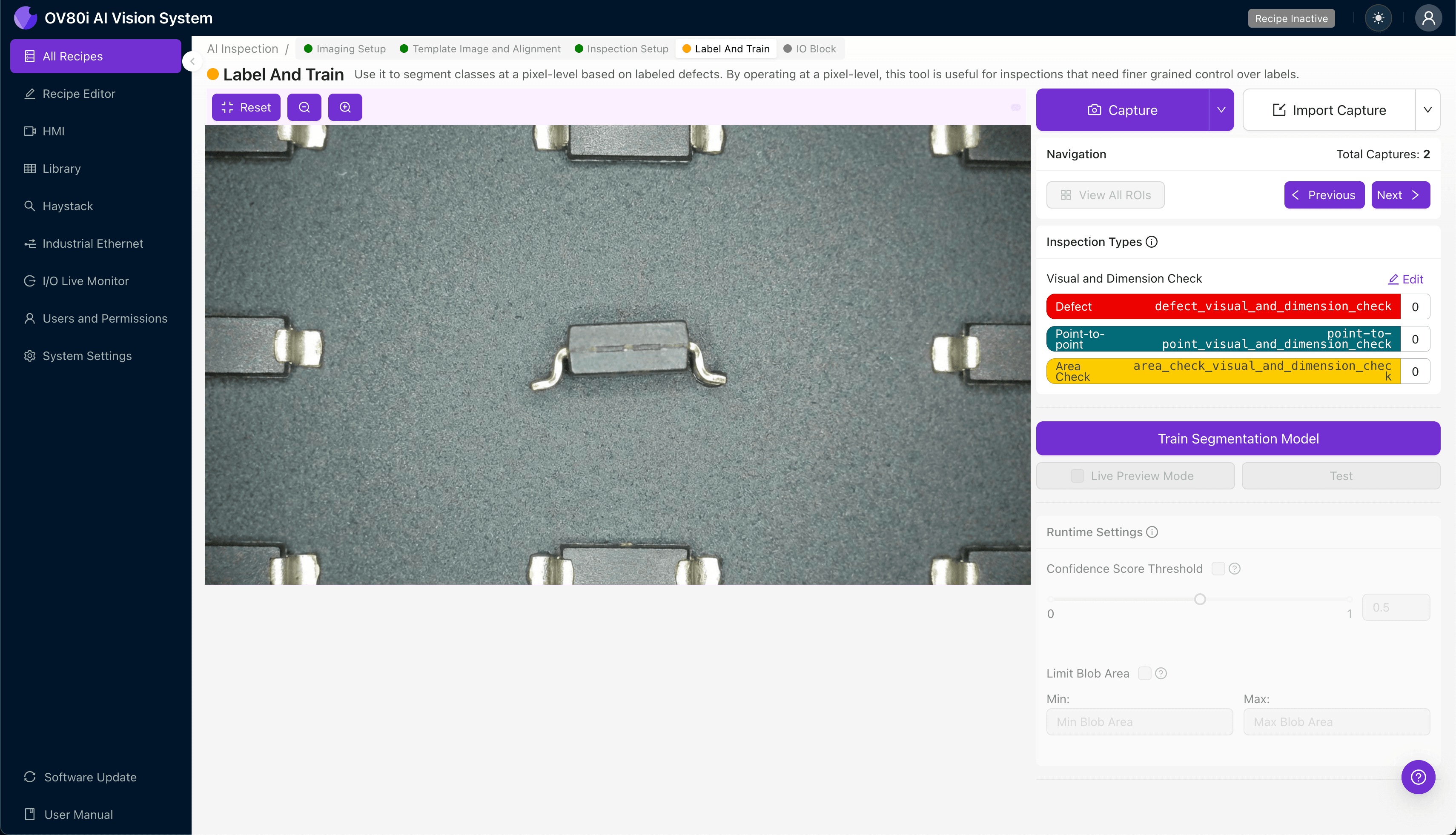
This human-in-the-loop process teaches the AI what good and bad parts actually look like. Quality engineers review captured images and assign labels based on their expertise.
Label images as Good (leads coplanar within tolerance) or Bad (any coplanarity deviation exceeding spec). Include representative samples across the full range of acceptable variation, plus known failure modes from your defect library.
The more diverse your training set, the more robust your deployed model becomes. Aim for at least 50-100 examples of each defect type before initial training.
Step 5: Creating Rules
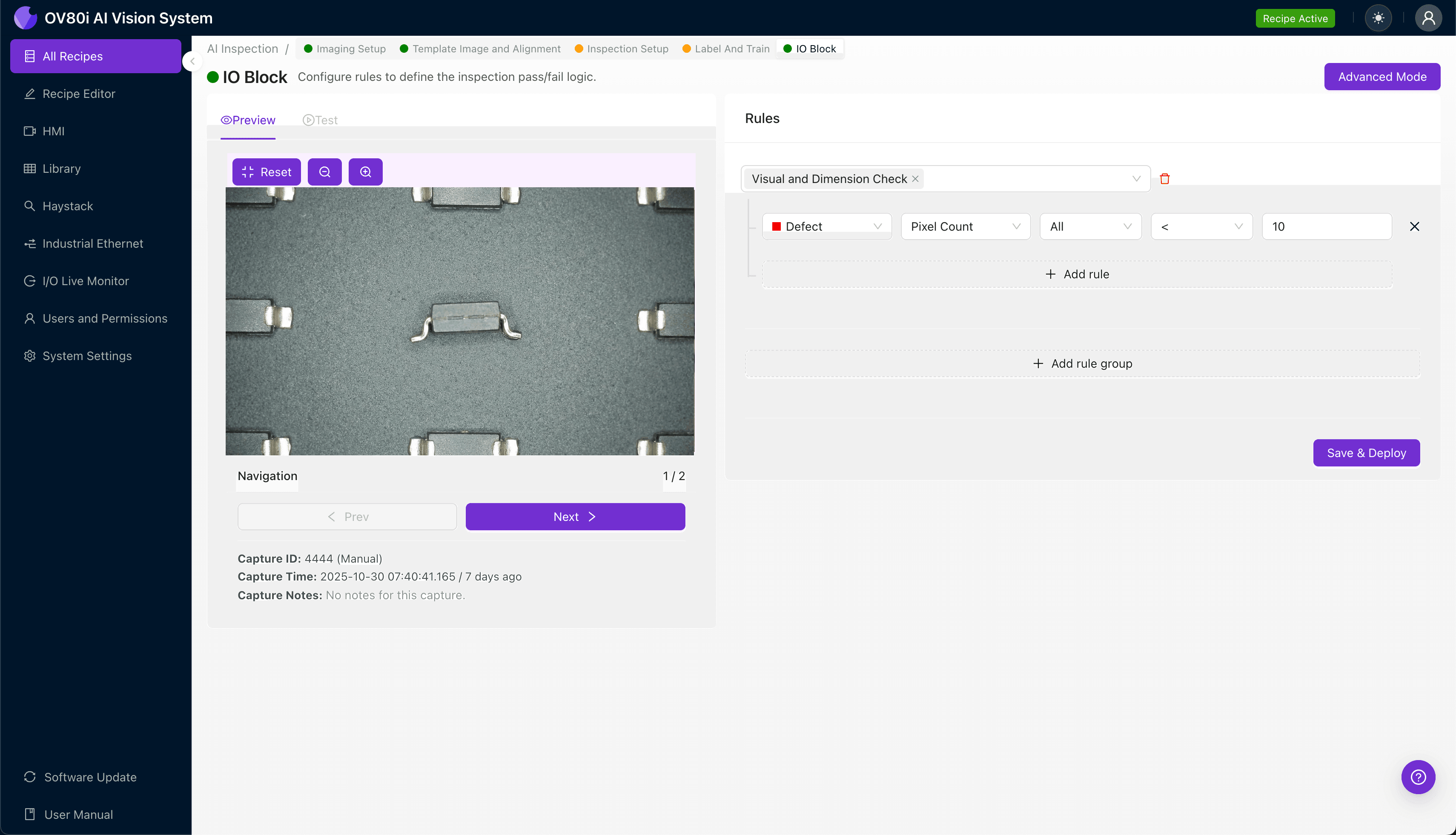
Configure pass/fail logic based on the Inspection Types you defined earlier. Set confidence thresholds that balance escape risk against false reject rates for your specific quality requirements.
Gate automated acceptance on the line by connecting inspection results to your reject mechanism. Parts flagged as "Bad" divert automatically, while "Good" parts continue downstream—no operator intervention required for routine decisions.
Key Outcomes & ROI
Deploying AI-powered coplanarity inspection delivers measurable returns across multiple dimensions of manufacturing performance.
Business benefits include:
- Reduced scrap and rework — Catch coplanarity issues before reflow, when components can still be replaced at minimal cost
- Higher throughput — Eliminate inspection bottlenecks with automated decisions in milliseconds
- Compliance and traceability — Generate automatic inspection records with timestamped images for customer audits and root cause analysis
- Process improvement insights — Trend data reveals upstream issues like feeder problems or handling damage before they cause epidemic failures
Coplanarity deviations don't have to be invisible defects that escape to your customers. With the right imaging setup and AI-powered analysis, you can achieve 100% inspection coverage without sacrificing line speed.
Overview.ai's visual inspection platform makes it straightforward to deploy deep learning models for SMT quality control—no machine vision expertise required. The result is consistent, objective inspection that improves over time as your model sees more parts.
Stop Coplanarity Defects from Escaping
Deploy AI-powered inspection to catch gullwing lead defects that human inspectors miss. Get 100% inline coverage at full line speed.