TPA (Terminal Position Assurance) with a Fractured Locking Tab: A Complete Machine Vision Inspection Guide
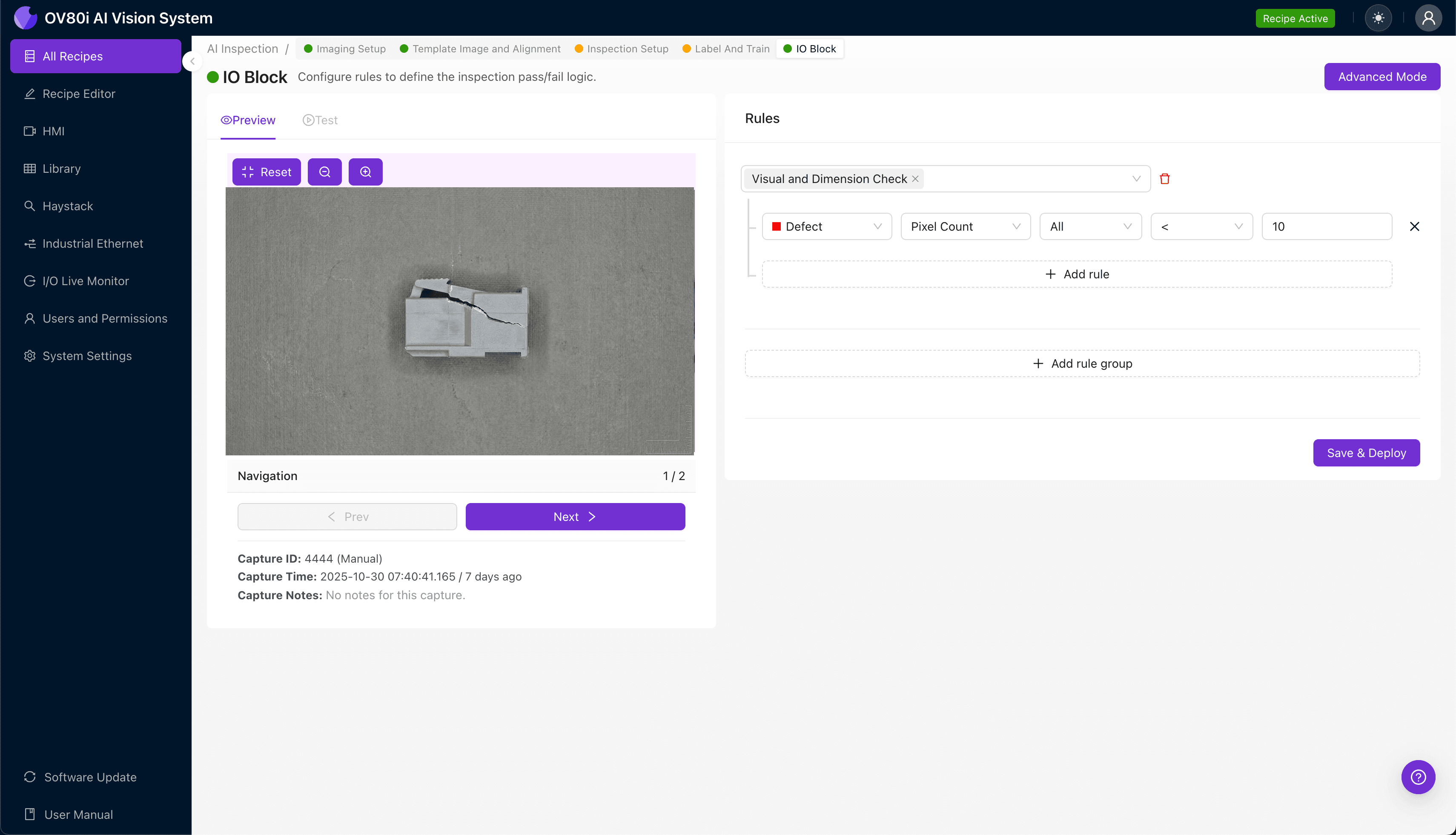
"Fractured TPA locking tabs create intermittent electrical failures and safety hazards that human inspectors miss at production speeds. Overview.ai's machine vision system detects hairline fractures and tab defects in milliseconds, ensuring 100% inline inspection without slowing your production line."
The Problem: Why Fractured TPA Locking Tabs Slip Through Manual Inspection
Terminal Position Assurance (TPA) devices are critical secondary locking mechanisms in automotive and industrial connector assemblies. When a TPA locking tab fractures, it compromises the connector's ability to verify proper terminal seating—creating potential for intermittent electrical failures, costly warranty claims, and safety hazards in the field.
Common Defects Found in TPA Components with Fractured Locking Tabs:
- Hairline stress fractures — Microscopic cracks at the base of the locking tab that propagate under vibration
- Complete tab separation — Full breakage where the locking feature detaches from the TPA body
- Partial tab deformation — Bent or warped tabs that appear intact but fail to engage properly
- Injection molding flash — Excess material near the tab hinge point causing brittleness
- Short shots — Incomplete tab formation due to insufficient material fill during molding
- Weld line weakness — Structural compromise where material flow fronts meet during injection
Human inspectors struggle to catch these defects consistently. Visual fatigue sets in within 20-30 minutes of repetitive inspection, and subtle fractures measuring fractions of a millimeter are nearly impossible to detect at production speeds exceeding 1,000 parts per hour.
The Solution: Machine Vision and Deep Learning for TPA Inspection
Machine vision systems equipped with deep learning algorithms eliminate the variability inherent in human inspection. Unlike rule-based systems that require explicit programming for every defect type, AI-powered inspection learns to recognize the subtle visual signatures of fractured locking tabs—even variations never explicitly programmed.
Overview.ai's approach delivers consistent, objective inspection at full line speed. The OV80i system captures high-resolution images of every TPA component, analyzes them against trained models in milliseconds, and flags defective parts for rejection—ensuring 100% inline inspection without bottlenecking production.
Step 1: Imaging Setup
Position the TPA component under the OV80i camera, ensuring the locking tab is fully visible and properly illuminated. Angled lighting often works best for revealing hairline fractures that flat lighting would miss.
Navigate to "Configure Imaging" in the Overview interface. Adjust the Camera Settings—increase exposure to capture fine surface details and tune gain to optimize contrast between the tab and body.
Click "Save" to lock in your imaging configuration.
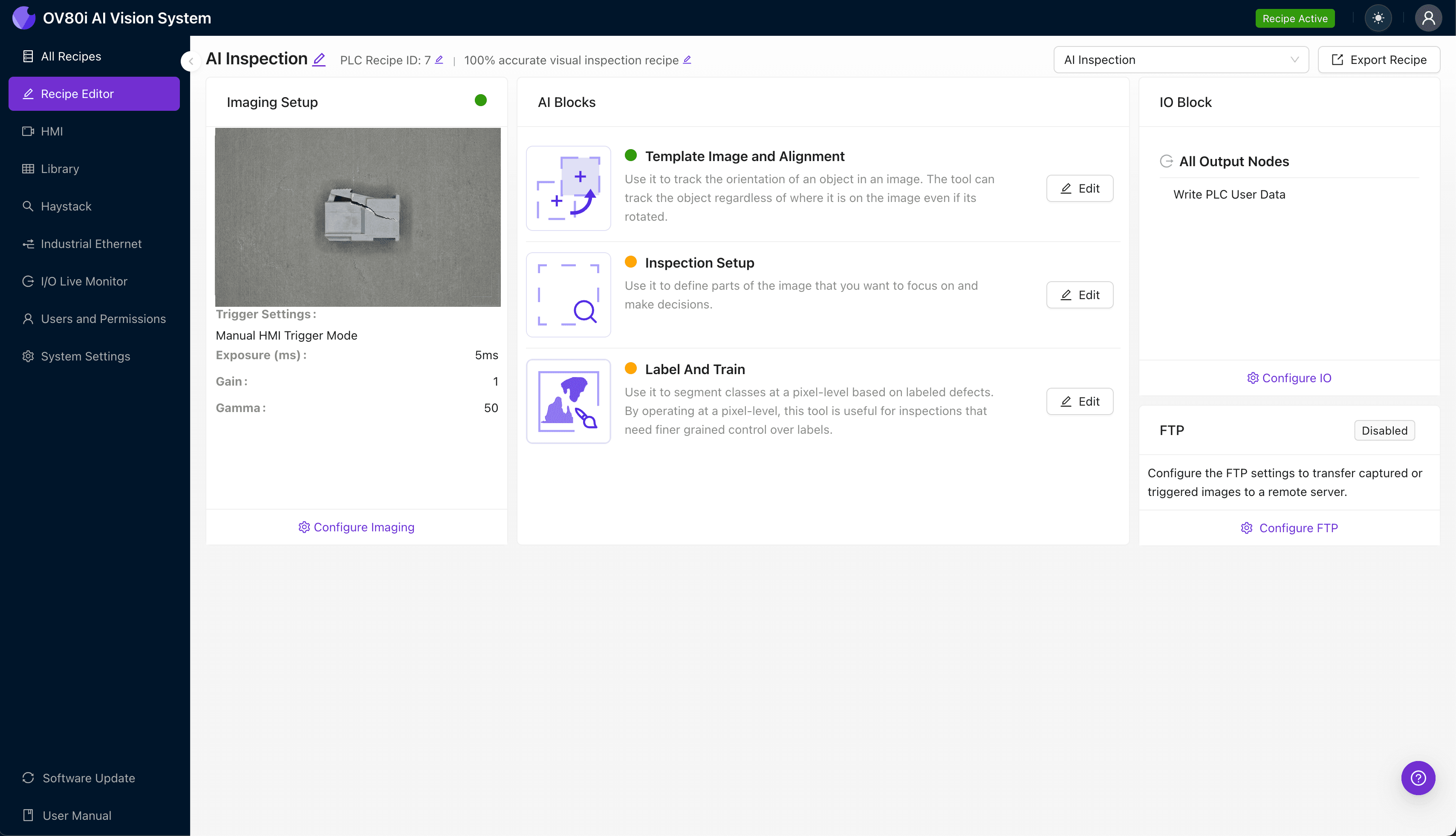
Step 2: Image Alignment
Navigate to the "Template Image" section and capture a reference image of a known-good TPA component. This template serves as the baseline for aligning all subsequent parts during inspection.
Click "+ Rectangle" to add an alignment region around the main body of the TPA. Set the "Rotation Range" to 20 degrees to accommodate slight orientation variations as parts move through the inspection station.

Step 3: Inspection Region Selection
Navigate to "Inspection Setup" to define where the system should focus its analysis. Rename "Inspection Types" to descriptive labels such as "Locking Tab Integrity" and "Tab Base Fracture Zone."
Click "+ Add Inspection Region" to create a new detection zone. Resize the yellow bounding box to cover the critical areas—specifically the locking tab itself and the hinge point where fractures most commonly originate.
Click "Save" to confirm your inspection regions.
Step 4: Labeling Data
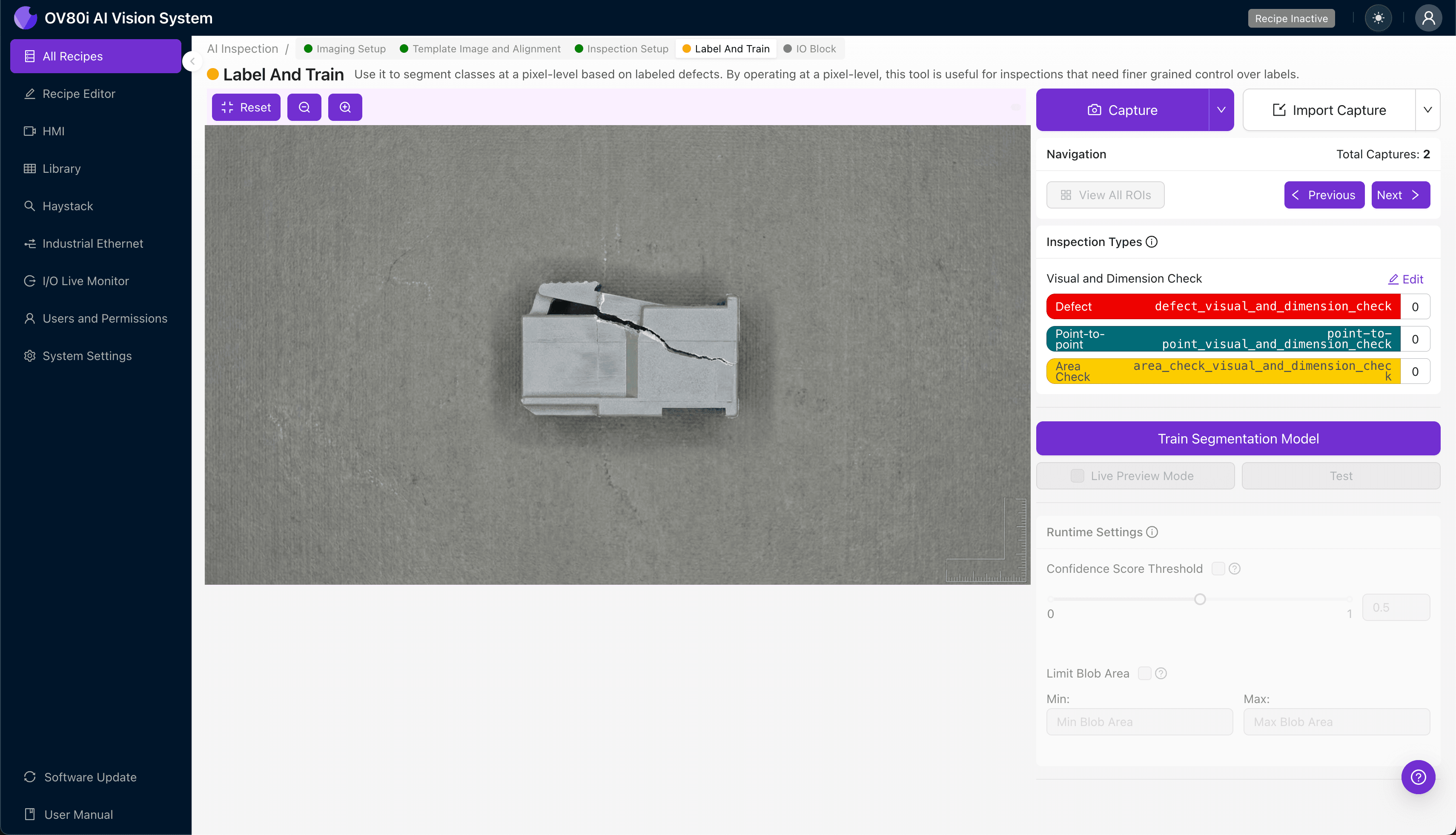
The human-in-the-loop labeling process is where your deep learning model gains its intelligence. Production operators and quality engineers review captured images, marking each as Good (intact tab) or Bad (fractured, cracked, or deformed).
Include representative samples across the full spectrum of acceptable parts and known failure modes. The more diverse your labeled dataset—including borderline cases and subtle defects—the more robust your trained model will become.
Step 5: Creating Rules
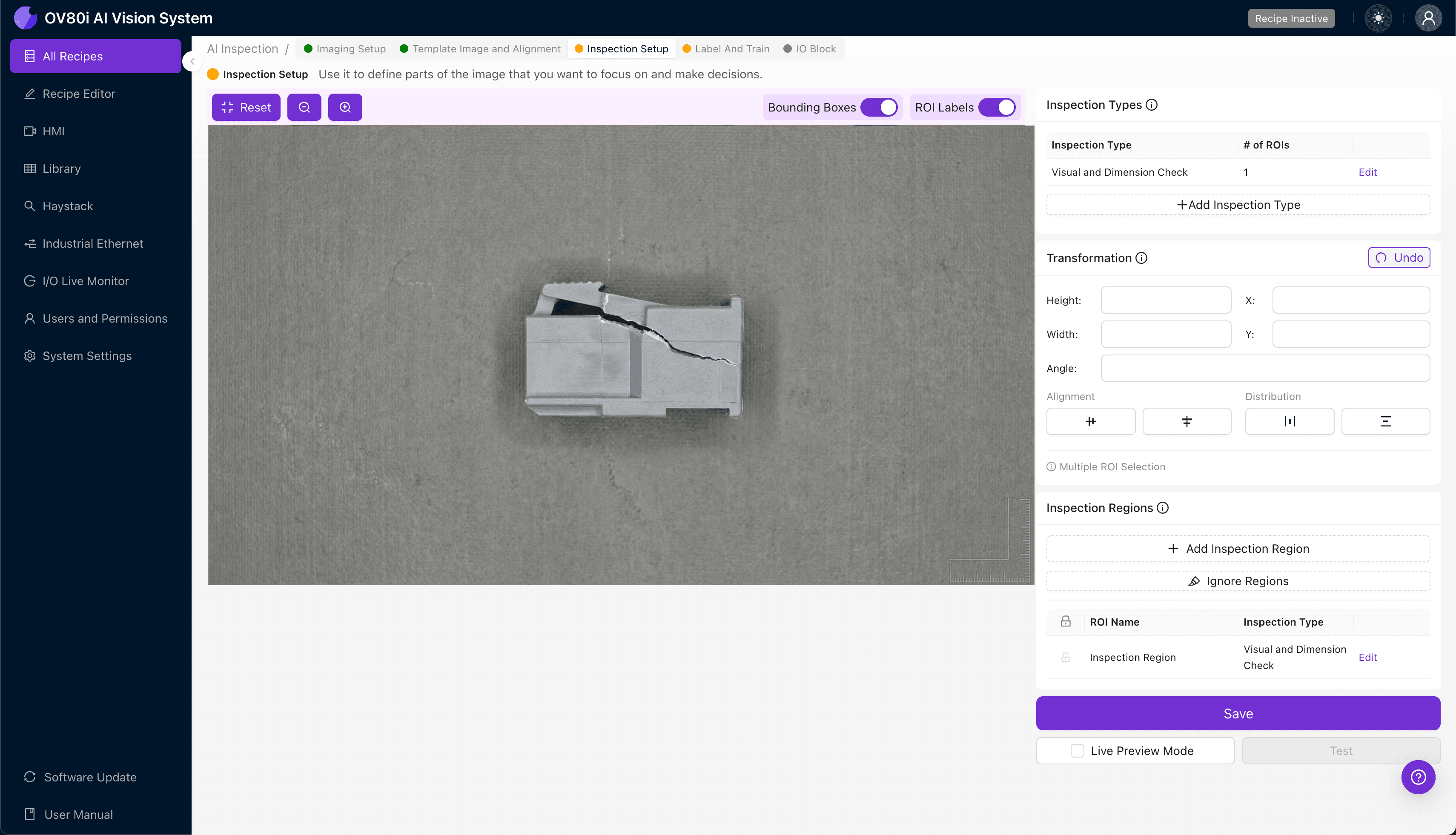
With your model trained, navigate to the rules engine to establish pass/fail logic. Configure acceptance criteria based on your Inspection Types—for example, any detection of "Tab Base Fracture Zone" defects triggers automatic rejection.
These rules gate automated acceptance on the production line. Parts passing inspection proceed downstream while flagged components are diverted for secondary review or scrap, eliminating defective TPAs before they reach assembly.
Key Outcomes & ROI
Implementing AI-powered visual inspection for TPA locking tab fractures delivers measurable business impact:
- Reduced Scrap and Rework — Catch fractures at the source before defective TPAs are assembled into finished connectors
- Higher Throughput — Inspect 100% of parts at full line speed without adding inspection labor or slowing production
- Compliance and Traceability — Automatically log every inspection result with timestamped images for audit trails and customer documentation requirements
- Process Improvement Insights — Analyze defect trend data to identify upstream issues like tooling wear, material batch variation, or molding parameter drift
Conclusion
Fractured TPA locking tabs represent a high-risk, hard-to-detect defect category that demands better-than-human inspection consistency. Overview.ai's machine vision platform transforms this challenge into a competitive advantage—protecting your customers, your brand, and your bottom line.
Eliminate TPA Defects Today
Stop relying on manual inspection for critical connector components. Deploy Overview.ai to catch fractured locking tabs instantly.