OV AI Expert Helper: Your Intelligent Assistant for Vision Inspection
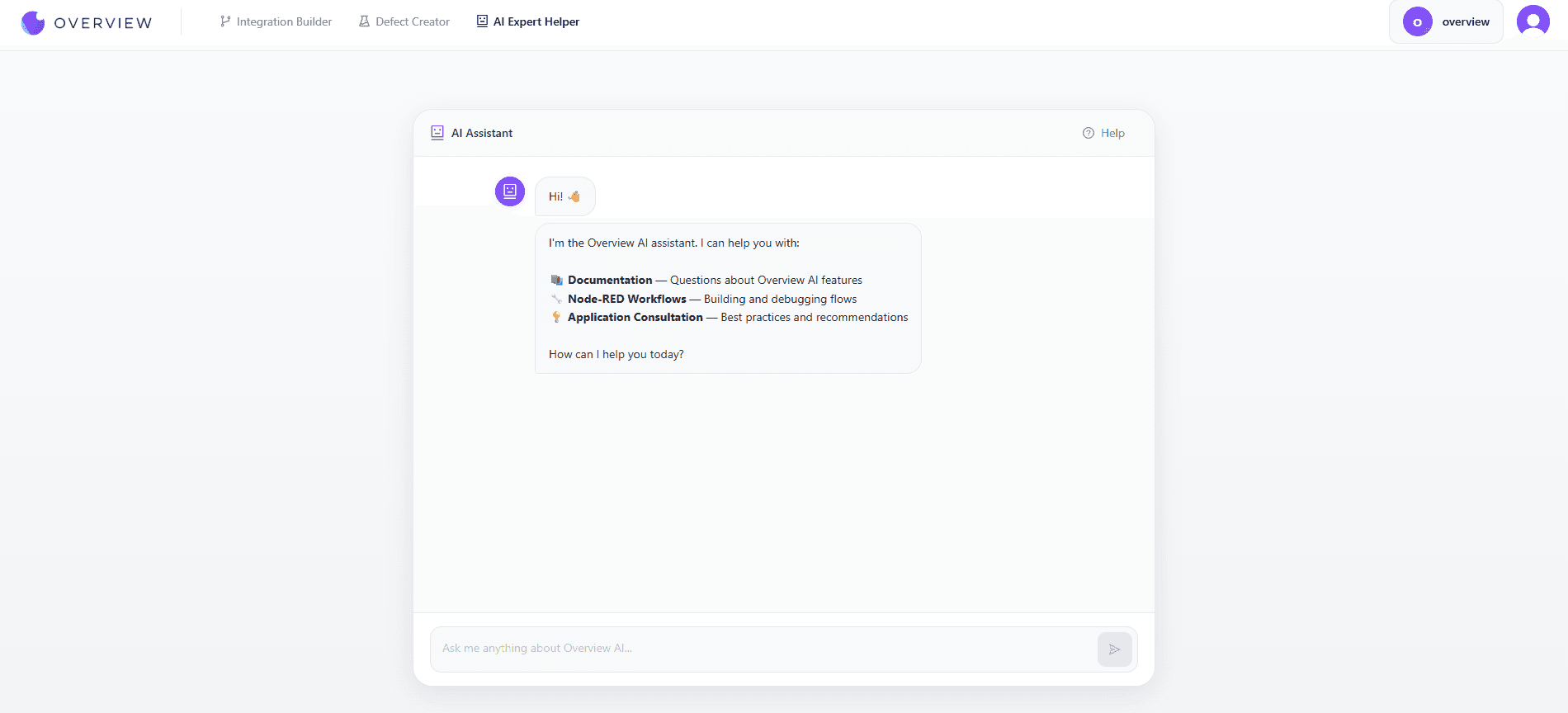
Implementing and maintaining AI vision inspection systems raises countless questions. How do I configure this setting? What is the best way to handle this use case? Why is my workflow not working as expected? Getting answers traditionally meant searching documentation, submitting support tickets, or scheduling calls with integrators.
The OV AI Expert Helper changes this by providing instant, expert-level assistance whenever you need it. This intelligent assistant is trained on the complete Overview knowledge base and is part of the Overview Advanced GenAI Tools platform.
Three Modes of Assistance
The OV AI Expert Helper is designed around the three most common types of assistance manufacturing teams need:
Documentation
Questions about Overview AI features, capabilities, and configurations
Node-RED Help
Building and debugging inspection workflows step by step
Consultation
Best practices and recommendations for your specific use case
Documentation Mode
Have a question about how an Overview AI feature works? Instead of searching through documentation pages, simply ask the bot. It has been trained on:
- Complete product documentation for all Overview cameras and software
- Technical specifications and configuration options
- API references and integration guides
- Troubleshooting guides and common issues
- Best practices and recommended configurations
- Release notes and feature updates
Example Questions
"What image resolution does the OV20i support?"
"How do I configure the camera to trigger on a PLC signal?"
"What is the difference between classification and detection models?"
"How many images do I need to train an accurate model?"
The bot provides detailed answers with references to relevant documentation sections. If you need more depth, it can explain concepts further or point you to specific documentation pages.
Node-RED Workflow Help
Building Node-RED workflows can be challenging, especially for teams new to flow-based programming. The AI Bot provides step-by-step guidance for creating, understanding, and debugging workflows.
Unlike the dedicated OV Auto-Integration Builder that generates complete flows automatically, the Bot mode focuses on teaching and guiding you through the process.
How It Helps
Step-by-Step Guidance
Walks you through building flows node by node, explaining each step along the way.
Concept Explanation
Explains Node-RED concepts like message passing, context variables, and function nodes.
Debugging Assistance
Helps identify why a flow is not working and suggests fixes for common problems.
Best Practices
Recommends patterns and approaches that lead to maintainable, efficient flows.
Example Interactions
"I want to send inspection results to our MES system. What nodes do I need?"
"My flow is not triggering the camera. Can you help me debug it?"
"How do I parse the JSON output from the camera to extract just the defect count?"
"What is the best way to handle timeout errors in my inspection flow?"
Application Consultation
Every manufacturing application is unique. The consultation mode provides personalized recommendations based on your specific situation. The bot draws on Overview's extensive experience across industries and applications to provide relevant guidance.
What You Can Ask
Application Planning:
- "What camera should I use for inspecting reflective metal parts?"
- "How should I set up lighting for detecting surface scratches?"
- "What frame rate do I need for my 60 parts per minute line?"
Implementation Strategy:
- "What is the best approach for inspecting assembled products with multiple components?"
- "How many cameras do I need for 360 degree inspection?"
- "Should I use classification or detection for my use case?"
Optimization:
- "How can I improve my model's accuracy for detecting small defects?"
- "What is causing false positives in my inspection?"
- "How do I handle natural variation in my parts without triggering false rejects?"
Available 24/7
Manufacturing does not stop for business hours. When a quality issue emerges at 2 AM or a workflow stops working on a weekend, the AI Bot is available to help. No waiting for support tickets, no scheduling calls, just instant assistance when you need it.
The bot has great memory to support complex issues, so you can ask follow-up questions naturally and work through multi-step problems. Responses stream in real-time for faster feedback.
Instant Responses
Get answers in seconds instead of waiting hours or days for human support.
Consistent Quality
The bot provides accurate, detailed answers every time, based on the full knowledge base.
No Queue
Ask as many questions as you need. There is no wait time or ticket prioritization.
Continuous Learning
The bot is regularly updated with new documentation, features, and best practices.
Complementing Human Support
The OV AI Expert Helper does not replace human support. It is designed to handle routine questions and provide immediate assistance for common issues. For complex situations, unique challenges, or when you simply prefer human interaction, our support team remains available.
Many users find the bot helpful for:
- Quick answers to configuration questions
- Initial troubleshooting before escalating to support
- Learning new features and capabilities
- After-hours assistance for urgent issues
- Onboarding new team members
When the bot identifies a question that requires human expertise or involves account-specific issues, it will recommend contacting support directly.
Knowledge Preservation
One often-overlooked benefit of the OV AI Expert Helper is knowledge preservation. In manufacturing, expertise often resides in the heads of a few experienced engineers. When they move on, critical knowledge can be lost.
The OV AI Expert Helper provides a consistent knowledge source that:
- Helps train new team members on Overview systems
- Provides consistent answers regardless of who is asking
- Reduces dependency on individual experts
- Ensures best practices are followed across shifts and teams
Get Instant Expert Assistance
Stop waiting for answers. Get intelligent assistance for documentation, workflows, and applications 24/7. Visit the Advanced GenAI Tools page to request access and get started.
Request Access