
OV Auto-Integration Builder: Build Inspection Logic with AI
Node-RED has become the standard for building inspection workflows in manufacturing. Its visual programming approach makes it accessible, but creating complex flows still requires understanding of programming concepts, debugging techniques, and system integration patterns.
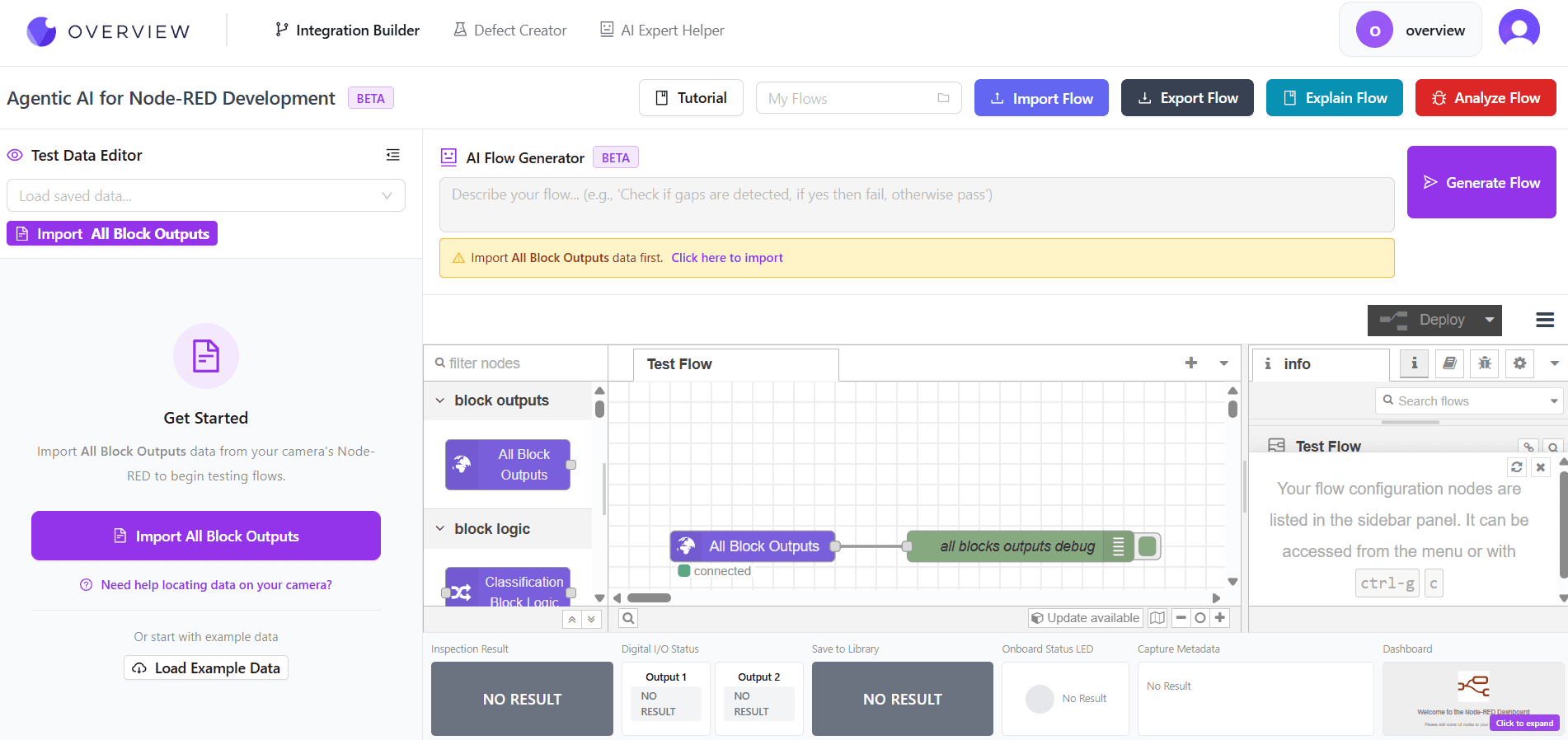
The OV Auto-Integration Builder changes this equation entirely. Each user gets their own personal Node-RED instance with AI assistance built in. Describe what you need in plain English, and AI writes the complete flow for you. This is part of the Overview Advanced GenAI Tools platform.
What is Node-RED and Why Does It Matter?
Node-RED is a flow-based programming tool that connects hardware devices, APIs, and online services. In manufacturing inspection, it serves as the brain that coordinates:
- When to trigger inspections based on sensor inputs or PLC signals
- How to process inspection results and make pass/fail decisions
- Where to send data, including databases, HMI displays, and PLC outputs
- What actions to take when defects are detected
- How to log and track quality metrics over time
Without Node-RED or similar workflow tools, integrating inspection cameras into production lines requires custom software development. Node-RED makes this accessible to engineers without programming backgrounds, but there is still a learning curve.
How OV Auto-Integration Builder Works
Our AI-powered Node-RED assistant provides five core capabilities that transform how you build inspection workflows:
1. AI Flow Builder
Describe what you need in natural language, and the AI writes a complete, working Node-RED flow.
2. Flow Modification
Upload an existing flow and ask the AI to modify it. Add features, change logic, or optimize performance.
3. Flow Explanation
Paste any flow and get a clear, step-by-step explanation of what it does and how it works.
4. Issue Detection
The AI identifies potential problems, inefficiencies, and best practice violations in your flows.
5. Camera Data Import
Import actual output data from your Overview cameras and work with real data structures. The AI understands the camera output format and can help you process inspection results correctly.
Example: Building a Basic Inspection Flow
Let us walk through how easy it is to create an inspection workflow with the AI tool.
Traditional Approach
Without AI assistance, creating a flow that triggers inspection on a PLC signal, processes results, and outputs pass/fail would require:
- Understanding Modbus or OPC-UA protocol nodes
- Configuring camera trigger nodes correctly
- Writing JavaScript functions to parse inspection results
- Setting up conditional logic for pass/fail decisions
- Configuring output nodes to write back to PLC
- Debugging connection and timing issues
This process typically takes hours or days, depending on experience level.
With OV Auto-Integration Builder
You simply type a description like:
"Create a flow that reads a trigger signal from Modbus register 100, triggers an inspection on my OV20i camera, checks if any defects were found, and writes 1 to register 200 for pass or 0 for fail. Also log each result to a local database."
The AI generates a complete, importable Node-RED flow with all the nodes configured correctly. You can then refine it with follow-up requests or deploy it directly.
Advanced Use Cases
Multi-Camera Coordination
Need to coordinate inspections across multiple cameras? Describe the sequence and dependencies, and the AI creates flows that handle timing, synchronization, and aggregate results from all cameras.
Custom Decision Logic
Different defect types may require different responses. The AI can create flows with complex branching logic based on defect classification, severity thresholds, or production context.
Data Pipeline Integration
Connect inspection data to your MES, ERP, or quality management systems. The AI understands common integration patterns and can generate flows for database writes, API calls, and message queuing.
Flow Explanation and Documentation
One of the most valuable features is the ability to understand existing flows. If you inherit a system from a previous engineer or need to understand a complex flow created months ago, simply paste it into the tool and ask for an explanation.
The AI provides:
- A high-level overview of what the flow accomplishes
- Step-by-step walkthrough of the execution path
- Explanation of each node's purpose and configuration
- Identification of any potential issues or improvements
- Suggestions for optimization or enhanced functionality
This capability is invaluable for knowledge transfer, troubleshooting, and maintaining inspection systems over time.
Issue Detection and Best Practices
The AI does not just build flows, it reviews them. Upload any flow and the tool identifies:
Potential Problems
- Missing error handling
- Race conditions or timing issues
- Inefficient processing patterns
- Security vulnerabilities
Improvement Suggestions
- Performance optimizations
- Better error handling patterns
- Code simplification opportunities
- Best practice recommendations
Working with Real Camera Data
The tool includes a data import feature that lets you bring in actual output from your Overview cameras. This means you can:
- Build flows using real data structures, not hypothetical examples
- Test flow logic against actual inspection results
- Ensure your processing correctly handles all fields in the camera output
- Validate edge cases before deploying to production
This tight integration with Overview cameras ensures the flows you build work correctly the first time.
Who Benefits Most?
Quality Engineers
Build inspection logic without programming knowledge. Focus on quality requirements, not code.
Integration Teams
Accelerate deployment timelines. Generate baseline flows quickly and customize as needed.
Maintenance Staff
Understand inherited systems. Get explanations of complex flows without hunting for documentation.
Getting Started
The OV Auto-Integration Builder is available through the Advanced GenAI Tools platform. To request access:
- Visit the Advanced GenAI Tools page and click "Gain Access"
- Fill out the request form with your use case
- Receive credentials and access instructions
- Start building flows with AI assistance immediately
Whether you are deploying your first inspection camera or managing a fleet of systems across multiple facilities, AI-powered workflow development will transform how you work with Node-RED.
Ready to Build Flows with AI?
Stop spending hours on workflow development. Let AI write your Node-RED flows in seconds. Visit the Advanced GenAI Tools page to request access and get started.
Request AccessFrequently Asked Questions
What is Node-RED and why does it matter for inspection?
Node-RED is a flow-based programming tool that connects hardware, APIs, and services. In manufacturing inspection it coordinates when to trigger inspections, how to process results into pass or fail decisions, where to send data, and how to log quality metrics over time.
What can the OV Auto-Integration Builder do?
It provides five core capabilities: an AI Flow Builder that writes complete flows from natural language, flow modification of existing flows, step-by-step flow explanation, issue detection for problems and best practice violations, and camera data import to work with real Overview camera output.
Do I need programming knowledge to build flows?
No. You describe what you need in plain English and the AI writes a complete, importable Node-RED flow with the nodes configured correctly. Quality engineers can build inspection logic by focusing on quality requirements rather than code.
Can it help me understand an existing flow?
Yes. Paste any flow and the tool provides a high-level overview, a step-by-step walkthrough of the execution path, an explanation of each node's purpose, identification of potential issues, and suggestions for optimization. This is valuable for knowledge transfer and troubleshooting inherited systems.
See how Overview AI inspects AI-built integration logic
Send us a photo of your part or defect and a vision engineer will tell you whether Overview can catch it, with most systems deployed on the line in days.
Related Articles
Overview Advanced GenAI Tools Platform
A suite of GenAI tools that transform how manufacturers build, train, and deploy vision inspection systems.
Read More →OV Auto-Defect Creator Studio: Create Synthetic Training Data for Vision AI
Generate realistic synthetic defect images across five specialized modes when real defect samples are scarce.
Read More →World Models Explained: How Synthetic Data Trains the Factories of the Future
How world models and synthetic defect generation solve the biggest bottleneck in factory AI: not enough defect data.
Read More →