
On-camera automation
Node-RED inside
The camera that speaks PLC, MES and operator, without a PC in between.
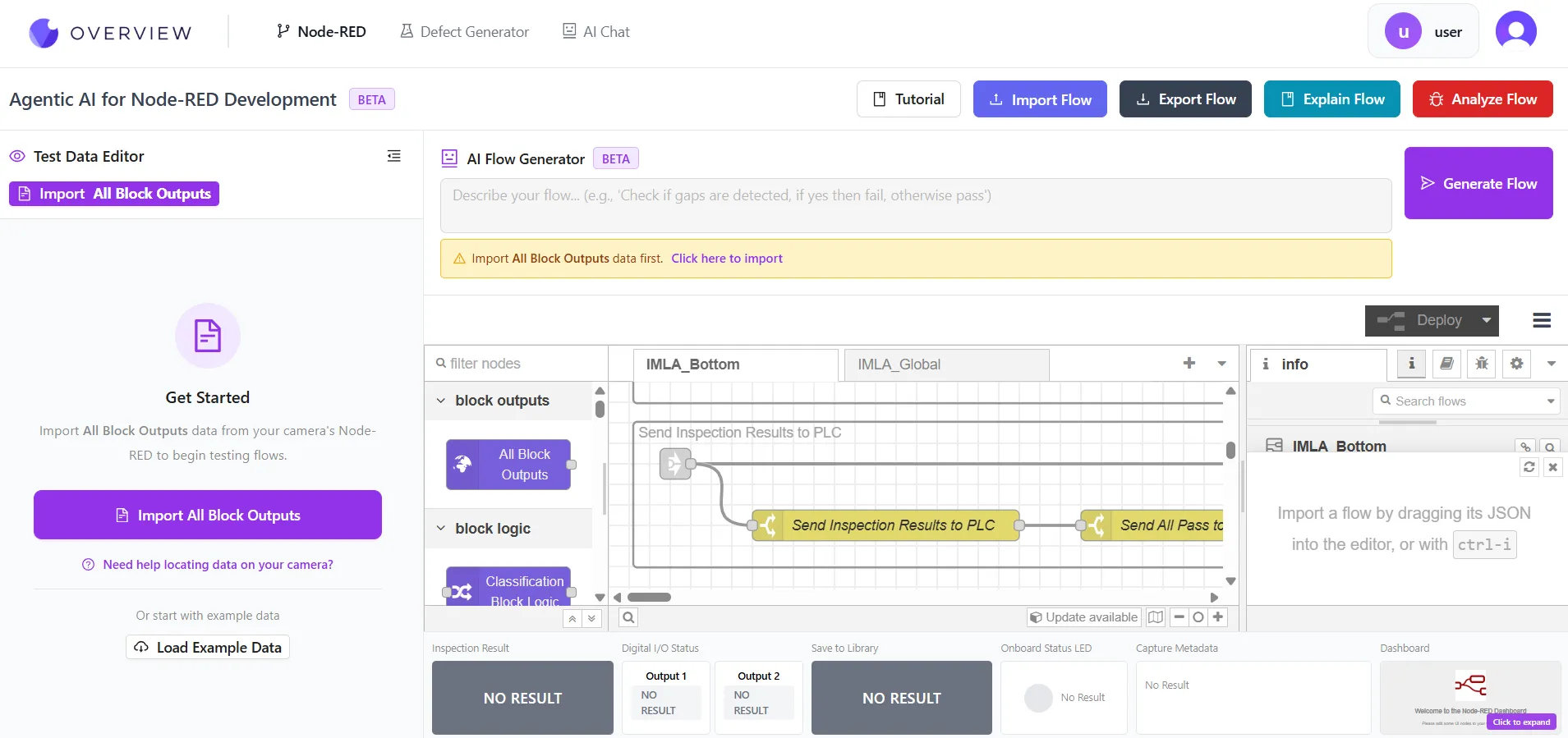
Every Overview camera ships a full Node-RED runtime wired directly into the inspection pipeline. AI results arrive after each capture, and the flow decides the verdict, drives outputs, shapes PLC data and serves the operator screen.
Why this matters commercially
The integration usually costs more than the camera. A gateway PC has to be specified, bought, licensed, mounted, powered, networked and patched, and it is the component most likely to pull IT into your project. Running the logic on the camera removes that machine entirely.
Two tiers
Most stations never open it
This is not a system you have to program. Simple cases are handled by rules in the interface. Node-RED is the escape hatch for the cases rules do not reach, and moving between the two is reversible.
Basic mode
Pass and fail conditions set in the interface. Match on a predicted class, threshold a blob area, check a detected string. Covers the majority of stations with no code at all.
Advanced mode
A real programming environment when the logic gets specific. Switch back at any time and the previous rules are restored automatically, so trying it costs nothing.
What people build
Six things customers do with it
Verdict logic the rules cannot express
Pass only if every region passes and write the failing region names into metadata. Fail on a blob above a pixel count. Combine results across two different model types in one condition.
PLC choreography
Standard result bits for a simple line, or a custom user-data layout when the controller wants its own structure. Read parameters the PLC sends down and act on them in the flow.
MES and ERP connectivity
Push results with serial numbers over HTTP, OPC-UA or MQTT. Per-station routing from camera environment variables, so one flow serves a whole fleet without per-camera edits.
Selective archiving
Save only failures, or every hundredth part, deciding per capture rather than storing everything and paying for it. Route uploads by part number, line or shift.
Custom operator screens
Dashboards served by the camera showing what that station needs, synchronised across recipe switches, with the failing region highlighted in colour on the live view.
Multi-camera sequencing
One camera triggering others, and cross-station dashboards, using the flow-driven capture node as the building block for custom trigger schemes.
What ships on the camera
Protocols, already installed
EtherNet/IP and PROFINET run as native cyclic connections. Everything below is available inside a flow, with nothing to install on a plant network.
| Family | What it reaches |
|---|---|
| Modbus TCP | Client and server, read, write and flex. Drives, meters and legacy controllers. |
| Siemens S7 | Direct tag read and write, alongside native PROFINET cyclic I/O. |
| OPC-UA | Client and server, browse, events and methods. The MES and SCADA lingua franca. |
| Omron FINS, Mitsubishi MC | Read and write against Omron and Mitsubishi controllers. |
| Ignition | Tag read, write and browse against Inductive Automation Ignition. |
| MQTT | Publish and subscribe to a broker. Native to most IIoT architectures. |
| HTTP, TCP, UDP, WebSocket | REST to an MES or ERP, raw sockets, and webhooks. |
| FTP, SFTP, SMB | Push files to servers and Windows shares straight from a flow. |
| Serial | RS-232 and RS-485 devices, handheld scanners, legacy equipment. |
| Barcode and data matrix | Decode codes from the captured image in-flow, and generate them. |
The contracts
What holds true whatever you build
Per-recipe flows
Logic switches with the recipe, atomically. Nothing to remember at changeover.
Basic and advanced coexist
Switch to advanced to write logic, switch back and your rules return. Not a one-way door.
Deterministic timing
A two second verdict budget, with slow work on parallel branches. Cycle time stays predictable.
Credentials persist
FTP, SMB and MQTT credentials survive recipe switches and reboots.
Environment variables
Per-camera configuration read inside the flow, so one flow can serve a fleet of stations.
Version control friendly
Flows export with the recipe and keep stable node identities, so diffs are readable.









Manufacturers running Overview AI in production
Manufacturers running Overview AI in production
FAQ
Frequently asked questions
Do I need to use Node-RED to run an inspection?
No. Most stations never open it. Basic mode covers the ordinary cases with rules: pass if the predicted class contains this word, fail if a blob exceeds this area. Node-RED is there for the cases the rules do not reach, and you can switch between basic and advanced mode at any time. Switching back restores your previous rules automatically, so trying the advanced path costs you nothing.
What is the advantage over a gateway PC running the logic?
One less machine to specify, buy, license, mount, power, network and patch. An industrial PC is often the largest line item in a vision quote and the component most likely to need IT involvement. Running the logic on the camera also removes a network hop from the verdict path, which matters when a PLC is waiting on a part-release signal.
Will custom logic slow down my cycle time?
Flows have a two second budget to return the verdict, which keeps cycle times deterministic rather than dependent on how much logic someone wrote. The practical discipline is to keep the verdict path short and push slow work, an HTTP call to an MES, a file upload, onto a parallel branch that does not block the decision. That is a normal Node-RED pattern rather than a limitation.
Which PLC and MES protocols are included?
EtherNet/IP and PROFINET run as native cyclic connections outside Node-RED. Inside a flow you also get Modbus TCP, Siemens S7 tag access, OPC-UA client and server, Omron FINS, Mitsubishi MC, Ignition tags, MQTT, plus HTTP, TCP, UDP, WebSocket, FTP, SFTP, SMB and serial. Barcode and data matrix decoding are available in-flow too. Everything ships on the camera, so there is nothing to install on a plant network.
Can the camera serve its own operator screen?
Yes. Flows can serve custom dashboards from the camera itself, built with the Node-RED dashboard nodes, so an operator sees exactly the information that station needs rather than a generic inspection view. Dashboards stay synchronised across recipe switches. Flows can also override the colour of individual inspection region overlays, so the specific region that failed turns red on the operator screen.
What happens to my flow when the recipe changes?
Each recipe carries its own flow, so switching recipes switches the logic atomically. A high-mix line can run different verdict rules, different PLC layouts and different operator screens per product without anyone editing anything at changeover. Flows travel inside recipe export and import with stable node identities, which means a proven setup can be moved to another camera or kept in version control.
Related
Industrial Protocols
EtherNet/IP, PROFINET, OPC UA and Modbus, and the handshake the camera implements.
Read more →Auto-Integration Builder
Describe the logic you want and have an AI agent build, test and deploy the flow.
Read more →OV80i
The camera that runs all of it, with up to ten AI models in one recipe.
Read more →Bring us your integration
Tell us what the PLC expects and what the operator needs to see. If it can be described, it can usually be a flow, and we will tell you honestly if it cannot.