The complete guide
Machine vision systems
How they work, what they are built from, and how to choose one.
A clear guide for anyone bringing automated inspection to the line, from the four steps inside to a buying checklist.
What is a machine vision system?
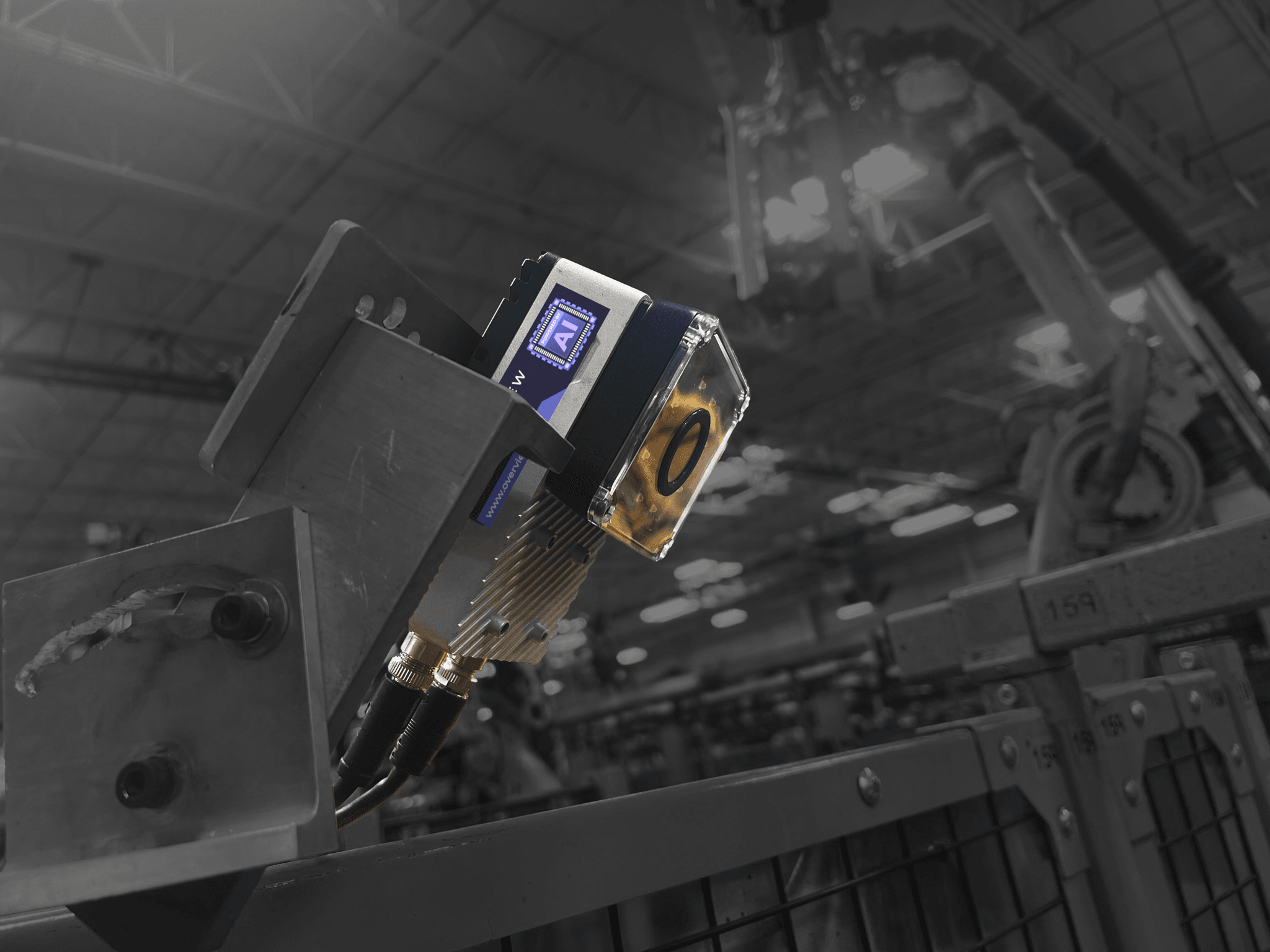
A machine vision system is an automated system that uses cameras, lighting, and software to capture and analyze images of products, then make a decision: pass, fail, or a measurement. It is how a factory inspects every part at line speed instead of pulling samples or relying on the human eye. Machine vision system, vision system, and industrial vision system all mean the same thing. For the field itself rather than the hardware, see what machine vision is.
How it works
How machine vision works, step by step
Four steps, all in milliseconds, from the part reaching the station to the line acting on the result.
Capture
A trigger fires as the part reaches the station, from a sensor, an encoder, or a signal from the PLC, and the camera takes an image under controlled lighting. Exposure has to be short enough that a moving part does not smear, which is why fast lines need bright, well-placed light rather than a longer shutter. Everything downstream depends on this step: if the defect is not present in the pixels, no software will recover it.
Process
The raw image is prepared before anything judges it. Noise is filtered, contrast is adjusted, and the part is located and squared up so the same feature lands in the same place on every frame. A rule-based tool then measures what it was told to measure, or a trained model compares the image against what it learned good and bad parts look like.
Decide
The analysis becomes one unambiguous output: pass, fail, a class name, a measurement against tolerance, or a coordinate. Where the threshold sits is a real decision, not a detail, because it sets the trade between letting a marginal part through and rejecting good product. Tuning that boundary against your own scrap and escape costs is part of commissioning.
Act
The result leaves the camera and something happens. A reject gate fires, a robot is told where to reach, a counter increments, and the image and measurement are stored against the unit for traceability. This is the step that separates inspection from monitoring: a verdict nothing reads is a dashboard, not a control. All four steps finish in milliseconds, before the next part arrives.
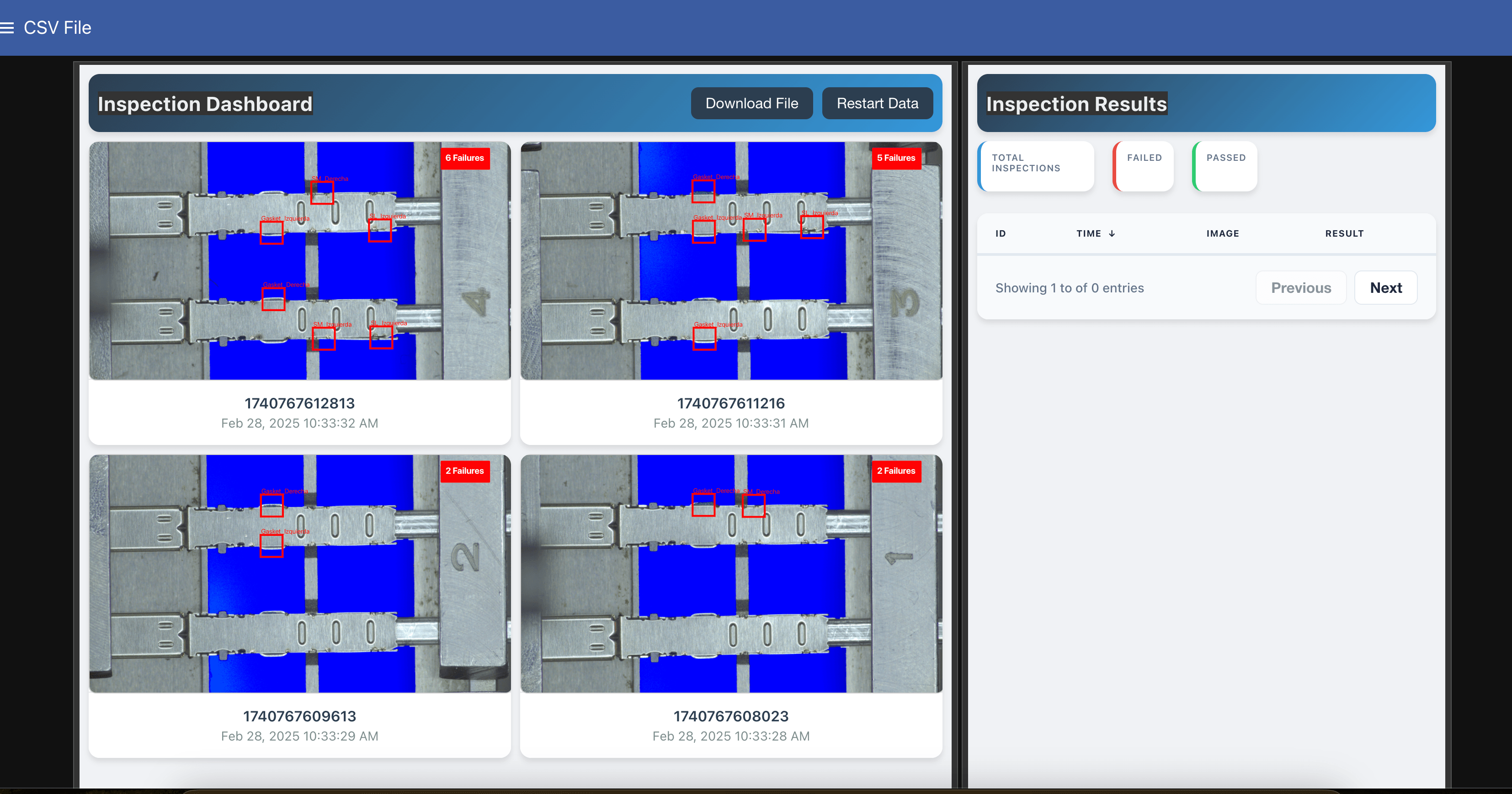
Step 4 in practice: every inspection logged and visible in real time, pass or fail.
Anatomy
The parts of a machine vision system
The same building blocks, whether in one smart camera or spread across a PC-based setup.
Camera or sensor
Captures the image. Resolution and frame rate set the smallest feature you can resolve and your maximum line speed.
Lighting
Makes the defect visible. Good illumination is the difference between an obvious flaw and an invisible one.
Lens and optics
Set field of view, working distance, and focus, controlling how much of the part you see and how sharply.
Processor and software
Runs the analysis. Rule-based logic or a trained deep-learning model turns the image into a decision.
Communication and I/O
Connects to the line over EtherNet/IP, PROFINET, or OPC UA to trigger rejects and exchange data.
Integration to the line
Mounting, triggering, and timing so the system inspects the right part at the right moment.
Terms
Machine vision vs computer vision vs AI vision
Three terms that overlap. Here is how they relate.
| Term | What it means | Where it lives |
|---|---|---|
| Computer vision | The broad science of getting computers to interpret images and video. | Research, software, any domain. |
| Machine vision | The industrial application of computer vision to inspect parts and control equipment. | The factory floor, in real time. |
| AI vision | Machine vision that decides with a trained deep-learning model instead of fixed rules. | Modern lines, for variable and cosmetic defects. |
Go deeper in computer vision vs machine vision and machine vision vs AI vision.
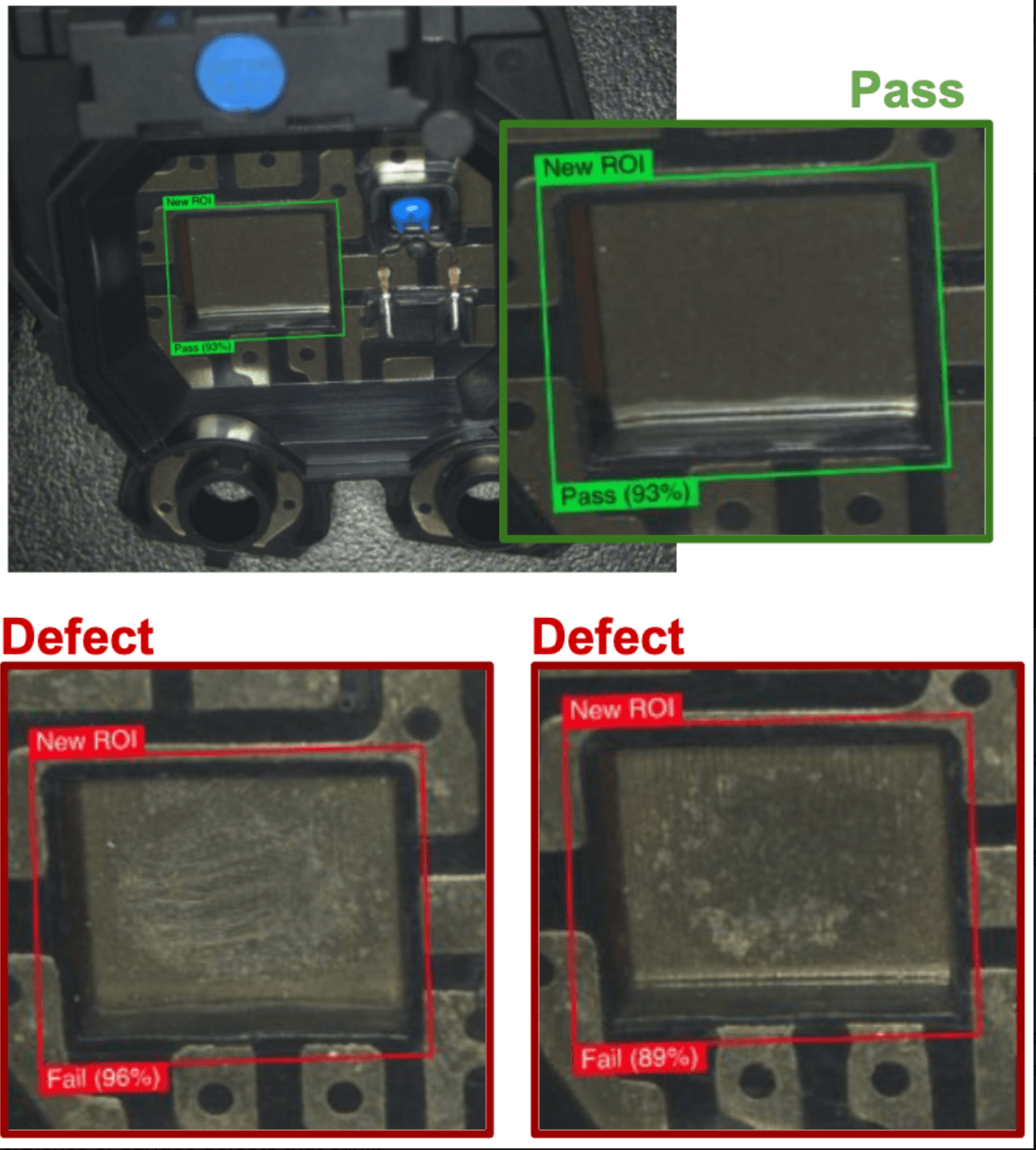
AI vision in action
It learns the good part, then flags what drifts
Instead of a fixed rule, an AI vision system learns from example images and returns a call with a confidence score on every unit. Here it passes a clean sensor surface and fails two with subtle cosmetic defects, the kind of variable flaw that defeats traditional thresholds.
Taxonomy
Types of machine vision systems
Smart cameras vs PC-based systems
A smart camera integrates the sensor, compute, and often lighting into one unit, simpler to deploy and maintain. A PC-based system connects separate cameras to an industrial computer, useful for very high resolution or many cameras, at the cost of more parts and integration work.
2D vs 3D
2D systems work from a flat image and cover most inspection, reading, and measurement. 3D systems add height and shape for volume, warpage, and seating checks where a flat image is not enough.
Rule-based vs AI
Rule-based systems use programmed measurements, precise for predictable features. AI systems learn from example images, which is what makes variable surfaces and cosmetic defects practical to automate.
Buying guide
How to choose and design a machine vision system
Start with the defect and the part, then work backward to the system. Machine vision system design is mostly this, done in the right order.
Can it image your defect?
Confirm the resolution, optics, and lighting can make your specific defect visible. This is where most projects succeed or fail.
Does it handle your variation?
Parts vary. Make sure the system tolerates the normal range of your good parts without false rejects.
How fast does it deploy, and who runs it?
Weigh an integrator-led build in weeks against a system your own team sets up in days.
Does it fit your line?
Check the protocols, triggering, and mounting against your existing equipment.
Test on your actual parts.
A proof of concept on your real samples is the only reliable way to confirm a system before you commit.
For the financial side, see building the business case and the ROI calculator.
On the line
What a machine vision inspection system checks
Inspection is what most of these systems are bought for, which is why a machine vision inspection system and a machine vision system usually mean the same box. A snapshot of common tasks below; the full set is in machine vision applications.
Where Overview fits
A complete machine vision system, not a kit of parts
Overview delivers the camera, edge compute, lighting, and AI software as one IP67 smart camera. Your quality team trains it on your parts in a browser and runs it in days, with no integrator and no cloud.
One unit, not five
Sensor, compute, and lighting integrated, with native PLC connectivity.
Deploy in days
Browser-based setup by your own team. Published pricing from $4.5K to $13.5K.
Edge AI
Inference on an integrated NVIDIA GPU. Works offline, your data stays on site.












Manufacturers running Overview AI in production
Manufacturers running Overview AI in production
FAQ
Frequently asked questions
What is a machine vision system?
A machine vision system is an automated system that uses one or more cameras, lighting, and software to capture and analyze images of products, then make a decision such as pass, fail, or a measurement. It performs visual inspection on a production line at line speed, on every part, without human fatigue.
How does a machine vision system work?
A machine vision system works in four steps. First it captures an image with a camera and controlled lighting. Second, software processes the image. Third, it makes a decision using programmed rules or a trained AI model. Fourth, it acts on the result by signaling a reject, logging data, or telling a PLC what to do. All four happen in milliseconds.
What is the difference between machine vision and computer vision?
Computer vision is the broad field of teaching computers to interpret images. Machine vision is the applied, industrial use of that technology to inspect parts and control equipment on a production line. Machine vision adds the cameras, lighting, real-time speed, and line integration that a factory needs.
What are the components of a machine vision system?
A machine vision system is built from a camera or sensor, lighting, a lens and optics, a processor running inspection software, and a communication interface to the line. In an all-in-one smart camera these sit in one housing. In a PC-based system they are separate parts connected to an industrial computer.
How much does a machine vision system cost?
Cost depends on the architecture. PC-based systems built by an integrator are quoted per project and often run into tens of thousands of dollars with integration. All-in-one AI smart cameras are priced per unit. Overview publishes per-camera pricing from $4.5K to $13.5K, so the cost is clear up front.
How do I choose a machine vision system?
Start with the defect and the part, then work backward. Confirm the system can image your defect with the right resolution and lighting, check that it handles the variation in your parts, weigh how fast it deploys and who operates it, and confirm it integrates with your line. Testing candidates on your actual parts is the most reliable way to decide.
Keep going
What Is Machine Vision
The field itself: what the term means, how it differs from computer vision, and the technology inside it.
Read more →Machine Vision Applications
The inspection tasks these systems run in production, by part and by defect, across industries.
Read more →Physical AI
Where visual inspection sits in the wider shift to AI that perceives and acts in the real world.
Read more →Related Articles
Machine Vision vs Computer Vision
Where the two terms diverge, and which one describes your project.
Read More →Best Machine Vision Solutions for Factories
How the leading machine vision options compare for production.
Read More →AI Vision Systems Explained
How deep learning changed what vision systems can inspect.
Read More →See a machine vision system on your parts
Tell us what you need to inspect and a vision engineer will show you how Overview catches it, typically with a system running on your line within days.