
A visual white paper · April 2026 · 16 pages
High-Volume, Medium-Mix Inspection, Visualized
A visual walkthrough of how synthetic data is changing inspection in high-volume, medium-mix manufacturing. One full Contaminate Verification deployment on a real production line, plus the Style Transfer mode that scales it across product variants.
See it on your line
Reach out by email or through the site to book a demo, and see how we can solve your high-volume, medium-mix, or even high-mix vision inspection problems.
Or reach us at contact@overview.ai or +1 (844) 799-7044. Overview AI, San Francisco.
Full text
Every page of the paper in text form, for reading, searching and screen readers.
1. Cover
A visual walkthrough of how synthetic data is changing inspection in high-volume, medium-mix manufacturing. One full Contaminate Verification deployment on a real production line, plus the Style Transfer mode that scales it across product variants. April 2026.
2. Contents
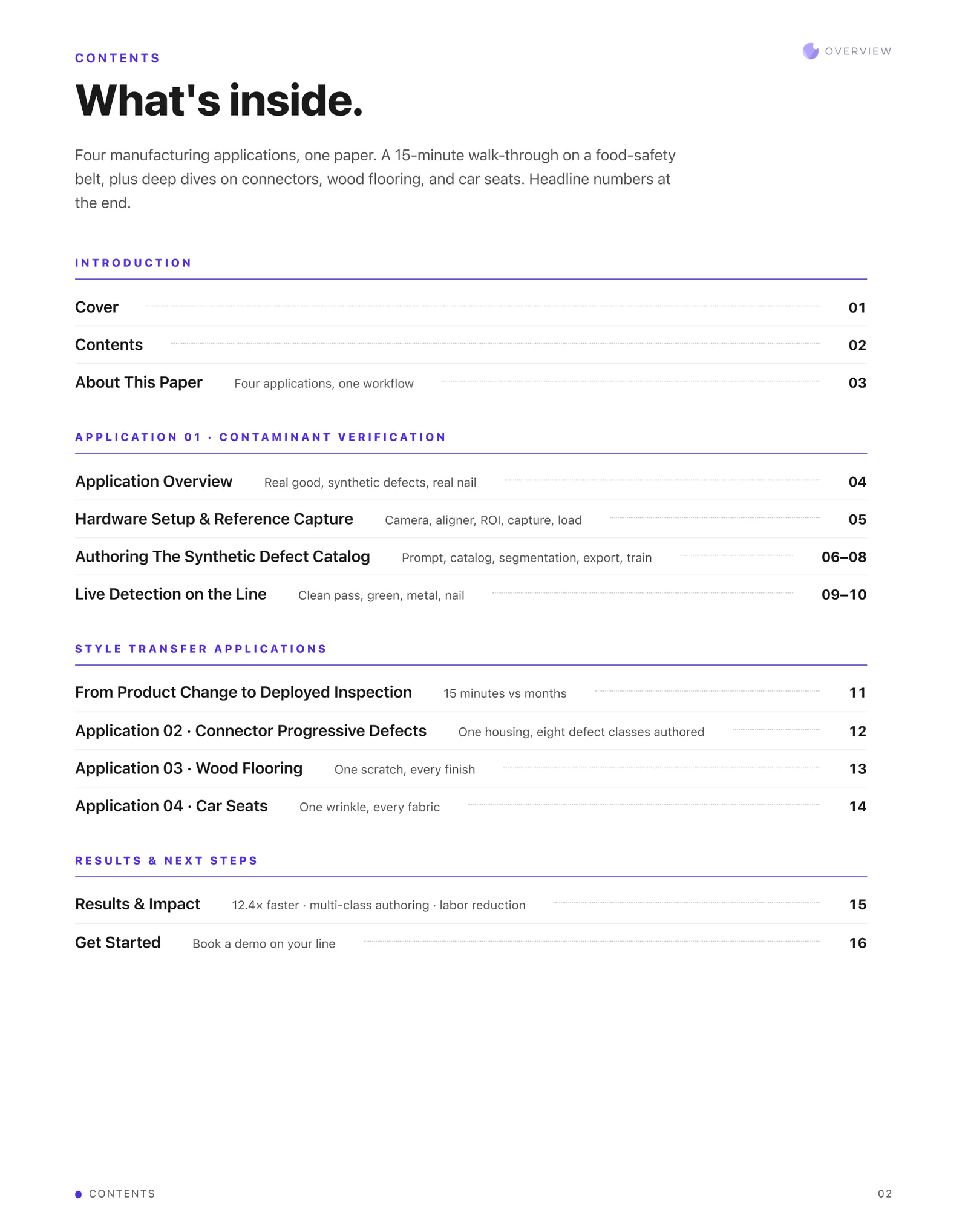
Four manufacturing applications, one paper. A 15-minute walk-through on a food-safety belt, plus deep dives on connectors, wood flooring, and car seats. Headline numbers at the end.
Introduction: cover, contents, about this paper. Application 01 Contaminant Verification: application overview, hardware setup and reference capture, authoring the synthetic defect catalog, live detection on the line. Style Transfer applications: from product change to deployed inspection, connector progressive defects, wood flooring, car seats. Results and next steps.
3. Real inspection lines, trained on synthetic defects
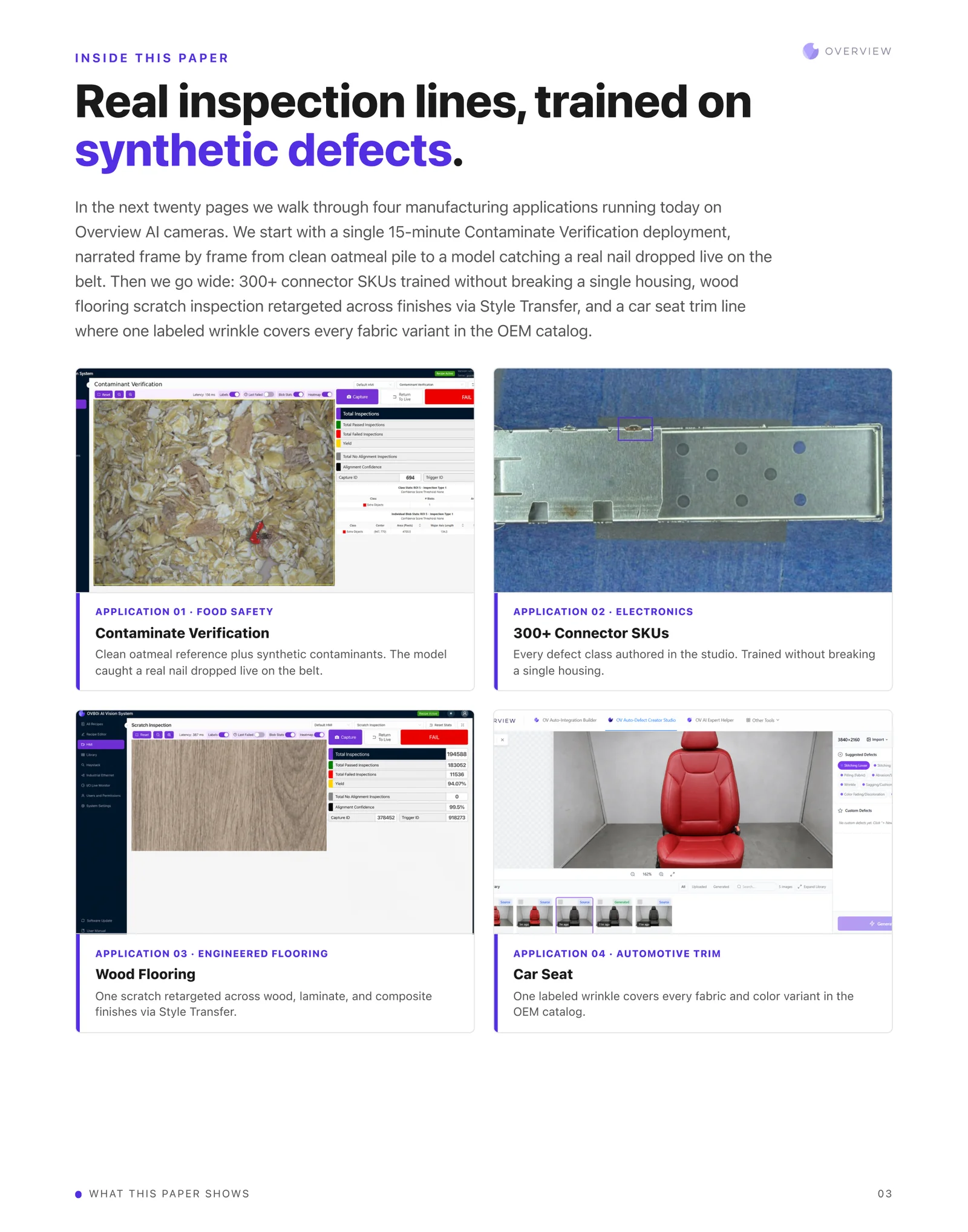
We walk through four manufacturing applications running today on Overview AI cameras. We start with a single 15-minute Contaminate Verification deployment, narrated frame by frame from clean oatmeal pile to a model catching a real nail dropped live on the belt. Then we go wide: 300+ connector SKUs trained without breaking a single housing, wood flooring scratch inspection retargeted across finishes via Style Transfer, and a car seat trim line where one labeled wrinkle covers every fabric variant in the OEM catalog.
Application 01, food safety, Contaminate Verification: clean oatmeal reference plus synthetic contaminants. The model caught a real nail dropped live on the belt. Application 02, electronics, 300+ connector SKUs: every defect class authored in the studio, trained without breaking a single housing. Application 03, engineered flooring, wood flooring: one scratch retargeted across wood, laminate, and composite finishes via Style Transfer. Application 04, automotive trim, car seat: one labeled wrinkle covers every fabric and color variant in the OEM catalog.
4. Application 01 · Contaminate Verification
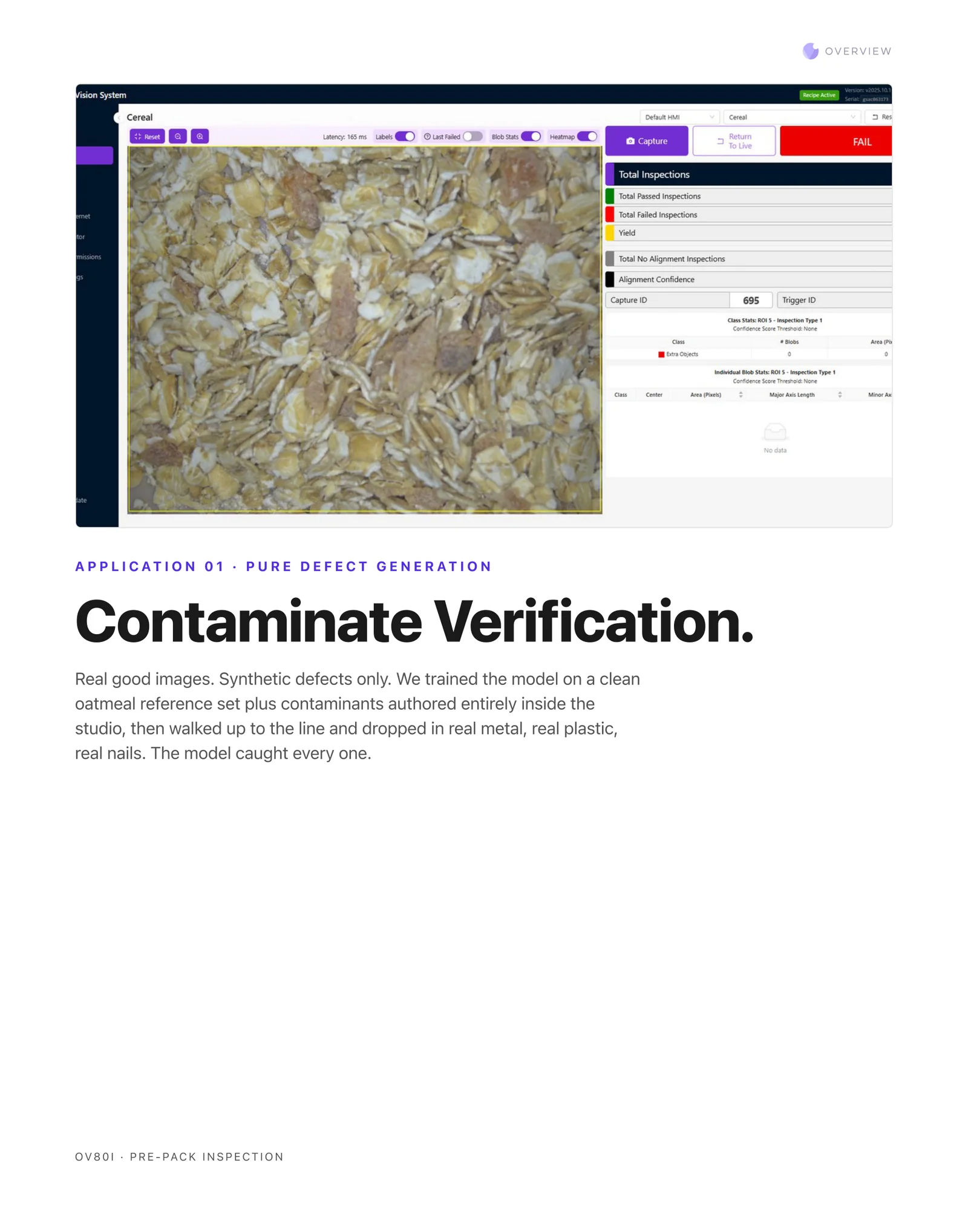
Real good images. Synthetic defects only. We trained the model on a clean oatmeal reference set plus contaminants authored entirely inside the studio, then walked up to the line and dropped in real metal, real plastic, real nails. The model caught every one. OV80i, pre-pack inspection.
5. The first five clicks
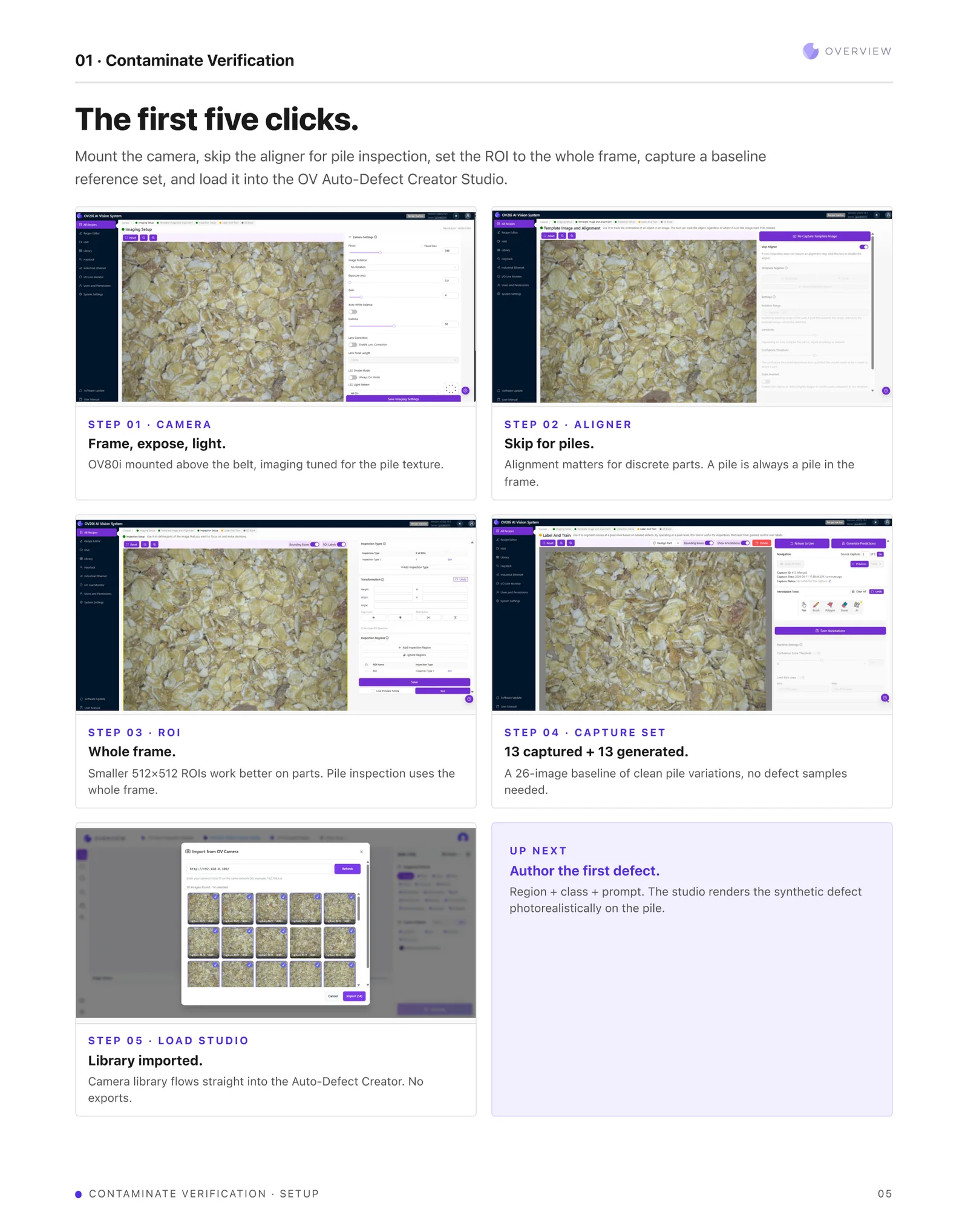
Mount the camera, skip the aligner for pile inspection, set the ROI to the whole frame, capture a baseline reference set, and load it into the OV Auto-Defect Creator Studio.
Step 01, camera: frame, expose, light. OV80i mounted above the belt, imaging tuned for the pile texture. Step 02, aligner: skip for piles. Alignment matters for discrete parts, and a pile is always a pile in the frame. Step 03, ROI: whole frame. Smaller 512x512 ROIs work better on parts; pile inspection uses the whole frame. Step 04, capture set: 13 captured plus 13 generated, a 26-image baseline of clean pile variations, no defect samples needed. Step 05, load studio: library imported. The camera library flows straight into the Auto-Defect Creator, no exports.
6. One session, dozens of defects
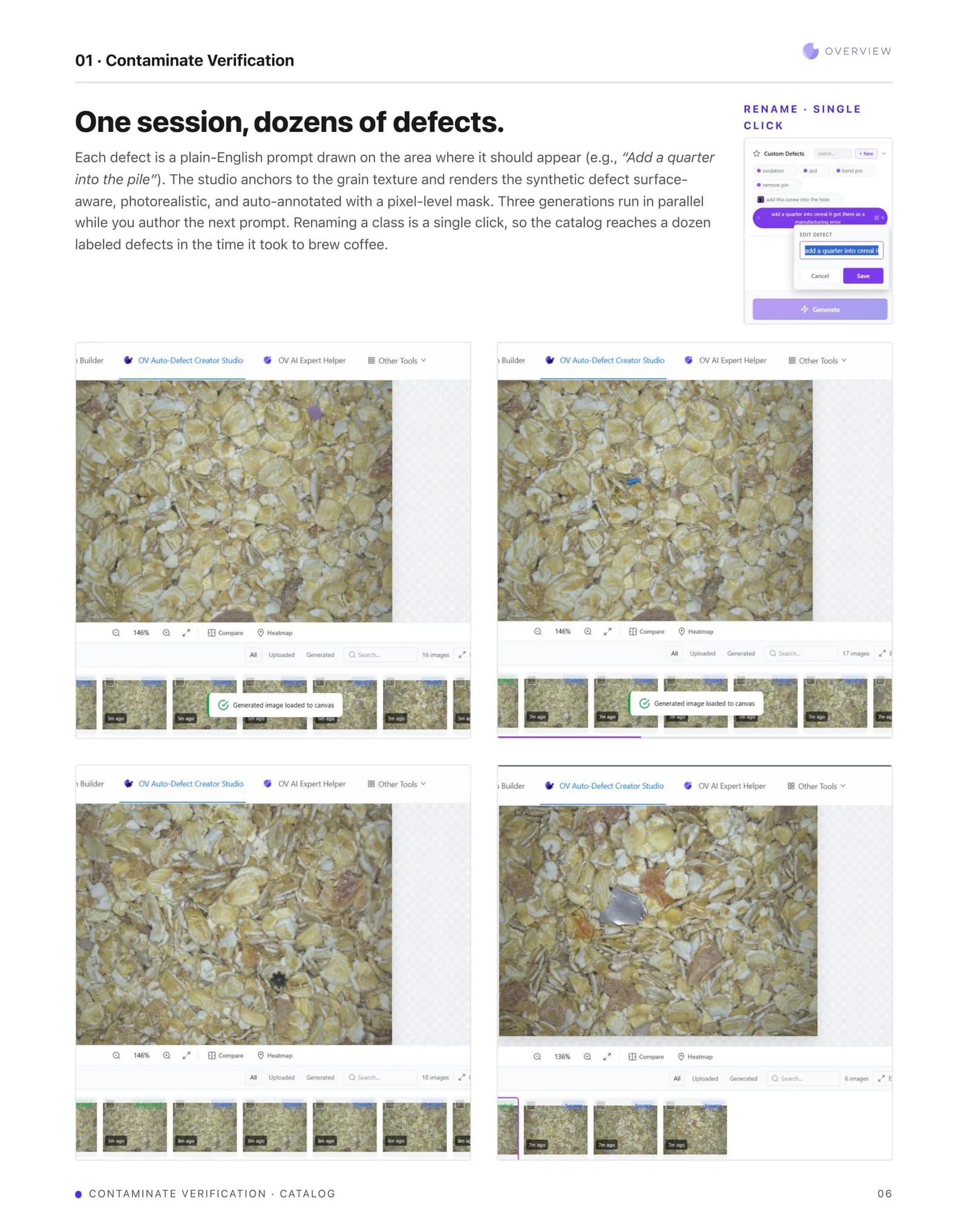
Each defect is a plain-English prompt drawn on the area where it should appear, for example "Add a quarter into the pile". The studio anchors to the grain texture and renders the synthetic defect surface-aware, photorealistic, and auto-annotated with a pixel-level mask. Three generations run in parallel while you author the next prompt. Renaming a class is a single click, so the catalog reaches a dozen labeled defects in the time it took to brew coffee.
7. Pixel-level ground truth, marked by hand
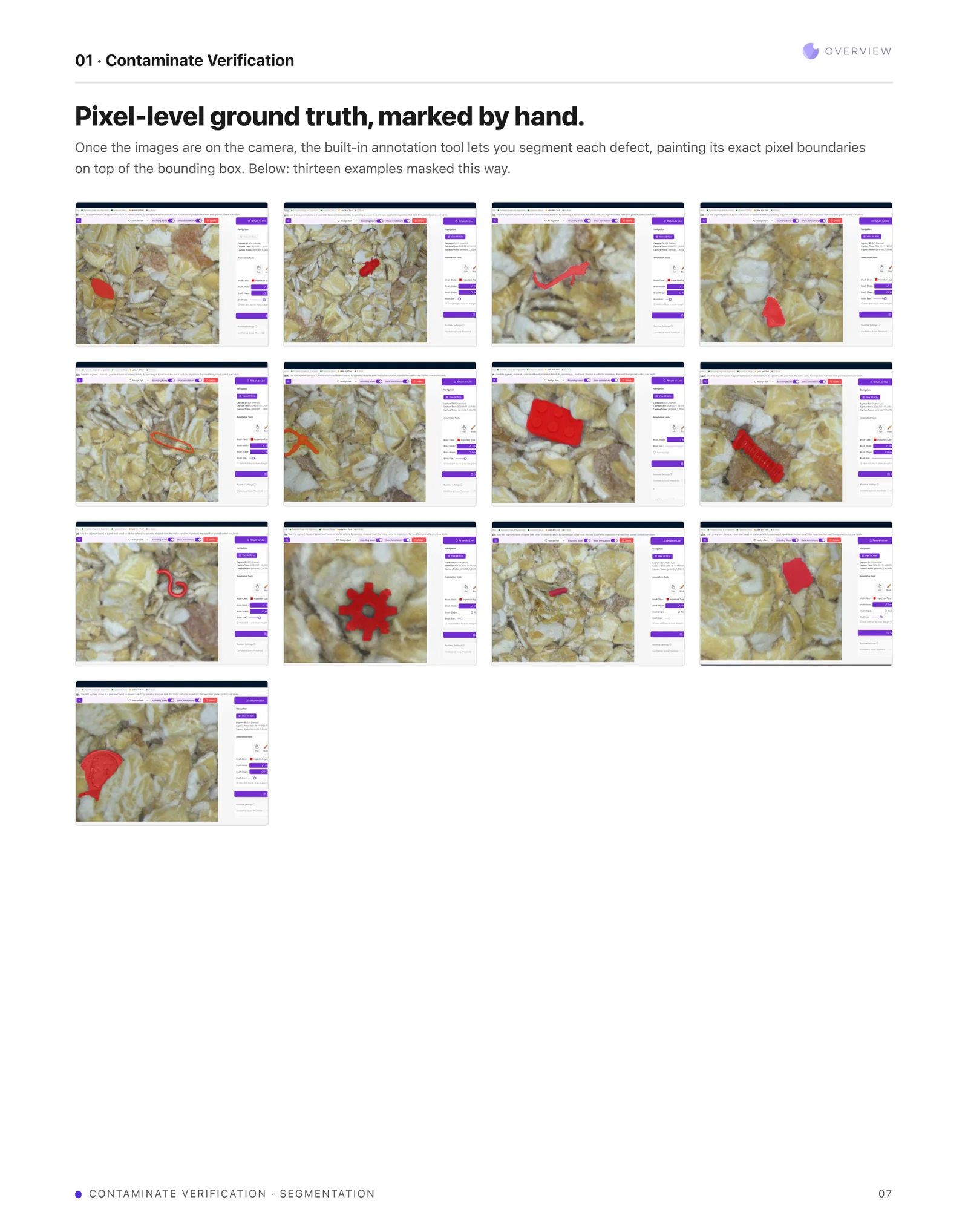
Once the images are on the camera, the built-in annotation tool lets you segment each defect, painting its exact pixel boundaries on top of the bounding box. Thirteen examples are masked this way.
8. From studio library to running recipe
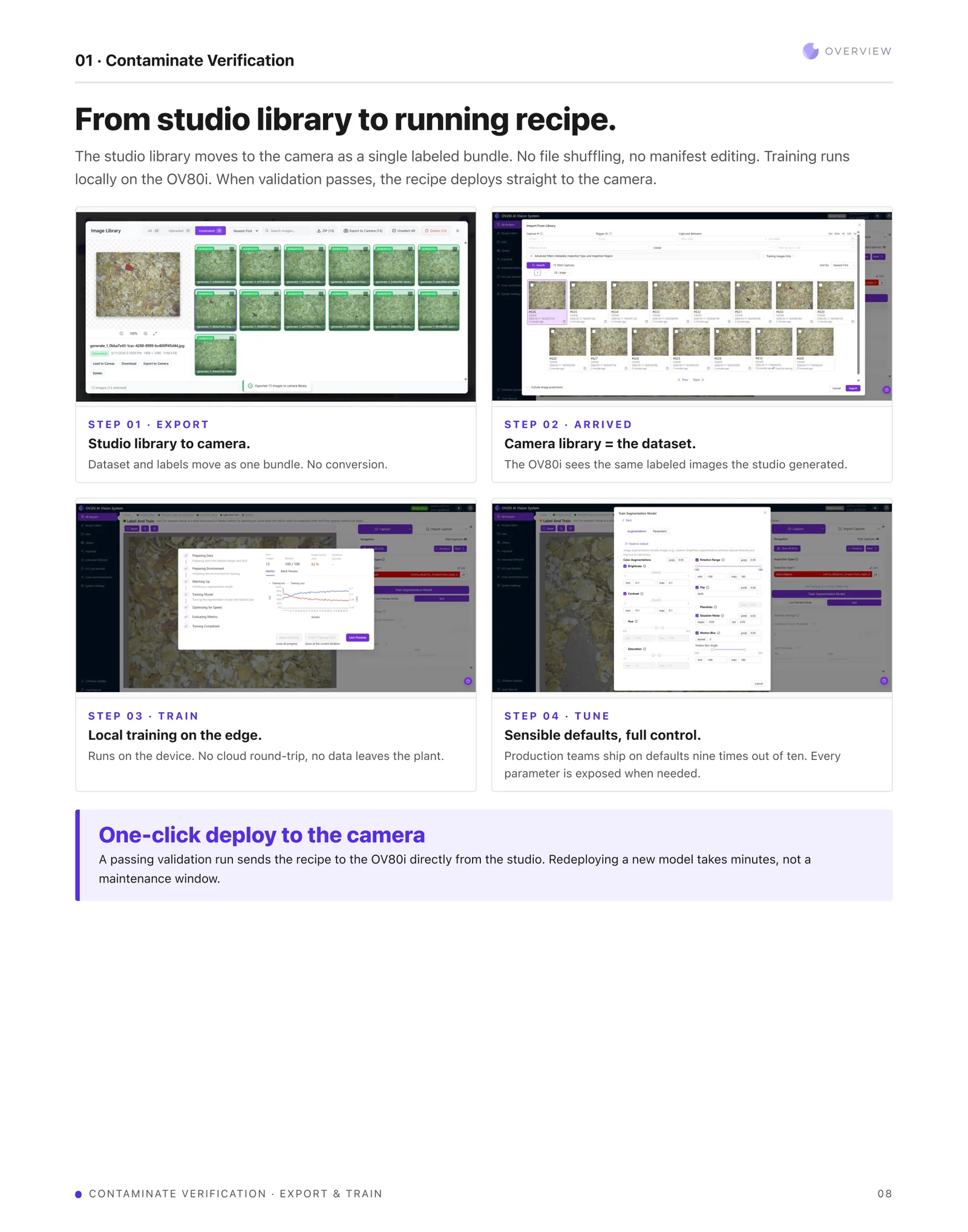
The studio library moves to the camera as a single labeled bundle. No file shuffling, no manifest editing. Training runs locally on the OV80i. When validation passes, the recipe deploys straight to the camera.
Step 01, export: studio library to camera, dataset and labels move as one bundle, no conversion. Step 02, arrived: the camera library is the dataset, and the OV80i sees the same labeled images the studio generated. Step 03, train: local training on the edge, running on the device with no cloud round-trip and no data leaving the plant. Step 04, tune: sensible defaults with full control. Production teams ship on defaults nine times out of ten, and every parameter is exposed when needed.
A passing validation run sends the recipe to the OV80i directly from the studio. Redeploying a new model takes minutes, not a maintenance window.
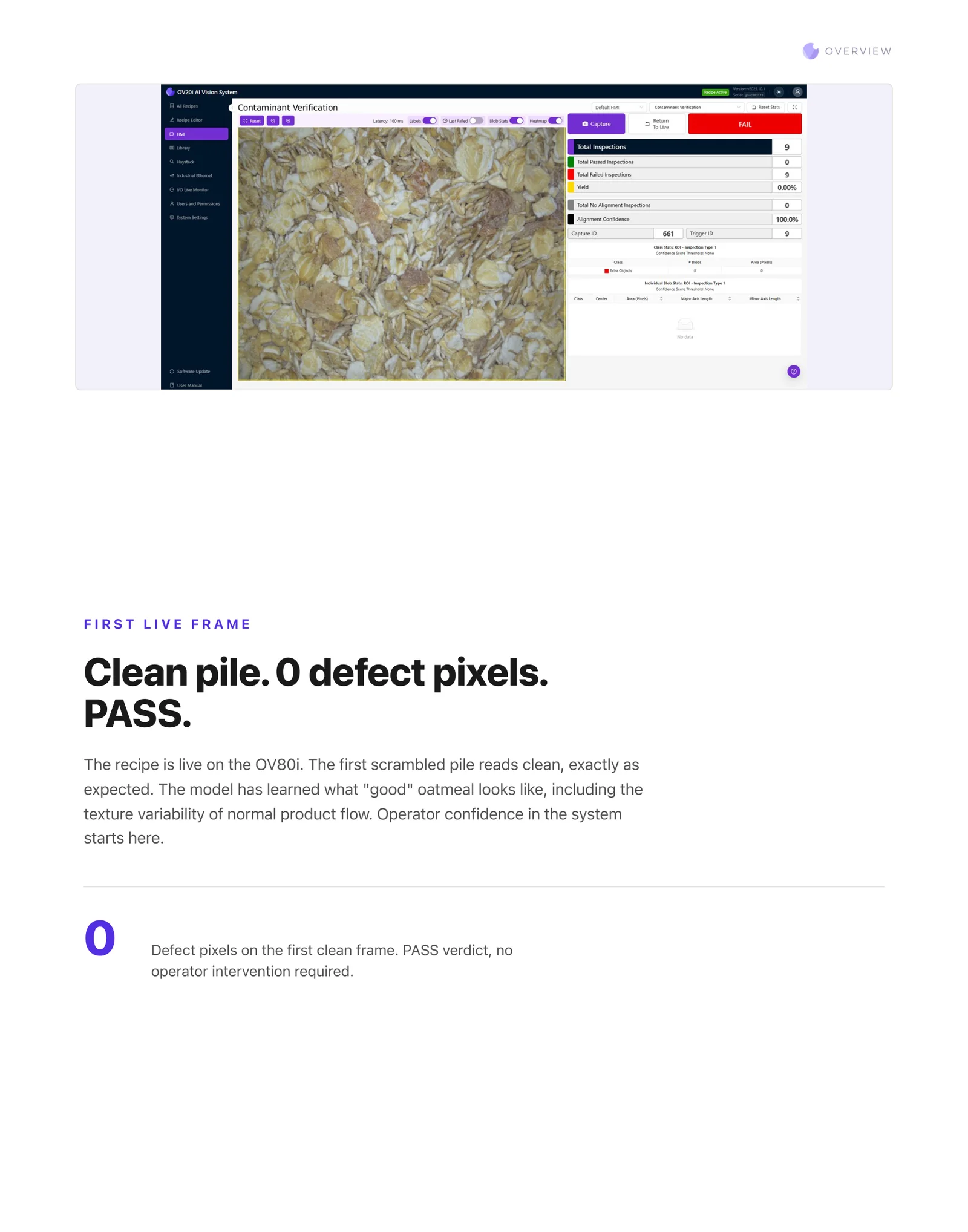
9. First live frame: clean pile, 0 defect pixels, PASS
The recipe is live on the OV80i. The first scrambled pile reads clean, exactly as expected. The model has learned what "good" oatmeal looks like, including the texture variability of normal product flow. Operator confidence in the system starts here. Zero defect pixels on the first clean frame, a PASS verdict, no operator intervention required.
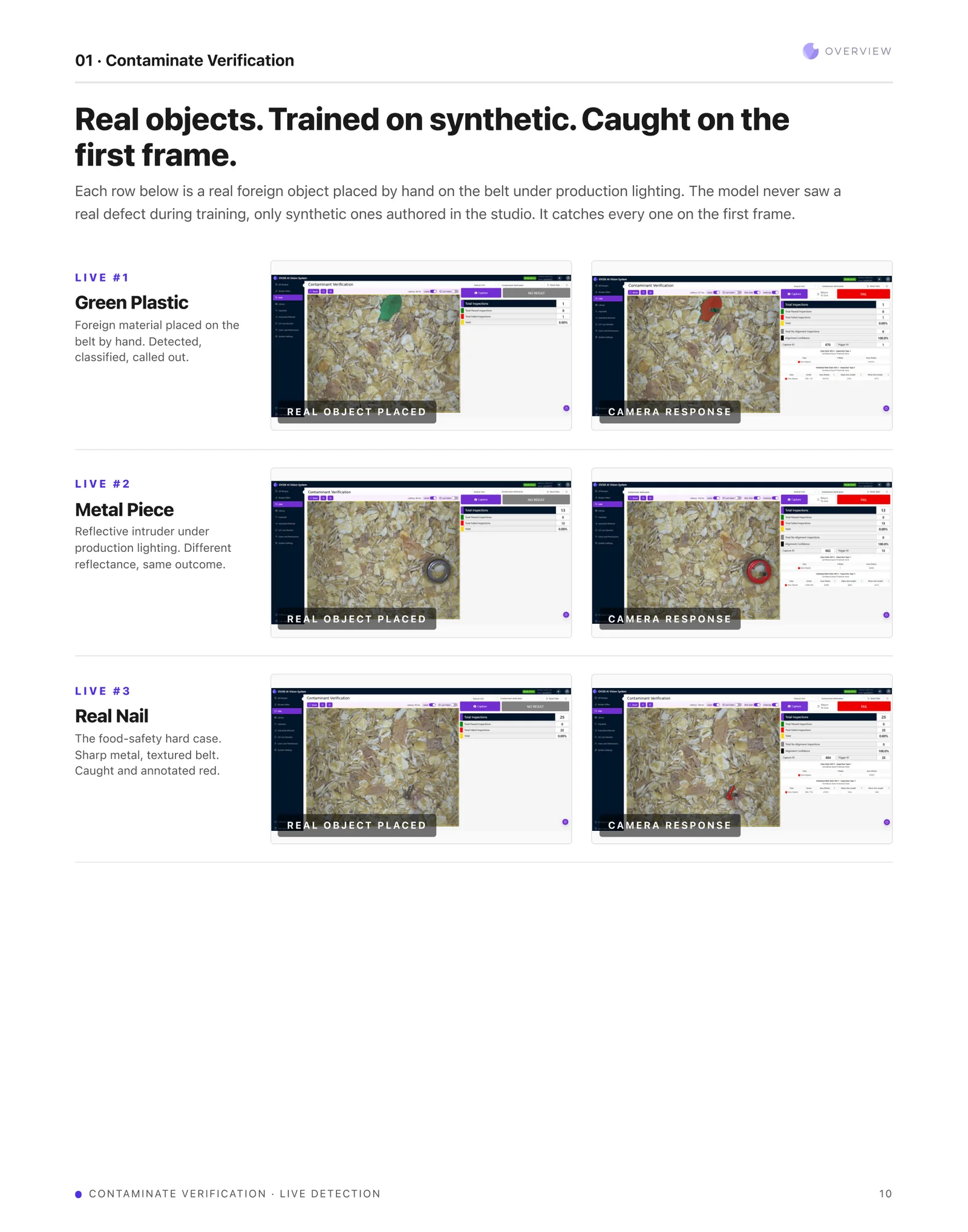
10. Real objects, trained on synthetic, caught on the first frame
Each row is a real foreign object placed by hand on the belt under production lighting. The model never saw a real defect during training, only synthetic ones authored in the studio. It catches every one on the first frame.
Live #1, green plastic: foreign material placed on the belt by hand, detected, classified, called out. Live #2, metal piece: a reflective intruder under production lighting, different reflectance, same outcome. Live #3, real nail: the food-safety hard case, sharp metal on a textured belt, caught and annotated red.
11. From product change to deployed inspection
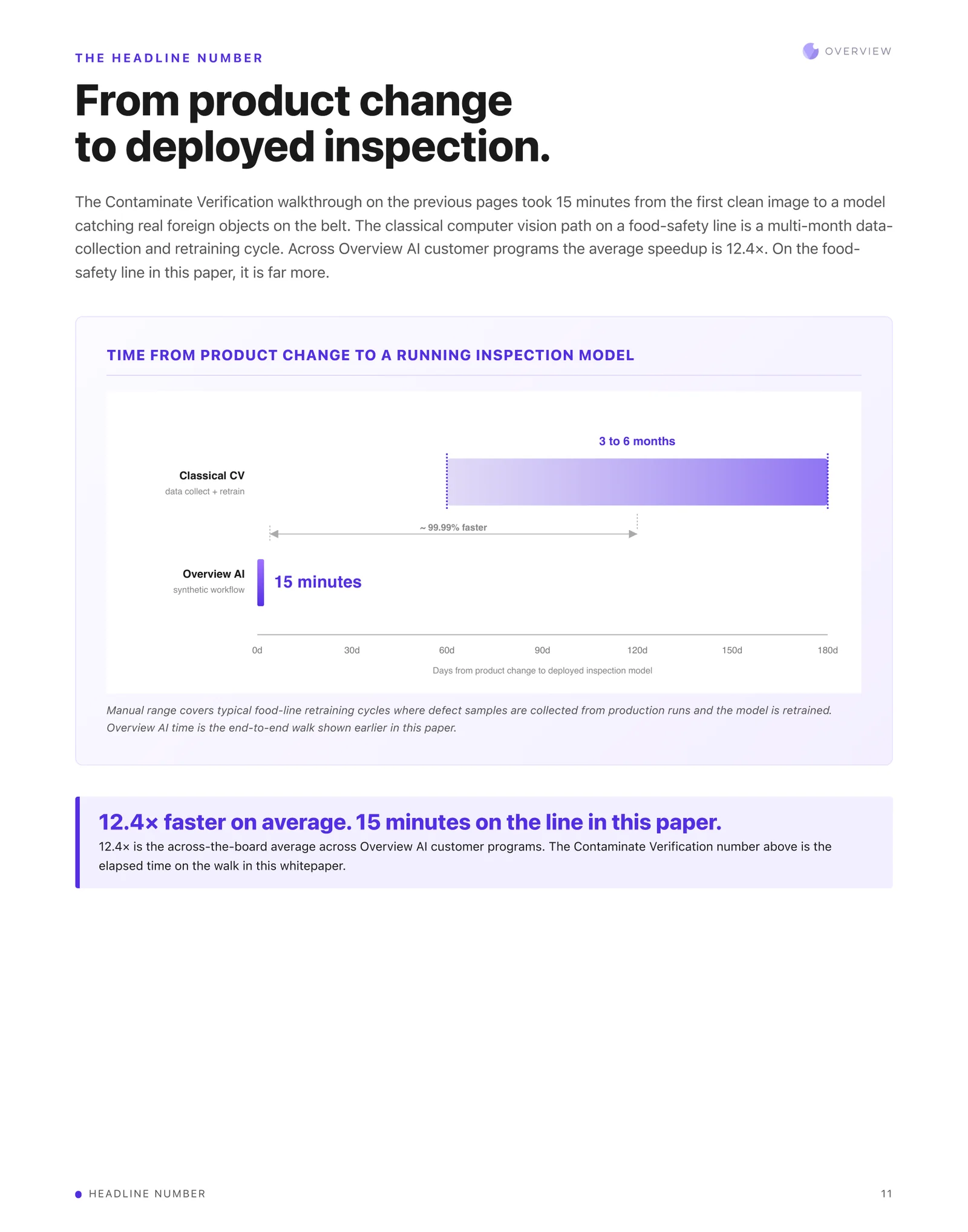
The Contaminate Verification walkthrough took 15 minutes from the first clean image to a model catching real foreign objects on the belt. The classical computer vision path on a food-safety line is a multi-month data-collection and retraining cycle. Across Overview AI customer programs the average speedup is 12.4x. On the food-safety line in this paper, it is far more.
The manual range covers typical food-line retraining cycles where defect samples are collected from production runs and the model is retrained. The Overview AI time is the end-to-end walk shown earlier in this paper. 12.4x is the across-the-board average across Overview AI customer programs; the Contaminate Verification number is the elapsed time on this specific walk.
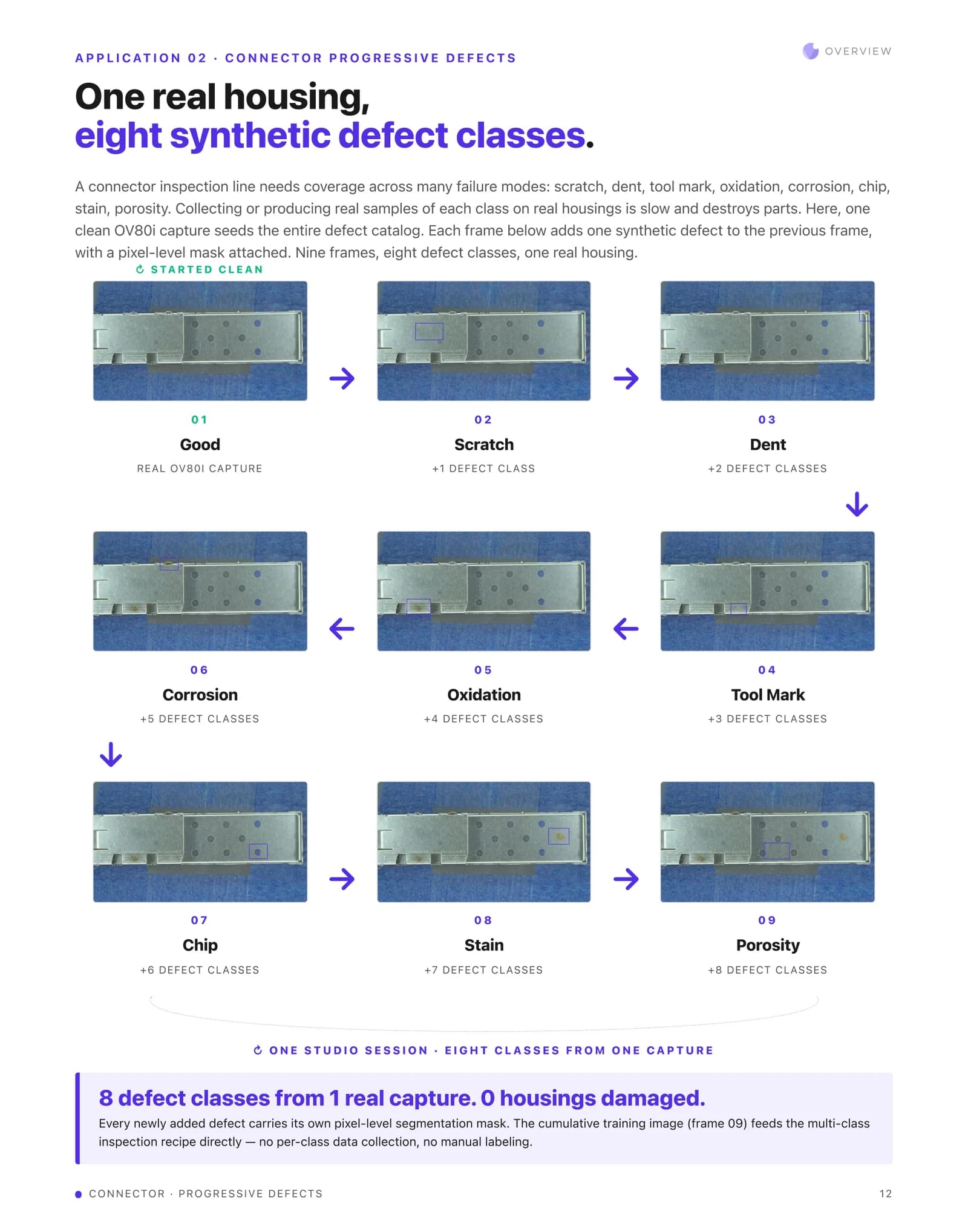
12. Application 02 · One real housing, eight synthetic defect classes
A connector inspection line needs coverage across many failure modes: scratch, dent, tool mark, oxidation, corrosion, chip, stain, porosity. Collecting or producing real samples of each class on real housings is slow and destroys parts. Here, one clean OV80i capture seeds the entire defect catalog. Each frame adds one synthetic defect to the previous frame, with a pixel-level mask attached. Nine frames, eight defect classes, one real housing.
Eight defect classes from one real capture, zero housings damaged. Every newly added defect carries its own pixel-level segmentation mask. The cumulative training image, frame 09, feeds the multi-class inspection recipe directly, with no per-class data collection and no manual labeling.
13. Application 03 · Wood flooring: one good plank, every finish, every defect
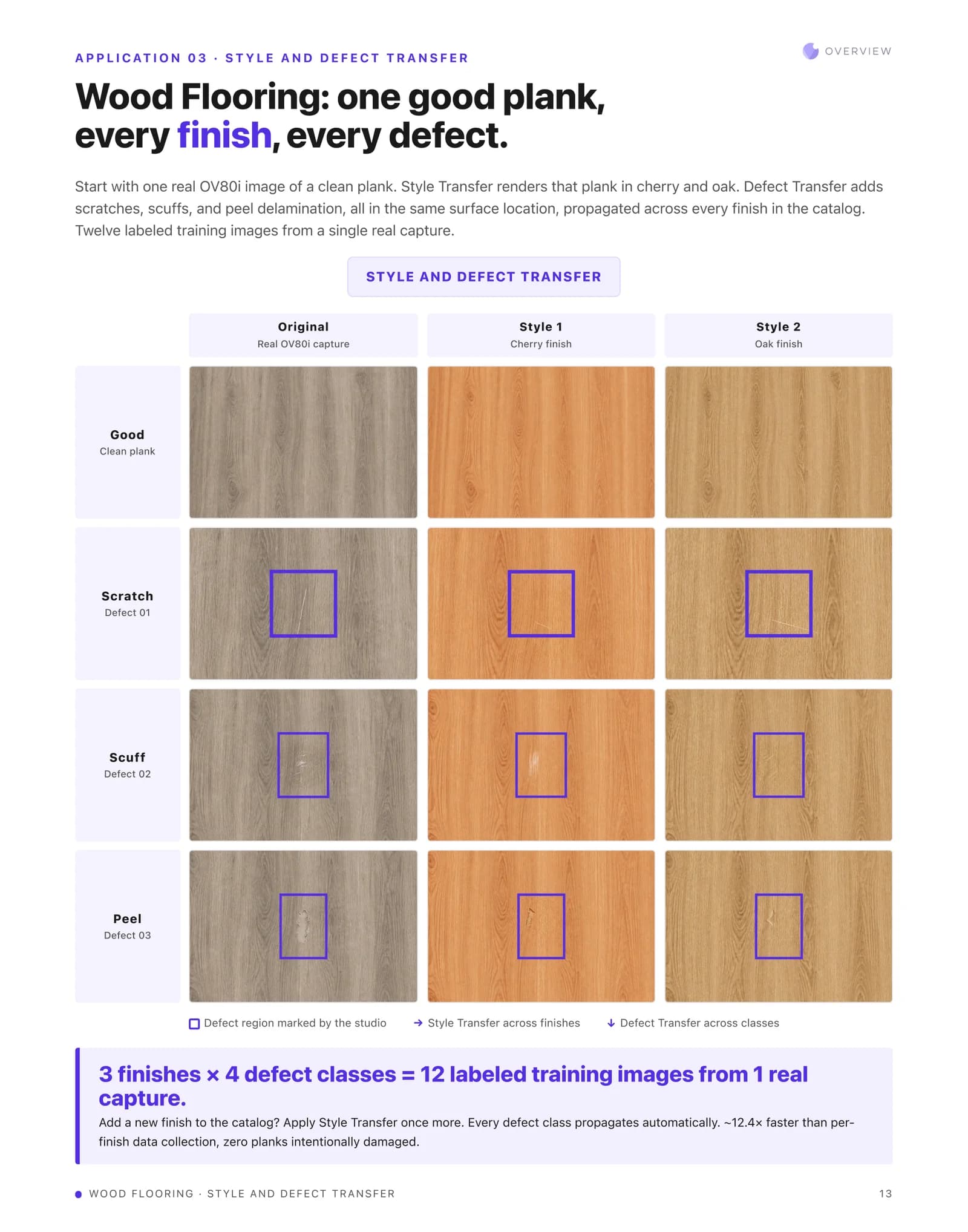
Start with one real OV80i image of a clean plank. Style Transfer renders that plank in cherry and oak. Defect Transfer adds scratches, scuffs, and peel delamination, all in the same surface location, propagated across every finish in the catalog. Twelve labeled training images from a single real capture.
3 finishes multiplied by 4 defect classes equals 12 labeled training images from 1 real capture. Add a new finish to the catalog and Style Transfer is applied once more, with every defect class propagating automatically. Around 12.4x faster than per-finish data collection, and zero planks intentionally damaged.
14. Application 04 · Car seats: one good seat, every fabric, every defect
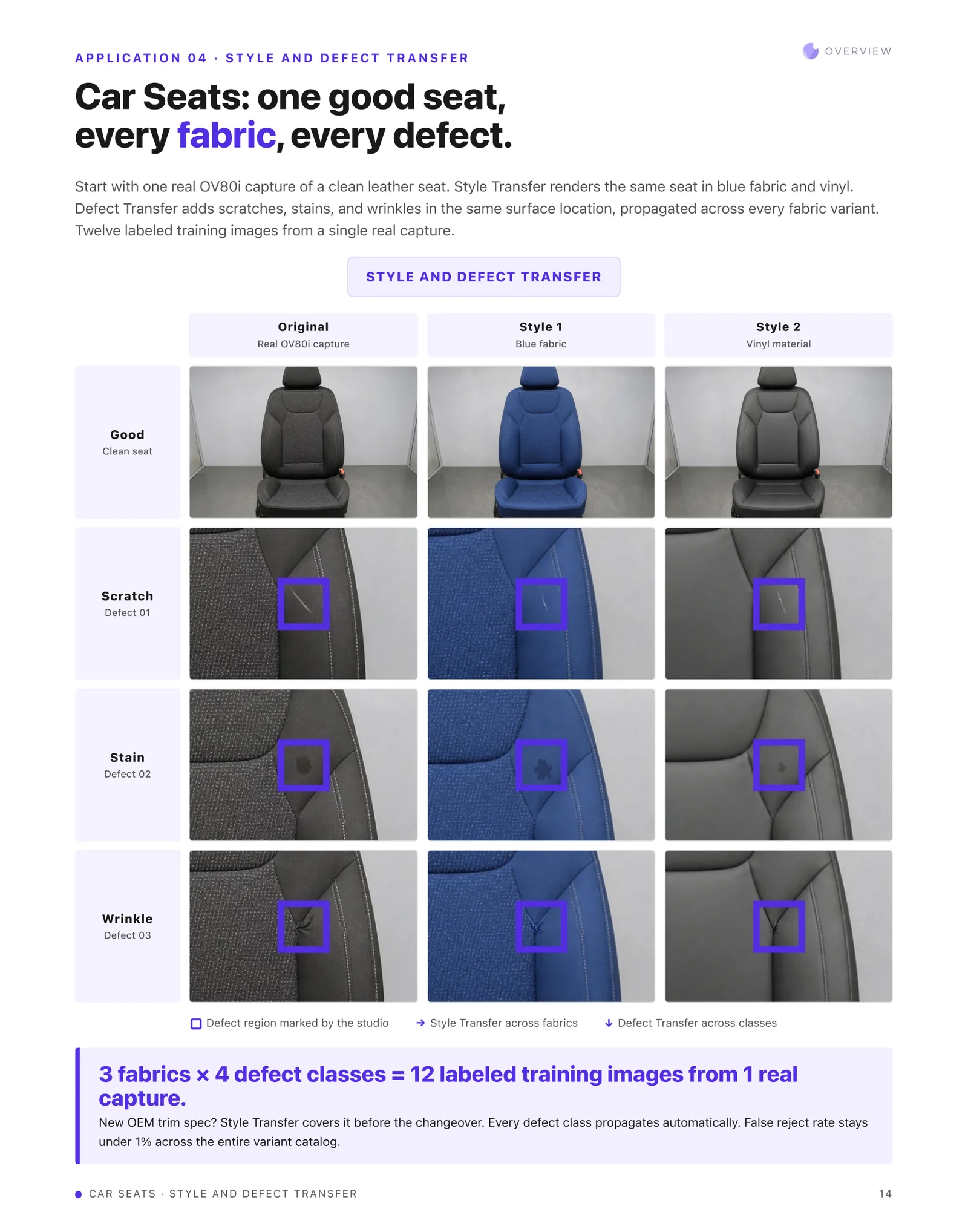
Start with one real OV80i capture of a clean leather seat. Style Transfer renders the same seat in blue fabric and vinyl. Defect Transfer adds scratches, stains, and wrinkles in the same surface location, propagated across every fabric variant. Twelve labeled training images from a single real capture.
3 fabrics multiplied by 4 defect classes equals 12 labeled training images from 1 real capture. A new OEM trim spec is covered by Style Transfer before the changeover, with every defect class propagating automatically. False reject rate stays under 1% across the entire variant catalog.
15. What this actually saves you
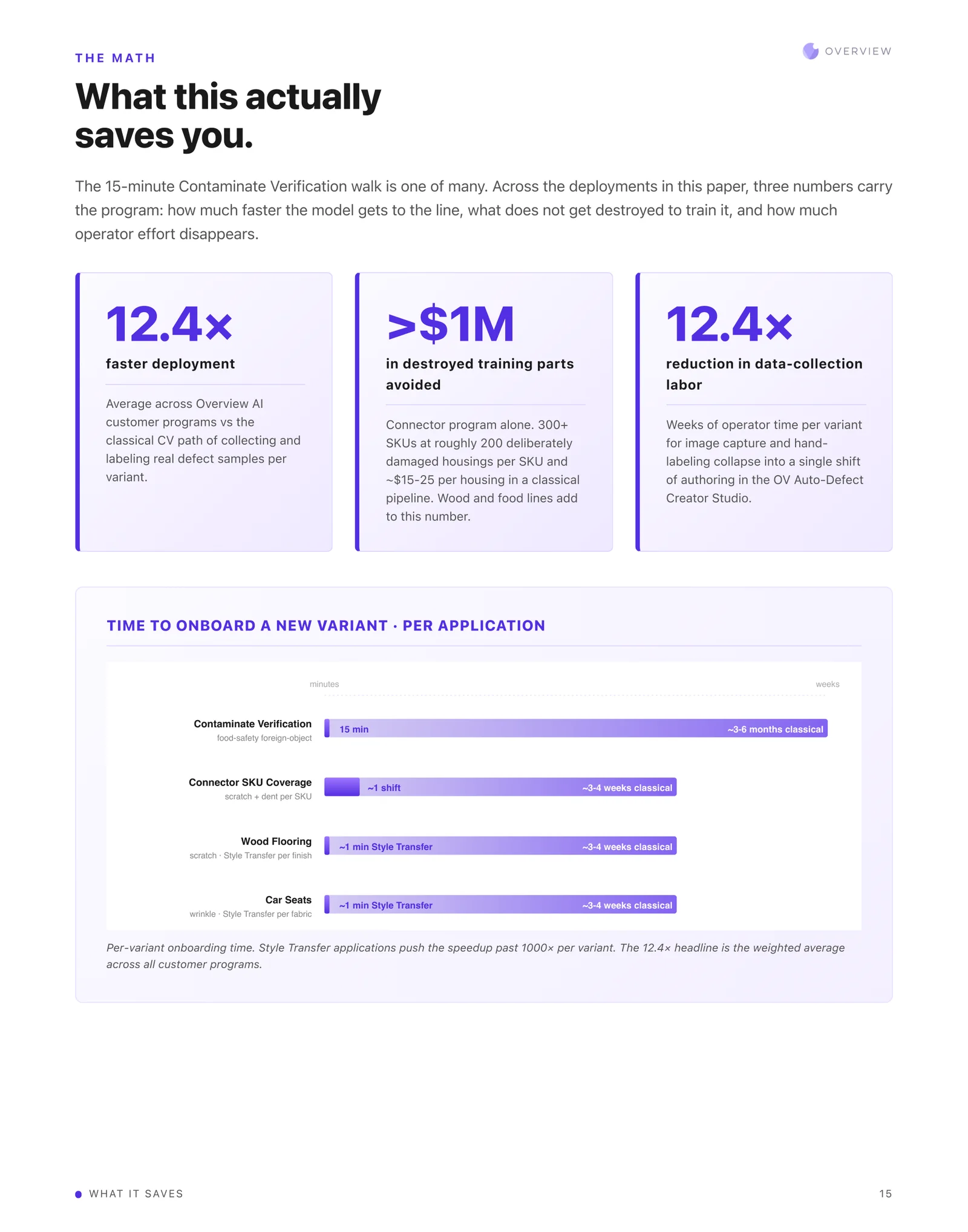
The 15-minute Contaminate Verification walk is one of many. Across the deployments in this paper, three numbers carry the program: how much faster the model gets to the line, what does not get destroyed to train it, and how much operator effort disappears.
12.4x faster deployment: average across Overview AI customer programs versus the classical CV path of collecting and labeling real defect samples per variant. More than $1M in destroyed training parts avoided: the connector program alone, 300+ SKUs at roughly 200 deliberately damaged housings per SKU and about $15 to $25 per housing in a classical pipeline. Wood and food lines add to this number. 12.4x reduction in data-collection labor: weeks of operator time per variant for image capture and hand-labeling collapse into a single shift of authoring in the OV Auto-Defect Creator Studio.
Time to onboard a new variant, per application. Contaminate Verification, food-safety foreign object: 15 minutes against roughly 3 to 6 months classical. Connector SKU coverage, scratch and dent per SKU: about 1 shift against roughly 3 to 4 weeks classical. Wood flooring, scratch via Style Transfer per finish: about 1 minute against roughly 3 to 4 weeks classical. Car seats, wrinkle via Style Transfer per fabric: about 1 minute against roughly 3 to 4 weeks classical. Style Transfer applications push the speedup past 1000x per variant. The 12.4x headline is the weighted average across all customer programs.
16. See it on your line
Reach out by email or through our website to book a demo, and see how we can solve your high-volume, medium-mix, or even high-mix vision inspection problems. contact@overview.ai. Overview AI, San Francisco. +1 (844) 799-7044.
On the numbers. The figures above are reproduced from the April 2026 paper as published. Note that 12.4x is applied both to deployment speed and to data-collection labour. The avoided-cost figure is a model, and the paper states its assumptions, so you can substitute your own SKU count and part cost. Ask us and we will run it against your inputs.